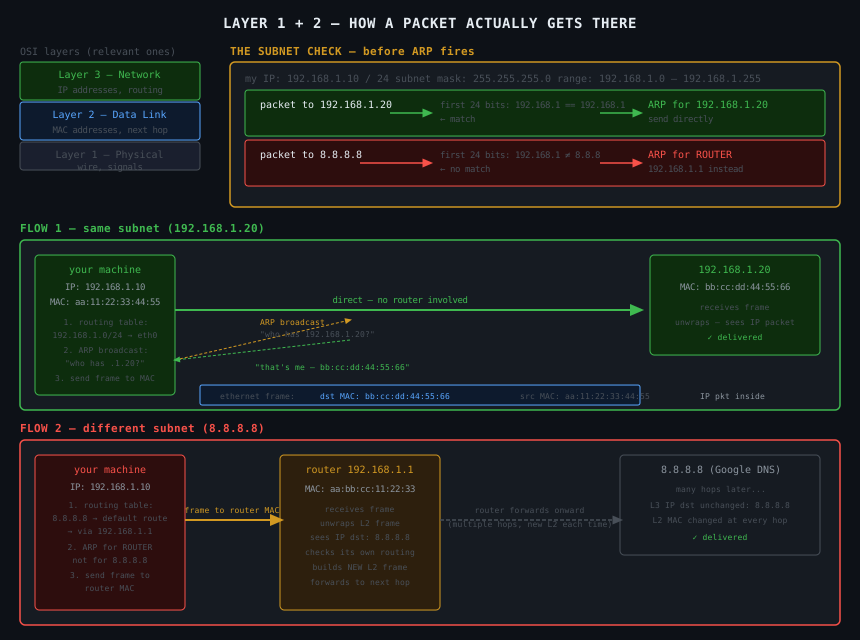
Linux Networking — Layer 1 and Layer 2
Before IP addresses and routing tables, two lower layers handle getting bits from one machine to the next. You don't touch these directly in software, but understanding them explains why the routing table works the way it does.
The OSI Model (Just the Relevant Bits)
The OSI model splits networking into separate concerns, each layer doing one job:
Layer 3 — Network     IP addresses, routing across multiple hops
Layer 2 — Data Link   MAC addresses, getting to the next physical hop
Layer 1 — Physical    The actual wire, raw electrical signals
You only need 1 and 2 here. Layer 3 (IP/routing) is what the previous article covered.
Layer 1 — Physical
The actual cable. Electrical signals, radio waves, light pulses in fibre. No intelligence — just raw bits moving from A to B.
The network interface card (eth0) is partly Layer 1 — it's the hardware that converts digital data into signals on the wire and back again.
You never think about this in software. It just exists underneath everything else.
Layer 2 — Data Link
This is where MAC addresses live.
Every network interface has a MAC address — a unique hardware identifier assigned at the factory. Something like aa:bb:cc:dd:ee:ff. Unlike IP addresses, MAC addresses don't change and don't need to be configured. They're burned into the hardware.
Layer 2 is responsible for one specific job: getting a packet from your machine to the next physical hop — the immediately adjacent machine on the same network. It has no concept of IPs, no concept of routing across multiple networks. It only knows about MACs.
ARP — How Layer 2 Finds MAC Addresses
Your machine knows the destination IP. But to send an ethernet frame, it needs the destination MAC address. ARP (Address Resolution Protocol) is how it finds it.
"Hey everyone on this network — who has IP 192.168.1.20?
 Tell me your MAC address."

192.168.1.20 replies: "That's me. My MAC is bb:cc:dd:ee:ff:00"

Your machine now has the MAC. Sends the frame directly.
# see the ARP cache — IPs your machine has already resolved to MACs
arp -n
# Address          HWtype  HWaddress           Flags
# 192.168.1.1      ether   aa:bb:cc:11:22:33   C     ← router MAC cached
# 192.168.1.20     ether   bb:cc:dd:44:55:66   C     ← neighbour MAC cached
ARP only works on the same network. You cannot ARP for a machine that's on a different subnet — the broadcast doesn't leave your network.
The Decision — Same Subnet or Not?
Here's the part that ties it together. Before your machine even touches ARP, it checks whether the destination is on the same subnet or not. It does this by comparing the destination IP against its own IP and subnet mask.
The /24 means: compare only the first 24 bits of the destination IP against mine. If they match — same network. If not — different network.
Packet to 192.168.1.20:
192.168.1.10  →  binary first 24 bits: 192.168.1
192.168.1.20  →  binary first 24 bits: 192.168.1
                                        ← match → same network
192.168.1.20 directly → send frame to its MAC.
Packet to 8.8.8.8:
192.168.1.10  →  binary first 24 bits: 192.168.1
8.8.8.8       →  binary first 24 bits: 8.8.8
                                        ← no match → different network
8.8.8.8 (it's not reachable directly) → use default route → ARP for the router's MAC instead → hand the packet to the router.
The key insight: ARP does fire for 8.8.8.8 — but it fires for the router's IP 192.168.1.1, not for 8.8.8.8 itself. Your machine never tries to ARP for things outside its subnet. It already knows they're unreachable directly.
The Full Flow for Two Packets
Packet to 192.168.1.20 (same subnet):
1. check routing table — 192.168.1.0/24 matches → send direct via eth0
2. ARP: "who has 192.168.1.20?" → gets MAC bb:cc:dd:44:55:66
3. wrap packet in ethernet frame addressed to that MAC
4. send out eth0
5. 192.168.1.20 receives it directly
Packet to 8.8.8.8 (outside subnet):
1. check routing table — no specific match → use default route via 192.168.1.1
2. ARP: "who has 192.168.1.1?" → gets router MAC aa:bb:cc:11:22:33
3. wrap packet in ethernet frame addressed to ROUTER'S MAC
4. send out eth0
5. router receives it, unwraps it, sees destination 8.8.8.8, forwards onward
Both packets leave through eth0. The routing table isn't deciding which interface — it's deciding who to hand the packet to once it leaves.
The Three Layers Together
Layer 3 (IP)      decides WHERE the packet ultimately goes — destination IP
Layer 2 (MAC)     decides WHO gets it next — next hop MAC address
Layer 1 (wire)    moves the bits — the actual signal on the cable

your machine wants to reach 8.8.8.8:
  Layer 3: routing table says → send to router 192.168.1.1
  Layer 2: ARP says router MAC is aa:bb:cc:11:22:33
  Layer 1: ethernet frame with that MAC goes out on the wire

router receives it:
  Layer 2: unwraps ethernet frame
  Layer 3: sees destination 8.8.8.8, checks its own routing table, forwards
Each hop strips the Layer 2 frame and adds a new one. The Layer 3 destination IP stays the same the whole journey. The Layer 2 MAC changes at every hop.
The One-Liners
Layer 1 — the wire. Raw signals. You never touch it.
Layer 2 — MAC addresses. Gets the packet to the next physical hop only.
ARP — maps IP to MAC. Only works on the same subnet.
Subnet mask — the bitmask your machine uses to decide "same network or not" before deciding whether to ARP directly or send to the router.
Both packets leave through eth0 — the routing table decides who to address the ethernet frame to, not which interface to use.