Skip to content

Control Plane

CKA Road Trip: K8s Components — What Each One Does

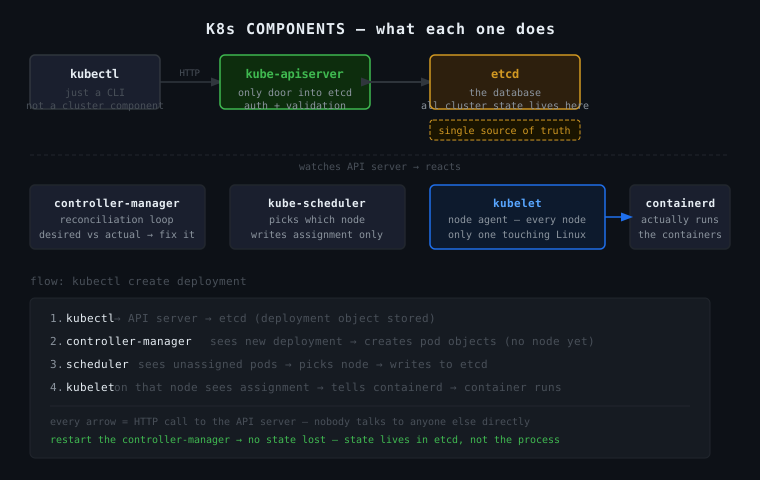
K8s is not a monolith. It's separate processes, each owning one job, talking to each other over HTTP.


The Components

etcd — the database. Stores every object in the cluster as key-value pairs. Every other component is stateless — they read/write etcd and that's where reality lives. If etcd dies, the cluster loses its mind.

kube-apiserver — the only door into etcd. Nobody talks to etcd directly except the API server. Everything — kubectl, kubelet, controller manager, scheduler — talks through here. It handles auth, validation, then reads/writes etcd.

kube-controller-manager — the reconciliation engine. Watches the API server in a loop: desired state vs actual state, gap found → fix it. ReplicaSet wants 3 pods, 1 exists → create 2 more. Does not actually run containers.

kube-scheduler — decides which node a pod runs on. Sees an unassigned pod, picks a node based on resources/taints/affinity, writes that assignment to the API server. That's it. Doesn't create the pod either.

kubelet — the agent on every node. Watches the API server for pods assigned to its node. When it sees one, it tells the container runtime to run it. The only component that touches real Linux processes. Also manages static pods from /etc/kubernetes/manifests/ with zero dependency on the API server.

kubectl — not a cluster component. A CLI on your machine that sends HTTP requests to the API server. k get pods = GET request to the API server. Nothing more.


The Flow: kubectl create deployment

kubectl → API server → etcd (deployment stored)
    controller manager sees new deployment
    creates ReplicaSet → creates pod objects (no node assigned yet)
    scheduler sees unassigned pods
    picks a node → writes assignment to API server → etcd
    kubelet on that node sees pod assigned to it
    tells containerd → container starts running

Every arrow is an HTTP call to the API server. Nobody talks to anyone else directly.


The One Thing That Makes It Click

API server + etcd = single source of truth. Every other component watches that source and reacts to it. They're all independently running processes that agree on one shared database. Restart the controller manager — no state lost, because state lives in etcd, not in the process.
697

CKA Road Trip: Deployment Stuck at 0 Replicas — The Silent Killer

A deployment with 2 desired replicas, 0 pods created, and not a single event. No errors. Just silence. That silence is the clue.


The Symptom

k get deploy video-app
# NAME        READY   UP-TO-DATE   AVAILABLE   AGE
# video-app   0/2     0            0           53s

k describe deploy video-app
# Replicas: 2 desired | 0 updated | 0 total | 0 available
# Events: <none>

No events at all. That's not a scheduling failure, not an image pull error — those would show events. Complete silence means nobody is even trying to create the pods.


The Chain

When you create a deployment, Kubernetes doesn't just magically make pods appear. The controller manager is the component that watches deployments and acts on them. It sees "desired: 2, actual: 0" and creates the pod objects. Without it, the deployment just sits there with nobody home to action it.

So Events: <none> on a deployment = controller manager isn't running.

k get pods -n kube-system
# kube-controller-manager-controlplane   0/1   CrashLoopBackOff   5    3m

There it is. Then:

k describe pod kube-controller-manager-controlplane -n kube-system
# exec: "kube-controller-manegaar": executable file not found in $PATH

Typo. kube-controller-manegaar instead of kube-controller-manager. One transposed letter, entire cluster stops creating pods.


Why You Can't Fix It With kubectl

The controller manager is a static pod — it's managed by the kubelet directly from a file on disk, not through the API server. Editing it via kubectl edit just modifies a read-only mirror copy that the kubelet immediately overwrites.

The source of truth is the manifest file:

vim /etc/kubernetes/manifests/kube-controller-manager.yaml
# fix: kube-controller-manegaar → kube-controller-manager

Save it. The kubelet watches that directory, detects the change, and restarts the pod automatically. No kubectl apply needed.

k get pods -n kube-system
# kube-controller-manager-controlplane   1/1   Running   0   30s

k get pods
# NAME                        READY   STATUS    RESTARTS   AGE
# video-app-xxx               1/1     Running   0          10s
# video-app-yyy               1/1     Running   0          10s

The Troubleshooting Chain

deployment 0 replicas, Events: <none>
        ↓ nobody is acting on the deployment
        ↓ k get pods -n kube-system
        ↓ kube-controller-manager CrashLoopBackOff
        ↓ k describe pod → typo in binary name
        ↓ fix /etc/kubernetes/manifests/kube-controller-manager.yaml
        ↓ kubelet restarts it automatically
        ↓ pods created, deployment Running

The Key Signal

Events: <none> on a deployment that has 0 pods is not normal. A scheduling failure has events. An image pull failure has events. Zero events means the controller manager never ran. That's your first check — not the deployment, not the pods, the controller manager.

CKA Road Trip: What Actually Runs in a Kubernetes Cluster

Went down a rabbit hole on this one after debugging a crashed controller manager. Ended up mapping out every component and what it actually does. Here's what I found.


Two Tiers

Every Kubernetes cluster has two tiers of components: the control plane and the node components. They have completely different jobs.

Control plane — the brain. Stores state, makes decisions, watches for drift between desired and actual. Runs on the controlplane node.

Node components — the hands. Actually run containers, manage networking, report status back. Run on every node.


Control Plane Components

kube-apiserver

The front door. Every single thing in Kubernetes — kubectl, the controller manager, the scheduler, the kubelet — talks to the API server. Nothing talks directly to etcd except the API server. It handles authentication, authorization, validation, and admission control before anything gets stored.

etcd

The database. Stores every Kubernetes object — pods, deployments, services, configmaps, everything. It's a distributed key-value store. If etcd dies, the cluster loses all state. This is why etcd backups are critical in production.

kube-controller-manager

The reconciliation engine. Runs a set of controllers in a loop — each one watches for drift between desired state and actual state and corrects it. The ReplicaSet controller sees "desired: 3, actual: 1" and creates 2 pods. The Node controller sees a node hasn't reported in and marks it NotReady. If this component is down, nothing in the cluster reacts to anything.

kube-scheduler

Decides which node a pod runs on. Looks at resource requests, node capacity, affinity rules, taints and tolerations. It doesn't create the pod — it just writes a node assignment to etcd. The kubelet on that node then picks it up and creates the pod.


Node Components

kubelet

The agent running on every node. Watches the API server for pods assigned to its node, then calls the container runtime to actually create them. Runs probes, reports pod status, manages static pods from /etc/kubernetes/manifests/. The only Kubernetes component that actually touches Linux directly.

kube-proxy

Manages networking rules for services. Writes iptables (or IPVS) rules so that traffic to a ClusterIP gets routed to the right pod. When a service is created or a pod is added/removed, kube-proxy updates the rules on every node.

container runtime

The thing that actually runs containers. containerd or CRI-O. The kubelet talks to it via the CRI (Container Runtime Interface). It pulls images, creates containers, reports status.


kubectl

Not a cluster component. It's a CLI tool that runs on your machine and talks to the API server over HTTPS. Worth calling out because it's easy to think of it as part of the cluster — it's not, it's just a client.


Where Each Component Lives

controlplane node:
  /etc/kubernetes/manifests/   ← static pods
    kube-apiserver.yaml
    kube-controller-manager.yaml
    kube-scheduler.yaml
    etcd.yaml

every node:
  kubelet        ← systemd service, not a pod
  kube-proxy     ← DaemonSet
  container runtime (containerd)  ← systemd service

The control plane components run as static pods. The kubelet and container runtime run as systemd services directly on the host. kube-proxy runs as a DaemonSet.


One Line Each

Component One line
kube-apiserver front door — everything talks through here
etcd the database — stores all cluster state
kube-controller-manager reconciliation loop — desired vs actual
kube-scheduler decides which node a pod runs on
kubelet node agent — creates containers, runs probes
kube-proxy writes iptables rules for service routing
container runtime actually runs the containers
kubectl client CLI — not a cluster component

CKA Road Trip: Static Pod vs Regular Pod vs DaemonSet

After fixing a crashed controller manager by editing a file in /etc/kubernetes/manifests/, I had to understand why that worked instead of using kubectl. That question opened up three related concepts worth getting clear on.


Regular Pod

A regular pod is created through the API server, stored in etcd, and managed by the controller manager. It lives and dies with the control plane. If the API server is down, you can't create new ones. If the controller manager is down, deployments don't react to changes.

This is what most things in a cluster are.


Static Pod

A static pod is defined as a YAML file on disk at /etc/kubernetes/manifests/ on a specific node. The kubelet watches that directory directly — no API server, no etcd, no controller manager involved. Drop a file in, the pod starts. Remove the file, the pod stops. Edit the file, the pod restarts.

The kubelet creates a read-only mirror copy of static pods in the API server so you can see them with kubectl get pods -n kube-system, but that mirror is read-only. Any changes you make via kubectl get overwritten immediately by the kubelet reading the file on disk.

The source of truth is always the file.

# control plane components are all static pods
ls /etc/kubernetes/manifests/
# etcd.yaml
# kube-apiserver.yaml
# kube-controller-manager.yaml
# kube-scheduler.yaml

Why static pods exist

The bootstrap problem. To create a pod via the API server, the API server needs to be running. But the API server is itself a pod. How does it start?

Answer: the kubelet starts before the API server exists. It reads /etc/kubernetes/manifests/, finds kube-apiserver.yaml, and starts it directly. No chicken-and-egg problem because the kubelet doesn't need the API server to manage static pods.

This is how kubeadm init bootstraps a cluster. It writes the manifest files, the kubelet picks them up, the control plane starts.

Should you use static pods for your own workloads?

Almost never. The one valid reason: something that must keep running even if the entire control plane is down. A node-level security agent that monitors syscalls — if the cluster is compromised and the control plane goes down, you still want that agent running. As a regular pod or DaemonSet it would stop being managed. As a static pod it keeps running because the kubelet manages it locally.

For everything else, use a DaemonSet.


DaemonSet

A DaemonSet says: run exactly one copy of this pod on every node. When a new node joins the cluster, the DaemonSet automatically schedules a pod on it. When a node is removed, the pod goes with it.

Use cases: - Log collector on every node (Fluentd, Filebeat) - Monitoring agent on every node (Prometheus node-exporter) - Network plugin on every node (Cilium, Flannel) - kube-proxy itself is a DaemonSet

Unlike a static pod, a DaemonSet is a proper Kubernetes resource — managed through the API server, updatable, rollbackable, visible and manageable with kubectl.


The Difference That Matters

The question isn't really static pod vs DaemonSet technically. It's: do you need this to survive a control plane outage?

If yes — static pod. The kubelet manages it from a file, no dependency on the control plane.

If no — DaemonSet. Proper Kubernetes resource, fully manageable, runs on every node.

In practice the only things that genuinely need to survive a control plane outage are the control plane components themselves. Which is why they're static pods. Everything else — including most node agents — can be a DaemonSet.


Side by Side

Static pod Regular pod DaemonSet
Managed by kubelet (file on disk) controller manager controller manager
Defined in /etc/kubernetes/manifests/ etcd via API server etcd via API server
Runs on one specific node scheduled by scheduler every node
Survives control plane outage yes no no
Updatable via kubectl no yes yes
Use case control plane bootstrap application workloads node-level agents