Skip to content

Storage

CKA Road Trip: Pod Pending — Three PV/PVC Bugs

database-deployment pods stuck in Pending. The fix required three separate corrections before anything ran.


The Symptom

k get pods
# database-deployment-5bd4f5bc58-2gl9m   0/1   Pending   0   4s

k describe pod database-deployment-5bd4f5bc58-2gl9m
# FailedScheduling: pod has unbound immediate PersistentVolumeClaims

Pod never scheduled. No node assigned.

That message is generic — it's the scheduler saying the PVC isn't in Bound state. It doesn't tell you why. The scheduler's only job is placing pods on nodes — it sees an unbound PVC and stops there.

The actual reason lives one level deeper:

k describe pvc postgres-pvc
# Cannot bind to requested volume "postgres-pv": requested PV is too small
# Cannot bind to requested volume "postgres-pv": incompatible accessMode

The diagnostic chain when a pod is Pending with storage:

k describe pod   →  tells you WHAT (PVC unbound)
k describe pvc   →  tells you WHY (size / accessMode / name mismatch)

Always go to k describe pvc when you see that message. Pod describe will never give you the PV/PVC detail.


Bug 1 — Wrong PVC name in the deployment

The deployment referenced postgres-db-pvc. The actual PVC in the cluster was named postgres-pvc. Kubernetes couldn't find it.

k edit deploy database-deployment
# fix claimName: postgres-db-pvc → postgres-pvc

New pod created. Still Pending.


Bug 2 — PV too small

k describe pvc postgres-pvc
# Cannot bind to requested volume "postgres-pv": requested PV is too small

PVC requested 150Mi. PV capacity was 100Mi. A PVC cannot bind to a PV smaller than its request.

k edit pv postgres-pv
# change capacity.storage: 100Mi → 150Mi

Still Pending. One more issue.


Bug 3 — Access mode mismatch

k describe pvc postgres-pvc
# Cannot bind to requested volume "postgres-pv": incompatible accessMode

PVC was ReadWriteMany. PV was ReadWriteOnce. They must match exactly.

PVCs are mostly immutable — you can't edit accessModes on a live PVC:

k edit pvc postgres-pvc
# error: persistentvolumeclaims "postgres-pvc" is invalid

Only way out is delete and recreate:

k get pvc postgres-pvc -o yaml > pvc.yml
k delete pvc postgres-pvc --force
# edit pvc.yml: accessModes: ReadWriteMany → ReadWriteOnce
k apply -f pvc.yml

Forcing the pods to pick up the fix

Editing the PV or recreating the PVC doesn't restart the pods. The deployment has no way of knowing something changed. Force new pods with:

k rollout restart deploy database-deployment

This patches the deployment with a restart timestamp, triggering a rolling update — old pods terminate, new pods come up and attempt the mount against the now-bound PVC.

k get pods
# database-deployment-645c9cf4f-txwpq   1/1   Running   0   22s

The binding rules

For a PVC to bind to a PV, three things must align:

storageClassName   ← same on both
capacity           ← PV must be >= PVC request  
accessModes        ← must match exactly

All three were wrong here. Check them first whenever a PVC is stuck in Pending.


The Takeaway

k describe pvc gives you the exact reason binding failed — not k describe pod. Fix the PV if possible, delete and recreate the PVC if the field is immutable, then rollout restart to force pods to remount.
CKA road trip: Why My Pod Was Stuck Pending -> PVC Access Mode Mismatch

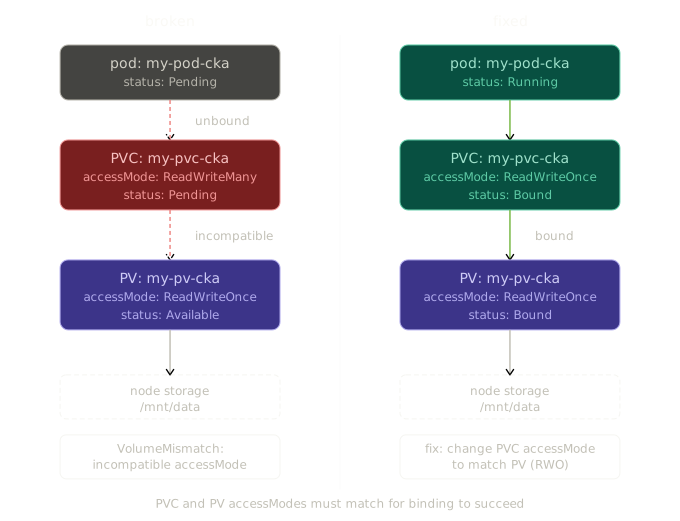
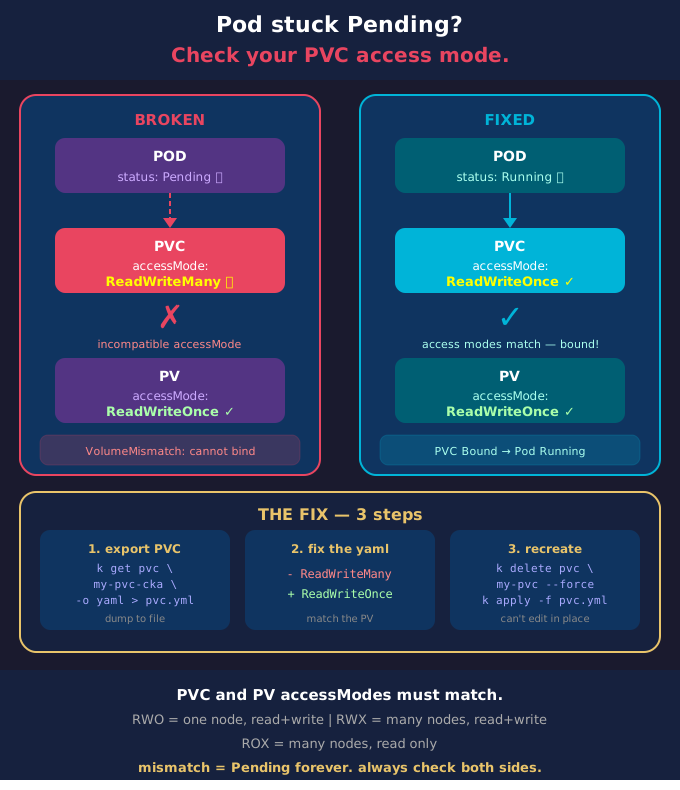
I was working through a Kubernetes troubleshooting exercise and found a pod stuck in Pending with no obvious reason. Here's exactly what I found and what it taught me about PVC access modes.


The Symptom

k get pods
# NAME         READY   STATUS    RESTARTS   AGE
# my-pod-cka   0/1     Pending   0          2m57s

Pod stuck in Pending. First thing I always check is describe:

k describe pod my-pod-cka
# Events:
#   Warning  FailedScheduling  default-scheduler
#   0/2 nodes are available: pod has unbound immediate PersistentVolumeClaims

The pod couldn't be scheduled because its PVC wasn't bound. So I looked at the PVC:

k describe pvc my-pvc-cka
# Events:
#   Warning  VolumeMismatch  persistentvolume-controller
#   Cannot bind to requested volume "my-pv-cka": incompatible accessMode

There it was. The PVC was explicitly targeting my-pv-cka via volumeName, but Kubernetes refused to bind them because their access modes were incompatible.


The Cause

The PV was defined with ReadWriteOnce:

spec:
  accessModes:
    - ReadWriteOnce
  capacity:
    storage: 100Mi

The PVC was requesting ReadWriteMany:

spec:
  accessModes:
    - ReadWriteMany   # ← wrong
  volumeName: my-pv-cka

Kubernetes won't bind a PVC to a PV if their access modes don't match. Didn't matter that volumeName was explicitly set — incompatible access modes block the binding entirely.


Access Modes — What They Actually Mean

There are three access modes in Kubernetes:

ReadWriteOnce (RWO) — the volume can be mounted by a single node at a time, for both reading and writing. Most common. hostPath volumes only support this. Most cloud block storage (AWS EBS, GCP Persistent Disk) only supports this too.

ReadOnlyMany (ROX) — the volume can be mounted by many nodes simultaneously, but only for reading. Used for shared config or static assets.

ReadWriteMany (RWX) — the volume can be mounted by many nodes simultaneously for reading and writing. Requires a storage backend that actually supports it — NFS, CephFS, Azure Files. Block storage like EBS cannot do this.

The access mode you set on the PVC must be supported by the PV. If it isn't, the binding fails.


The Binding Rule

For a PVC to bind to a PV, three things must be compatible:

  • storageClassName must match
  • requested storage must be less than or equal to PV capacity
  • accessModes must be compatible

All three. If any one of them is off, the PVC stays Pending and the pod never gets scheduled.


The Fix

I exported the PVC, changed ReadWriteMany to ReadWriteOnce, deleted the existing PVC and reapplied:

k get pvc my-pvc-cka -o yaml > pvc.yml
vim pvc.yml   # change ReadWriteMany → ReadWriteOnce
k delete pvc my-pvc-cka --force
k apply -f pvc.yml

PVC bound immediately. Pod scheduled and running within seconds.

k get pods
# NAME         READY   STATUS    RESTARTS   AGE
# my-pod-cka   1/1     Running   0          5m57s

The Troubleshooting Chain

pod Pending
    ↓ describe pod → "unbound PersistentVolumeClaim"
    ↓ describe pvc → "incompatible accessMode"
    ↓ compare pvc vs pv → RWX vs RWO mismatch
    ↓ fix pvc accessMode → delete → reapply → bound → pod running

The key habit: when a pod is Pending, don't stare at the pod — follow the chain down. In this case the pod was fine, the PVC was fine, the PV was fine. The problem was a single mismatched field between the two.


One Thing Worth Knowing

You can't edit a bound PVC's access mode — and you can't edit a Pending PVC's spec either in some versions. The only reliable fix is delete and recreate with the correct spec. In production that means planning access modes correctly upfront, because changing them later is disruptive.