Skip to content

CKA

CKA Road Trip: ConfigMap vs Secret


The Spec

spec:
  containers:
  - env:
    - name: POSTGRES_DB
      valueFrom:
        configMapKeyRef:
          key: POSTGRES_DB
          name: postgres-db-config
    - name: POSTGRES_USER
      valueFrom:
        configMapKeyRef:
          key: POSTGRES_USER
          name: postgres-db-config
    - name: POSTGRES_PASSWORD
      valueFrom:
        secretKeyRef:
          key: POSTGRES_PASSWORD
          name: postgres-db-secret
    image: postgres:latest
    name: postgres-container
    ports:
    - containerPort: 5432

Is configMapKeyRef where the config is coming from? A file?

No. The config is not coming from a file.

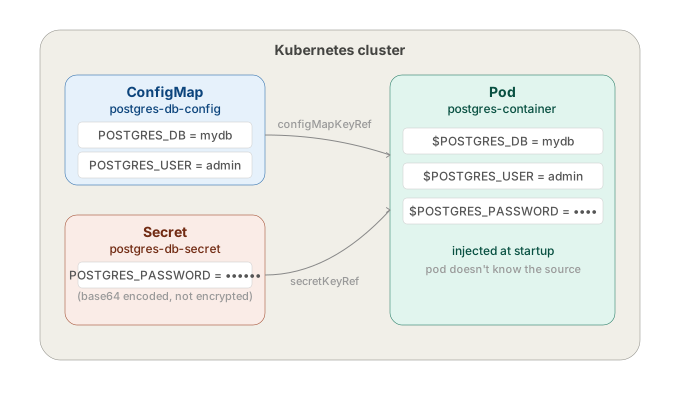
configMapKeyRef means the value is pulled from a ConfigMap object that already exists in the cluster. Someone created it beforehand with kubectl create configmap or applied a YAML manifest for it.

When the pod starts, Kubernetes goes:

find ConfigMap named "postgres-db-config" in this namespace
  → get the value at key "POSTGRES_DB"
  → inject it as env var POSTGRES_DB into the container

Same for the Secret — secretKeyRef does the same thing but pulls from a Secret object instead.

Neither of these exist in the pod spec itself. They're separate objects that must already exist in the cluster before the pod starts. If they don't, the pod won't start — CreateContainerConfigError.

k get configmap postgres-db-config -o yaml
k get secret postgres-db-secret -o yaml

So — take the KEY POSTGRES_DB from the ConfigMap postgres-db-config and create an env var named POSTGRES_DB with that value?

Exactly.

name: postgres-db-config   ← which ConfigMap to look in
key:  POSTGRES_DB          ← which key inside that ConfigMap
name: POSTGRES_DB          ← what to call the env var in the container

Go to ConfigMap postgres-db-config, grab the value stored under key POSTGRES_DB, expose it inside the container as environment variable POSTGRES_DB.

If the ConfigMap looks like this:

data:
  POSTGRES_DB: mydb
  POSTGRES_USER: admin

Then inside the container: echo $POSTGRES_DBmydb.


Why use a ConfigMap?

Because you don't want to hardcode config values inside the image or the pod spec.

Without ConfigMap:

env:
  - name: POSTGRES_DB
    value: mydb

That value is baked into the manifest. Every environment — dev, staging, prod — needs a different manifest, or you're running prod with dev values.

With a ConfigMap, the same pod spec works everywhere. The ConfigMap changes per environment. The person managing app config doesn't need to touch the deployment manifest.

Why not a Secret for everything then? ConfigMaps are for non-sensitive config — database name, port, feature flags. Secrets are for passwords, tokens, keys. That's the split in this spec — DB name and user in ConfigMap, password in Secret.


But Secrets are only encoded, not encrypted

Correct. Base64 encoding, not encryption. Anyone who can read the Secret object can decode it in seconds:

echo "cGFzc3dvcmQ=" | base64 -d
# password

Secrets are only as safe as your cluster access controls. If someone can run kubectl get secret postgres-db-secret -o yaml they have the password.

The real protection comes from RBAC — restricting who can read Secret objects, etcd encryption at rest — encrypting the etcd database itself (not on by default), and external secret managers — Vault, AWS Secrets Manager — where the actual value never lives in etcd at all.


So why use Secrets over ConfigMap if they're not even encrypted?

Fair point. The difference isn't security — it's intent and tooling.

ConfigMap — plaintext, visible everywhere, no special handling. For stuff that's genuinely not sensitive: DB name, port number, feature flags.

Secret — base64, but the cluster treats it differently:

  • Not printed in logs by default
  • Not shown in kubectl describe pod output
  • Can be encrypted at rest if you configure it
  • RBAC policies can restrict Secret access separately from ConfigMap access
  • External secret managers (Vault etc.) integrate with the Secret API, not ConfigMap

It's not that Secrets are secure out of the box. It's that they're the hook point for security. You build protection around them. ConfigMaps have no such hook — they're never meant to hold sensitive data so no tooling exists to protect them.

Put a password in a ConfigMap and it'll show up in kubectl describe pod, in logs, in dashboards, everywhere. Put it in a Secret and at least the ecosystem knows to handle it carefully.
697

CKA Road Trip: UP-TO-DATE Was 0 — But Nothing Was Broken

The task said UP-TO-DATE should be 1. It was showing 0. I assumed something was broken and went the long way round. The issue was one field.


The Symptom

k get deploy stream-deployment
# NAME                READY   UP-TO-DATE   AVAILABLE   AGE
# stream-deployment   0/0     0            0           69s

Task: UP-TO-DATE is showing 0, it should be 1. Troubleshoot and fix.


What I Did (the Long Way)

k get deploy stream-deployment -o yaml > deploy.yml
vim deploy.yml          # changed replicas: 0 → 1
k delete deploy stream-deployment --force
k apply -f deploy.yml

It worked. But it was 4 steps, and the force delete is dangerous in prod — bypasses graceful termination. If the pod was doing anything, that's data loss risk.


What I Should Have Done

k scale deploy stream-deployment --replicas=1

One command. No file, no delete, no risk.

Or if editing more than just replicas:

k edit deploy stream-deployment

Live YAML in the editor. Change what you need, save, done. No delete needed — ever.


What UP-TO-DATE Actually Means

READY = running / desired. 0/0 means you asked for 0, you got 0. Not broken.

UP-TO-DATE = how many pods are running the latest pod template spec — latest image, env vars, config. Are your pods on the current version of the deployment?

UP-TO-DATE: 0 when replicas: 0 is correct math. Nothing to update. The actual issue was replicas: 0 in the spec. UP-TO-DATE was a red herring.


When UP-TO-DATE Actually Matters

k get deploy my-deploy
# NAME        READY   UP-TO-DATE   AVAILABLE
# my-deploy   3/3     1            3

3 pods running, only 1 on the new version. Rolling update in progress — the other 2 are still on the old template. That is the signal UP-TO-DATE is for. Not deployment health — rollout progress.


The Rule

READY left/right = reality vs desired. If they don't match, something is wrong.

UP-TO-DATE only means something when replicas > 0 and you have changed the pod template. When you see 0/0, check spec.replicas first.

k get deploy stream-deployment -o jsonpath='{.spec.replicas}'
# 0

Root cause in one shot.

CKA Road Trip: You Don't Memorise kubectl — You Discover It

The advice is always: here is a list of kubectl commands, memorise them. It doesn't work like that. You can't look up something if you don't know it exists.


The Problem

After the replicas exercise, the fix was k scale. Simple. But what if I didn't know scale existed? I would have gone straight to k edit or k get -o yaml and edited the file directly. Which works, but it's slower.

The issue isn't syntax. It's not knowing which commands exist in the first place.


The Chicken and Egg

You can't --help a command you don't know exists. And memorising a list of 30 commands without context doesn't stick — you need to use them in the right situation 3 or 4 times before they become muscle memory.

So the question is: how do you find out what exists without memorising everything upfront?


One Command Solves It

kubectl --help

Run it once. It lists every top-level command grouped by category. You see scale, set, rollout, patch, label, annotate — now you know they exist. That is the only thing worth skimming upfront. Not syntax, not flags. Just what is there.


Then --help Does the Rest

Once you know a command exists, the syntax is one flag away:

k scale --help
k set --help
k rollout --help

Exact syntax, flags, and examples on the spot. You look it up when you need it. After 3 or 4 times in real exercises, it sticks without trying.


When to Use k edit Instead

Not everything has a dedicated command. If you need to change something that k scale, k set, or k rollout don't cover — k edit is the right tool. Live YAML, change what you need, save. No file, no apply, no delete.

The dedicated commands are faster for what they cover. k edit covers everything else.


The Workflow

need to change something
is there a dedicated command?
        ↓ not sure
kubectl --help → scan → find it or confirm it doesn't exist
k <command> --help → syntax → done
        ↓ or no command exists
k edit → change the field directly

One skim of kubectl --help gives you the map. Everything else on demand.

CKA Road Trip: Namespace Not Found

Applied a deployment manifest. Got an error before a single pod even tried to start. Fixed it in one command, but it forced me to think about what namespaces actually are.


The Symptom

k apply -f frontend-deployment.yaml
# Error from server (NotFound): error when creating "frontend-deployment.yaml": namespaces "nginx-ns" not found

Nothing about the image, nothing about the container. The API server refused to process the request entirely because the target namespace didn't exist.


What a Namespace Actually Is

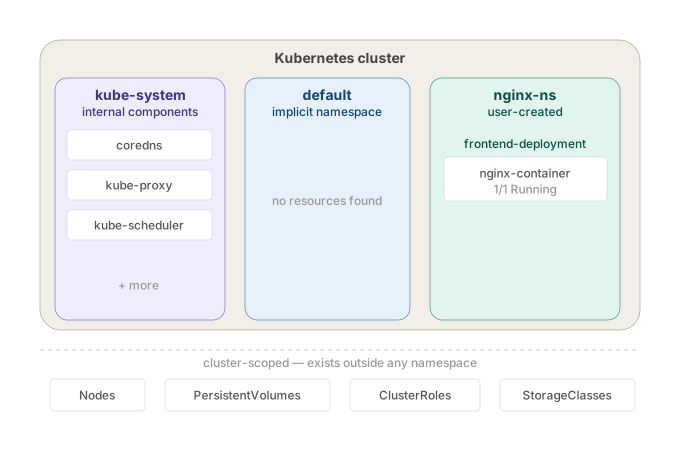
A namespace is a scope for resource names. When Kubernetes stores a resource in etcd, the key includes the namespace:

/registry/deployments/nginx-ns/frontend-deployment
/registry/deployments/default/frontend-deployment

Those are two different keys. Same name, no conflict. The namespace is part of the path — that's all it is.

When you run kubectl get pods, the API server filters by namespace. You're not entering an isolated environment — you're scoping the query.

cluster
├── namespace: default       ← where everything lands if you don't specify
├── namespace: kube-system   ← Kubernetes internal components
└── namespace: nginx-ns      ← doesn't exist until you create it

It does not isolate network traffic. A pod in nginx-ns can reach a pod in default by IP with no restriction. Pods from every namespace land on the same nodes. There's no kernel-level separation of any kind. It's a naming boundary, not a network or compute boundary.

It means namespaces are purely organisational. Kubernetes doesn't build any walls between them at the infrastructure level.

Network: Two pods in different namespaces can talk to each other directly by pod IP. No firewall, no routing rule, nothing blocking it. The namespace label on the pod makes zero difference to how packets flow.

Nodes: You have 3 nodes in your cluster. A pod from kube-system and a pod from nginx-ns can both end up scheduled on node01. The scheduler doesn't segregate by namespace.

Kernel: Container isolation (namespaces in the Linux sense — pid, net, mount) happens at the container runtime level, not the Kubernetes namespace level. A Kubernetes namespace does nothing to the underlying Linux process isolation.

So if someone tells you "put this in a separate namespace for security" — that's meaningless on its own. The namespace just stops name collisions. It doesn't stop traffic, it doesn't stop resource contention, it doesn't sandbox anything. To actually isolate traffic between namespaces you need NetworkPolicies on top.


Why Kubernetes Won't Create It Automatically

Intentional. Kubernetes has no way to know if nginx-ns in your manifest is:

  • a namespace you meant to create
  • a typo (nginx-n instead of nginx-ns)
  • a namespace that should already exist from a previous step

Auto-creating it would silently mask config mistakes. It fails loudly instead. If you're deploying into a namespace, that namespace is infrastructure — it should already exist.


The Fix

k create ns nginx-ns
k apply -f frontend-deployment.yaml

Or declaratively:

apiVersion: v1
kind: Namespace
metadata:
  name: nginx-ns

Apply the namespace file first, then the deployment. Namespace as code — that's the production pattern.


Querying Across Namespaces

k get pods                 # default namespace only
k get pods -n nginx-ns     # specific namespace
k get pods -A              # all namespaces

If you forget -n and your pod isn't in default, you'll get No resources found — looks like the pod doesn't exist. It does. Wrong namespace.


Setting a Default Namespace

k config set-context --current --namespace=nginx-ns

All kubectl commands now target nginx-ns without -n. Useful during exam tasks scoped to one namespace. Reset it when done.


The Takeaway

Namespaces don't create themselves. The NotFound error isn't about your deployment — it's about missing infrastructure the deployment depends on. Namespace first, resources second.

CKA Road Trip: Pod Pending — Three PV/PVC Bugs

database-deployment pods stuck in Pending. The fix required three separate corrections before anything ran.


The Symptom

k get pods
# database-deployment-5bd4f5bc58-2gl9m   0/1   Pending   0   4s

k describe pod database-deployment-5bd4f5bc58-2gl9m
# FailedScheduling: pod has unbound immediate PersistentVolumeClaims

Pod never scheduled. No node assigned.

That message is generic — it's the scheduler saying the PVC isn't in Bound state. It doesn't tell you why. The scheduler's only job is placing pods on nodes — it sees an unbound PVC and stops there.

The actual reason lives one level deeper:

k describe pvc postgres-pvc
# Cannot bind to requested volume "postgres-pv": requested PV is too small
# Cannot bind to requested volume "postgres-pv": incompatible accessMode

The diagnostic chain when a pod is Pending with storage:

k describe pod   →  tells you WHAT (PVC unbound)
k describe pvc   →  tells you WHY (size / accessMode / name mismatch)

Always go to k describe pvc when you see that message. Pod describe will never give you the PV/PVC detail.


Bug 1 — Wrong PVC name in the deployment

The deployment referenced postgres-db-pvc. The actual PVC in the cluster was named postgres-pvc. Kubernetes couldn't find it.

k edit deploy database-deployment
# fix claimName: postgres-db-pvc → postgres-pvc

New pod created. Still Pending.


Bug 2 — PV too small

k describe pvc postgres-pvc
# Cannot bind to requested volume "postgres-pv": requested PV is too small

PVC requested 150Mi. PV capacity was 100Mi. A PVC cannot bind to a PV smaller than its request.

k edit pv postgres-pv
# change capacity.storage: 100Mi → 150Mi

Still Pending. One more issue.


Bug 3 — Access mode mismatch

k describe pvc postgres-pvc
# Cannot bind to requested volume "postgres-pv": incompatible accessMode

PVC was ReadWriteMany. PV was ReadWriteOnce. They must match exactly.

PVCs are mostly immutable — you can't edit accessModes on a live PVC:

k edit pvc postgres-pvc
# error: persistentvolumeclaims "postgres-pvc" is invalid

Only way out is delete and recreate:

k get pvc postgres-pvc -o yaml > pvc.yml
k delete pvc postgres-pvc --force
# edit pvc.yml: accessModes: ReadWriteMany → ReadWriteOnce
k apply -f pvc.yml

Forcing the pods to pick up the fix

Editing the PV or recreating the PVC doesn't restart the pods. The deployment has no way of knowing something changed. Force new pods with:

k rollout restart deploy database-deployment

This patches the deployment with a restart timestamp, triggering a rolling update — old pods terminate, new pods come up and attempt the mount against the now-bound PVC.

k get pods
# database-deployment-645c9cf4f-txwpq   1/1   Running   0   22s

The binding rules

For a PVC to bind to a PV, three things must align:

storageClassName   ← same on both
capacity           ← PV must be >= PVC request  
accessModes        ← must match exactly

All three were wrong here. Check them first whenever a PVC is stuck in Pending.


The Takeaway

k describe pvc gives you the exact reason binding failed — not k describe pod. Fix the PV if possible, delete and recreate the PVC if the field is immutable, then rollout restart to force pods to remount.