Skip to content

Fundamentals

CKA Road Trip: Kubernetes Networking — From the Ground Up

Kubernetes networking is confusing because there are multiple layers of "network" stacked on top of each other. Once you understand each layer and what it owns, it stops being magic.


Layer 0 — The Linux Host Network

Before Kubernetes exists, you have a Linux machine with a network interface:

controlplane node
  eth0: 172.30.1.2     ← the real IP of this machine
  lo:   127.0.0.1      ← loopback, local to this machine only

This is the node network. Machines talk to each other here. 172.30.1.2 is reachable from node01 at 172.30.2.2. Normal networking.


Layer 1 — Linux Network Namespaces

This is where containers come in. When a container starts, the kernel creates a network namespace for it. Think of a network namespace as a completely separate, isolated copy of the networking stack.

Inside a network namespace: - its own network interfaces - its own IP address - its own routing table - its own loopback (127.0.0.1)

The container has no idea the host network exists. Its localhost is its own loopback, not the node's.

host network namespace          container network namespace
  eth0: 172.30.1.2               eth0: 192.168.1.5  ← pod IP
  lo:   127.0.0.1                lo:   127.0.0.1     ← container's OWN loopback

These are two completely separate localhostes. This is the source of most networking confusion.


Layer 2 — The veth Pair (The Wire)

A container in its own namespace can't talk to anything. It needs a wire connecting it to the outside world.

That wire is a veth pair — two virtual network interfaces connected like a cable. What goes in one end comes out the other.

host side                    container side
  veth_abc123  ←──────────→  eth0 (inside container)
  (on the bridge)              (pod IP: 192.168.1.5)

The host end plugs into a bridge (think: a virtual network switch). The container end is the pod's eth0. Every pod gets one veth pair.


Layer 3 — The Bridge (The Switch)

The bridge connects all the veth pairs on a node. Pods on the same node talk through the bridge.

         bridge (cni0: 192.168.1.1)
         /            \
   veth_pod_A      veth_pod_B
       |                |
   pod A             pod B
192.168.1.2      192.168.1.3

Pod A pings Pod B: 1. Pod A sends packet to 192.168.1.3 2. Goes through veth_pod_A to the bridge 3. Bridge forwards to veth_pod_B 4. Pod B receives it

No iptables, no routing — pure L2 switching on the same node.


Layer 4 — Pod IPs (Cross-Node)

Pods on different nodes need to reach each other too. The CNI plugin (Flannel, Cilium, Calico) handles this.

Each node gets a block of pod IPs:

controlplane: pods get 192.168.0.0/24
node01:       pods get 192.168.1.0/24

Cross-node traffic goes through the CNI plugin — either encapsulated in a tunnel (Flannel VXLAN) or routed directly (Calico BGP). The pod doesn't know or care. It just sends to the destination pod IP and the CNI handles getting it there.

Key point: every pod in the cluster gets a unique IP. Any pod can reach any other pod directly by IP — no NAT, no port mapping needed. This is the Kubernetes networking model.


Layer 5 — Services and ClusterIP

Pod IPs are ephemeral. A pod dies, its IP is gone. A new pod gets a new IP. You can't hardcode pod IPs.

A Service gives you a stable IP that never changes. It's called a ClusterIP.

nginx-service   ClusterIP: 10.96.45.123:80
              load balances to:
                pod-A: 192.168.1.2:80
                pod-B: 192.168.1.3:80

But here's the thing — the ClusterIP is not assigned to any interface. You can't ping it. It exists only as an iptables rule written by kube-proxy on every node.

When a pod sends traffic to 10.96.45.123:80: 1. Packet hits the iptables KUBE-SERVICES chain 2. iptables randomly picks a pod IP (load balancing) 3. DNAT rewrites the destination to the pod IP 4. Packet routes normally to the pod

The ClusterIP is just a hook in iptables. That's it.


Layer 6 — DNS

Nobody remembers 10.96.45.123. DNS maps service names to ClusterIPs.

Every pod has /etc/resolv.conf pointing at CoreDNS:

nameserver 10.96.0.10      ← CoreDNS ClusterIP
search default.svc.cluster.local svc.cluster.local cluster.local

When a pod does curl nginx-service: 1. DNS lookup: nginx-service → resolves to nginx-service.default.svc.cluster.local 2. CoreDNS returns 10.96.45.123 3. Pod sends to 10.96.45.123 4. iptables DNAT → pod IP 5. Packet reaches the pod


The localhost confusion — fully explained

Now that you understand network namespaces:

controlplane node (host namespace)
  127.0.0.1:6443  ← apiserver listening here

pod on that node (its own namespace)
  127.0.0.1       ← the pod's OWN loopback
                    completely separate from the node's loopback

When you kubectl exec into a pod and run curl localhost:6443 — you are inside the pod's network namespace. Its localhost is its own loopback. The apiserver is on the node's loopback, which is a completely different network namespace. The packet never leaves the pod's namespace, never reaches the node, never reaches the apiserver.

To reach the apiserver from inside a pod:

# use the kubernetes service — this IS reachable from any pod
curl -k https://kubernetes.default.svc.cluster.local/healthz
# or
curl -k https://10.96.0.1/healthz   # kubernetes service ClusterIP

This works because 10.96.0.1 is a ClusterIP — iptables on the node rewrites it to the apiserver's actual IP and port.


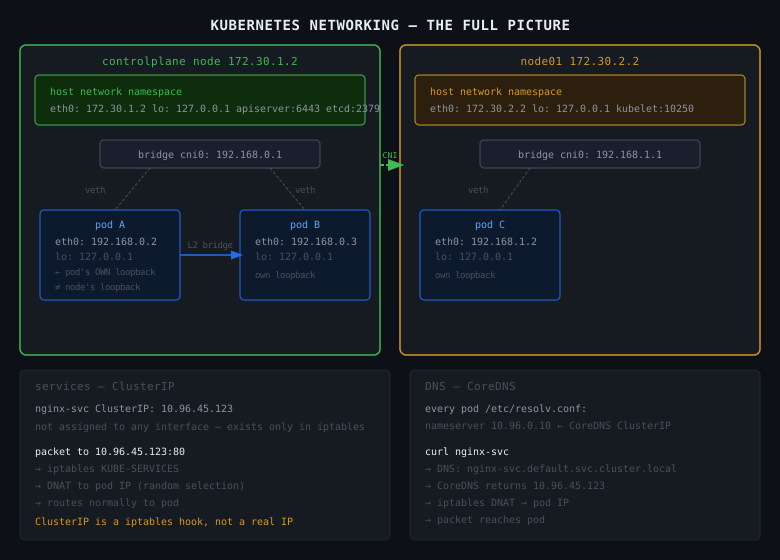
The Full Picture

                    ┌─────────────────────────────────┐
                    │         controlplane node         │
                    │  eth0: 172.30.1.2  (node IP)     │
                    │  lo:   127.0.0.1   (node loopback)│
                    │    apiserver: 127.0.0.1:6443      │
                    │    etcd:      127.0.0.1:2379      │
                    │                                   │
                    │  ┌─────────────┐                  │
                    │  │   pod A     │ ← own namespace  │
                    │  │ 192.168.0.2 │                  │
                    │  │ lo:127.0.0.1│ ← pod's loopback │
                    │  └──────┬──────┘                  │
                    │      veth pair                    │
                    │      bridge cni0                  │
                    └─────────────────────────────────┘
                              │ cross-node via CNI
                    ┌─────────────────────────────────┐
                    │           node01                  │
                    │  eth0: 172.30.2.2                 │
                    │  ┌─────────────┐                  │
                    │  │   pod B     │                  │
                    │  │ 192.168.1.3 │                  │
                    │  └─────────────┘                  │
                    └─────────────────────────────────┘

services (ClusterIP) — exist only as iptables rules, on every node
DNS (CoreDNS)        — a pod, reachable via its own ClusterIP 10.96.0.10

The Rules Worth Memorising

Pod to pod (same node): direct via bridge — no NAT, no routing.

Pod to pod (different node): CNI handles it — pod just sends to the pod IP.

Pod to service: iptables DNAT on the node — ClusterIP gets rewritten to a pod IP.

Pod to apiserver: use kubernetes.default.svc.cluster.local — never localhost.

Node to component: localhost works — you're on the same host.

localhost inside a container: the container's own loopback only — nothing else.
697

Linux Networking From Zero — The 4 Things You Need to Understand Kubernetes Networking

Before Kubernetes. Before containers. Just Linux.

If you understand these 4 things, Kubernetes networking stops being magic and becomes obvious. If you don't, no amount of Kubernetes articles will help.


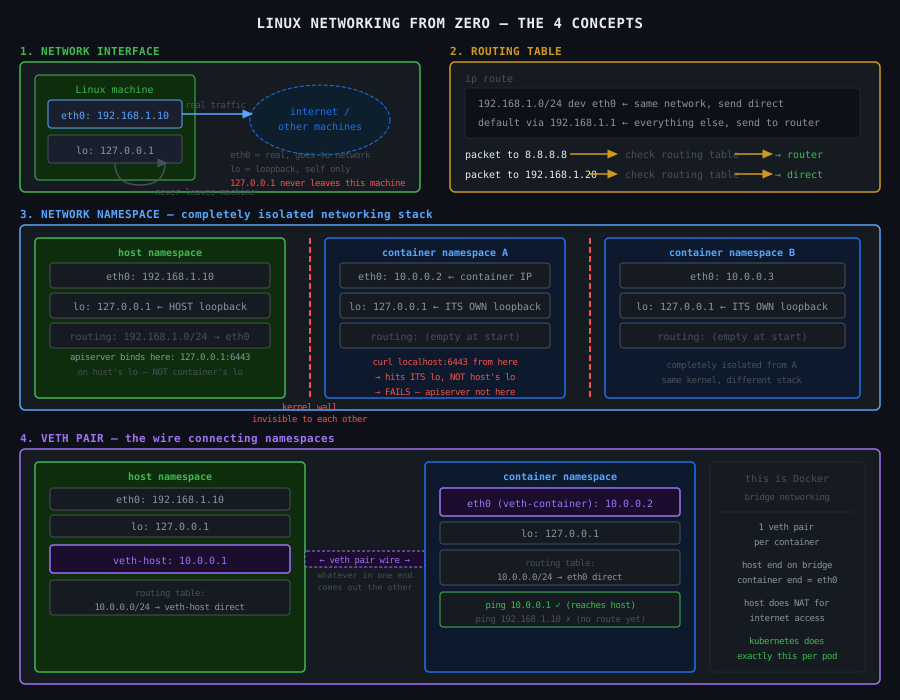
1. The Network Interface

A network interface is how a machine sends and receives data on a network. Think of it as a socket in the wall — the physical plug point between your machine and the outside world.

On a Linux machine:

ip a
# 1: lo: <LOOPBACK>
#    inet 127.0.0.1/8
# 2: eth0: <BROADCAST,MULTICAST,UP>
#    inet 192.168.1.10/24

Two interfaces here:

eth0 — the real network interface. Has IP 192.168.1.10. This is how this machine talks to other machines. Data going out leaves through eth0. Data coming in arrives through eth0.

lo — the loopback interface. Has IP 127.0.0.1. This is special — it never leaves the machine. It's a self-addressed envelope. When you curl localhost, the packet goes into lo and comes straight back out to the same machine. No network cable involved. Nothing leaves.

This is critical. 127.0.0.1 and localhost are not "the machine" in an abstract sense. They are specifically the loopback interface lo. Traffic sent to 127.0.0.1 goes to lo and stays on that machine. It cannot reach any other machine. It cannot be seen by any other machine.


2. The Routing Table

When your machine wants to send a packet, it needs to know where to send it. The routing table is the map it uses to make that decision.

ip route
# default via 192.168.1.1 dev eth0
# 192.168.1.0/24 dev eth0 proto kernel scope link

Two rules here:

192.168.1.0/24 dev eth0 — any packet going to an IP in the range 192.168.1.0 to 192.168.1.255 — send it out through eth0 directly. These machines are on the same network. No middleman needed.

default via 192.168.1.1 dev eth0 — any packet going anywhere else — send it to 192.168.1.1 (the router/gateway) through eth0. The router knows where to forward it from there.

The machine checks the routing table top to bottom, picks the first rule that matches the destination IP, and sends the packet out through the specified interface.

If no rule matches and there's no default — the packet is dropped. The machine has no idea where to send it.

The key point: the routing table is per-machine. Every machine has its own. Every container has its own. This is why networking breaks when routing tables are wrong or missing.


3. The Network Namespace

Here is where containers start making sense.

A network namespace is a completely isolated copy of the entire Linux networking stack. Not a different machine — the same kernel — but a completely separate set of:

  • network interfaces
  • routing tables
  • iptables rules
  • port bindings

When you create a new network namespace, it starts with nothing. No interfaces except a DOWN loopback. No routes. Empty iptables. No way to reach anything.

# create a new network namespace called "myns"
ip netns add myns

# run a command inside it
ip netns exec myns ip a
# 1: lo: <LOOPBACK>  ← only loopback, and it's DOWN
#    inet 127.0.0.1/8

ip netns exec myns ip route
# (empty — no routes at all)

From inside myns, you cannot reach the internet. You cannot reach the host. You cannot reach anything. It is completely empty.

From the host, myns doesn't exist on the network at all. The host's eth0 has no idea myns is there.

This is what a container is. When Docker or containerd creates a container, it creates a new network namespace. The container's process runs inside that namespace. It gets its own interfaces, its own routing table, its own 127.0.0.1. The host's network is completely invisible to it.

This is why localhost inside a container is the container's own loopback — not the host's. The container is in a different network namespace. It has its own lo. The host's lo is in a different namespace entirely.


4. The veth Pair

A network namespace starts isolated. To make it useful, you need to connect it to something. That connection is a veth pair.

A veth pair is two virtual network interfaces linked together like a pipe. Whatever you send into one end comes out the other end. They always come in pairs — you cannot have just one.

# create a veth pair: veth-host and veth-container
ip link add veth-host type veth peer name veth-container

# currently both ends are on the host
ip a | grep veth
# veth-host
# veth-container

# move veth-container into the namespace
ip link set veth-container netns myns

# now:
# veth-host      → on the host
# veth-container → inside myns namespace

# configure the host end
ip addr add 10.0.0.1/24 dev veth-host
ip link set veth-host up

# configure the container end
ip netns exec myns ip addr add 10.0.0.2/24 dev veth-container
ip netns exec myns ip link set veth-container up
ip netns exec myns ip link set lo up

# test
ip netns exec myns ping 10.0.0.1   # namespace pings host end ✓
ping 10.0.0.2                       # host pings namespace ✓

The namespace now has connectivity — but only to the host end of the veth pair. Not the internet. Not other namespaces. Just the one wire you gave it.

This is exactly what Docker does for every container. One veth pair per container. One end on the host, one end inside the container's network namespace. The container calls its end eth0.


How These 4 Things Connect

Start from nothing and build up:

Step 1 — bare machine:

eth0: 192.168.1.10   ← real interface, talks to the world
lo:   127.0.0.1      ← loopback, stays on this machine
routing table tells packets which interface to use

Step 2 — create a network namespace:

host namespace         new namespace (myns)
  eth0: 192.168.1.10     lo: 127.0.0.1 (DOWN)
  lo:   127.0.0.1        (nothing else)

myns is completely isolated — no way in or out

Step 3 — add a veth pair:

host namespace              myns namespace
  eth0: 192.168.1.10          eth0: 10.0.0.2  ← veth-container renamed
  lo:   127.0.0.1             lo:   127.0.0.1
  veth-host: 10.0.0.1 ←──→ veth-container: 10.0.0.2

myns can now talk to the host via the veth pair
myns still cannot reach the internet

Step 4 — add routing + NAT for internet access:

host enables IP forwarding
host adds NAT rule: traffic from 10.0.0.0/24 → masquerade as 192.168.1.10

myns adds default route: all traffic → via 10.0.0.1 (the host end)

now myns can reach the internet through the host

This is a Docker container with bridge networking. Every container is a network namespace connected to the host via a veth pair, with the host doing NAT to give it internet access.


The 5 Things to Remember

A network interface is how a machine connects to a network. eth0 is real. lo is loopback — never leaves the machine.

The routing table decides where each packet goes based on the destination IP. No route = packet dropped.

A network namespace is a completely isolated networking stack. Its own interfaces, routes, iptables, and its own 127.0.0.1. What happens in a namespace stays in that namespace.

A veth pair is the wire connecting two namespaces. Always two ends. Move one end into a namespace, the other stays on the host.

localhost inside a container is the container's own loopback in its own namespace. It is not the host's loopback. They share a kernel but not a network namespace.

697

CKA Road Trip: Why Would I Schedule a Pod on the Control Plane?

Short answer: you usually wouldn't. But here's why the option exists.


The Default Taint

The control plane node has a taint on it by default:

node-role.kubernetes.io/control-plane:NoSchedule

That means: don't schedule pods here unless they explicitly tolerate it. Without a toleration, the scheduler sees the taint and skips the node silently. No error. Just one less node available.


The Three Legitimate Reasons

Node-level agents that need to run everywhere. A security scanner, log collector, or monitoring agent that must observe every node — including the control plane. If it doesn't run there, you have a blind spot. That's the real production use case for the toleration.

Single or minimal node clusters. In a lab with only a controlplane and one worker, not tolerating the taint means half your cluster is off-limits for scheduling. Fine in prod, painful in a two-node lab.

The exam. KillerKoda and similar environments use minimal setups. You'll hit exercises where pods need to land on the control plane just to satisfy the task.


The Toleration

tolerations:
  - key: node-role.kubernetes.io/control-plane
    operator: Exists
    effect: NoSchedule

Add this under spec in your pod or DaemonSet template. Without it the control plane node is invisible to the scheduler.


Why the Taint Exists

The control plane runs etcd, the API server, the scheduler, the controller manager. It's the most critical node in the cluster. Resource contention here means the whole cluster degrades. The taint enforces separation by default — workloads go on workers, infrastructure stays on the control plane.

The control plane components themselves are static pods. The kubelet places them directly, bypassing the scheduler entirely, so the taint doesn't affect them.


The Rule

In production with real worker nodes: leave the taint alone, never schedule workloads on the control plane.

In a lab or for genuine node-level agents: add the toleration and be deliberate about it.

CKA Road Trip: What Is a DaemonSet


What It Is

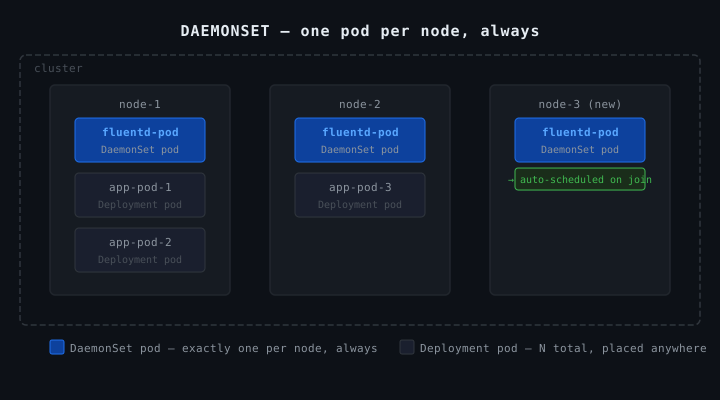
A DaemonSet ensures exactly one copy of a pod runs on every node in the cluster. New node joins → pod automatically created on it. Node removed → pod goes with it.


Real Uses

  • Log collectors (Fluentd, Filebeat)
  • Monitoring agents (Prometheus node-exporter)
  • Network plugins (Cilium, Flannel)
  • kube-proxy itself is a DaemonSet

Anything that needs to run on every node, once per node.


vs Deployment

Deployment says: run N copies, put them wherever the scheduler decides.

DaemonSet says: run exactly one copy on every node, no exceptions.


vs Static Pod

DaemonSet Static Pod
Managed by controller manager kubelet (file on disk)
Defined in etcd via API server /etc/kubernetes/manifests/
kubectl works yes read-only mirror only
Survives control plane outage no yes
Use case node-level agents control plane bootstrap

DaemonSet is a proper Kubernetes resource — updatable, rollbackable, kubectl works on it normally. Tradeoff: if the control plane goes down, the DaemonSet controller can't manage it.

Static pod has zero dependency on the control plane. The kubelet manages it from a file on disk directly.


The Decision Rule

Do you need this to survive a control plane outage?

  • No → DaemonSet
  • Yes → Static pod

In practice, almost nothing needs to survive a control plane outage except the control plane components themselves — which is exactly why they're static pods.

697

CKA Road Trip: ConfigMap vs Secret


The Spec

spec:
  containers:
  - env:
    - name: POSTGRES_DB
      valueFrom:
        configMapKeyRef:
          key: POSTGRES_DB
          name: postgres-db-config
    - name: POSTGRES_USER
      valueFrom:
        configMapKeyRef:
          key: POSTGRES_USER
          name: postgres-db-config
    - name: POSTGRES_PASSWORD
      valueFrom:
        secretKeyRef:
          key: POSTGRES_PASSWORD
          name: postgres-db-secret
    image: postgres:latest
    name: postgres-container
    ports:
    - containerPort: 5432

Is configMapKeyRef where the config is coming from? A file?

No. The config is not coming from a file.

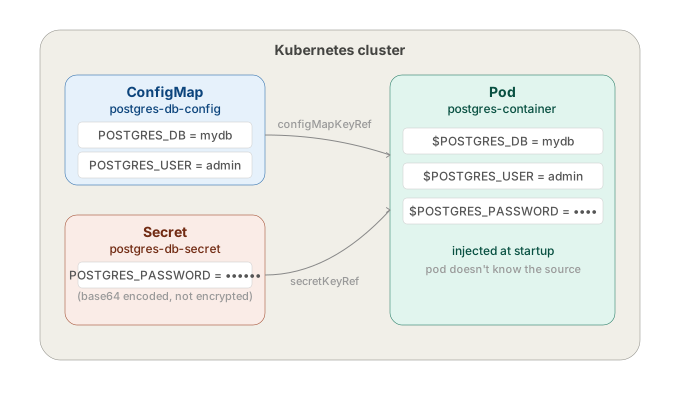
configMapKeyRef means the value is pulled from a ConfigMap object that already exists in the cluster. Someone created it beforehand with kubectl create configmap or applied a YAML manifest for it.

When the pod starts, Kubernetes goes:

find ConfigMap named "postgres-db-config" in this namespace
  → get the value at key "POSTGRES_DB"
  → inject it as env var POSTGRES_DB into the container

Same for the Secret — secretKeyRef does the same thing but pulls from a Secret object instead.

Neither of these exist in the pod spec itself. They're separate objects that must already exist in the cluster before the pod starts. If they don't, the pod won't start — CreateContainerConfigError.

k get configmap postgres-db-config -o yaml
k get secret postgres-db-secret -o yaml

So — take the KEY POSTGRES_DB from the ConfigMap postgres-db-config and create an env var named POSTGRES_DB with that value?

Exactly.

name: postgres-db-config   ← which ConfigMap to look in
key:  POSTGRES_DB          ← which key inside that ConfigMap
name: POSTGRES_DB          ← what to call the env var in the container

Go to ConfigMap postgres-db-config, grab the value stored under key POSTGRES_DB, expose it inside the container as environment variable POSTGRES_DB.

If the ConfigMap looks like this:

data:
  POSTGRES_DB: mydb
  POSTGRES_USER: admin

Then inside the container: echo $POSTGRES_DBmydb.


Why use a ConfigMap?

Because you don't want to hardcode config values inside the image or the pod spec.

Without ConfigMap:

env:
  - name: POSTGRES_DB
    value: mydb

That value is baked into the manifest. Every environment — dev, staging, prod — needs a different manifest, or you're running prod with dev values.

With a ConfigMap, the same pod spec works everywhere. The ConfigMap changes per environment. The person managing app config doesn't need to touch the deployment manifest.

Why not a Secret for everything then? ConfigMaps are for non-sensitive config — database name, port, feature flags. Secrets are for passwords, tokens, keys. That's the split in this spec — DB name and user in ConfigMap, password in Secret.


But Secrets are only encoded, not encrypted

Correct. Base64 encoding, not encryption. Anyone who can read the Secret object can decode it in seconds:

echo "cGFzc3dvcmQ=" | base64 -d
# password

Secrets are only as safe as your cluster access controls. If someone can run kubectl get secret postgres-db-secret -o yaml they have the password.

The real protection comes from RBAC — restricting who can read Secret objects, etcd encryption at rest — encrypting the etcd database itself (not on by default), and external secret managers — Vault, AWS Secrets Manager — where the actual value never lives in etcd at all.


So why use Secrets over ConfigMap if they're not even encrypted?

Fair point. The difference isn't security — it's intent and tooling.

ConfigMap — plaintext, visible everywhere, no special handling. For stuff that's genuinely not sensitive: DB name, port number, feature flags.

Secret — base64, but the cluster treats it differently:

  • Not printed in logs by default
  • Not shown in kubectl describe pod output
  • Can be encrypted at rest if you configure it
  • RBAC policies can restrict Secret access separately from ConfigMap access
  • External secret managers (Vault etc.) integrate with the Secret API, not ConfigMap

It's not that Secrets are secure out of the box. It's that they're the hook point for security. You build protection around them. ConfigMaps have no such hook — they're never meant to hold sensitive data so no tooling exists to protect them.

Put a password in a ConfigMap and it'll show up in kubectl describe pod, in logs, in dashboards, everywhere. Put it in a Secret and at least the ecosystem knows to handle it carefully.

697

CKA Road Trip: Namespace Not Found

Applied a deployment manifest. Got an error before a single pod even tried to start. Fixed it in one command, but it forced me to think about what namespaces actually are.


The Symptom

k apply -f frontend-deployment.yaml
# Error from server (NotFound): error when creating "frontend-deployment.yaml": namespaces "nginx-ns" not found

Nothing about the image, nothing about the container. The API server refused to process the request entirely because the target namespace didn't exist.


What a Namespace Actually Is

A namespace is a scope for resource names. When Kubernetes stores a resource in etcd, the key includes the namespace:

/registry/deployments/nginx-ns/frontend-deployment
/registry/deployments/default/frontend-deployment

Those are two different keys. Same name, no conflict. The namespace is part of the path — that's all it is.

When you run kubectl get pods, the API server filters by namespace. You're not entering an isolated environment — you're scoping the query.

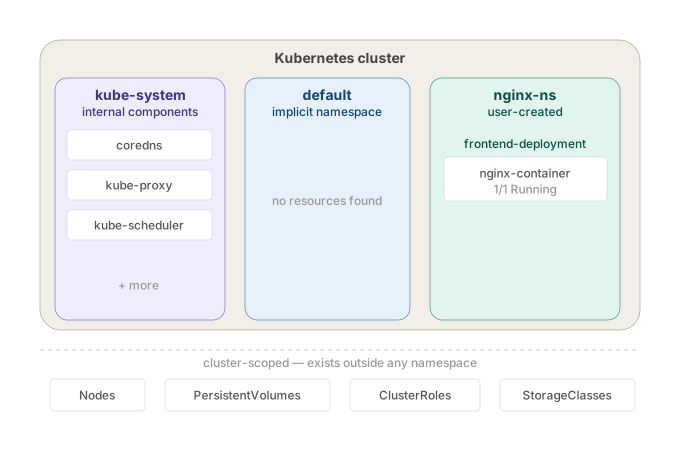
cluster
├── namespace: default       ← where everything lands if you don't specify
├── namespace: kube-system   ← Kubernetes internal components
└── namespace: nginx-ns      ← doesn't exist until you create it

It does not isolate network traffic. A pod in nginx-ns can reach a pod in default by IP with no restriction. Pods from every namespace land on the same nodes. There's no kernel-level separation of any kind. It's a naming boundary, not a network or compute boundary.

It means namespaces are purely organisational. Kubernetes doesn't build any walls between them at the infrastructure level.

Network: Two pods in different namespaces can talk to each other directly by pod IP. No firewall, no routing rule, nothing blocking it. The namespace label on the pod makes zero difference to how packets flow.

Nodes: You have 3 nodes in your cluster. A pod from kube-system and a pod from nginx-ns can both end up scheduled on node01. The scheduler doesn't segregate by namespace.

Kernel: Container isolation (namespaces in the Linux sense — pid, net, mount) happens at the container runtime level, not the Kubernetes namespace level. A Kubernetes namespace does nothing to the underlying Linux process isolation.

So if someone tells you "put this in a separate namespace for security" — that's meaningless on its own. The namespace just stops name collisions. It doesn't stop traffic, it doesn't stop resource contention, it doesn't sandbox anything. To actually isolate traffic between namespaces you need NetworkPolicies on top.


Why Kubernetes Won't Create It Automatically

Intentional. Kubernetes has no way to know if nginx-ns in your manifest is:

  • a namespace you meant to create
  • a typo (nginx-n instead of nginx-ns)
  • a namespace that should already exist from a previous step

Auto-creating it would silently mask config mistakes. It fails loudly instead. If you're deploying into a namespace, that namespace is infrastructure — it should already exist.


The Fix

k create ns nginx-ns
k apply -f frontend-deployment.yaml

Or declaratively:

apiVersion: v1
kind: Namespace
metadata:
  name: nginx-ns

Apply the namespace file first, then the deployment. Namespace as code — that's the production pattern.


Querying Across Namespaces

k get pods                 # default namespace only
k get pods -n nginx-ns     # specific namespace
k get pods -A              # all namespaces

If you forget -n and your pod isn't in default, you'll get No resources found — looks like the pod doesn't exist. It does. Wrong namespace.


Setting a Default Namespace

k config set-context --current --namespace=nginx-ns

All kubectl commands now target nginx-ns without -n. Useful during exam tasks scoped to one namespace. Reset it when done.


The Takeaway

Namespaces don't create themselves. The NotFound error isn't about your deployment — it's about missing infrastructure the deployment depends on. Namespace first, resources second.