CKA road trip - PV, PVC and Pod
I've been working through Kubernetes storage labs and found the documentation sparse. Here's what every line actually does and how the three files connect to each other.
The Three Files
PersistentVolume (my-pv-cka.yml)
apiVersion: v1
kind: PersistentVolume
metadata:
  name: my-pv-cka
spec:
  capacity:
    storage: 100Mi
  volumeMode: Filesystem
  accessModes:
    - ReadWriteOnce
  storageClassName: standard
  hostPath:
    path: /mnt/data
apiVersion: v1 — PersistentVolume is a core Kubernetes resource, lives in the v1 API group.
kind: PersistentVolume — tells Kubernetes this is a PV, not a pod or service.
name: my-pv-cka — the name used to reference this PV. The PVC will point to this exact name.
capacity.storage: 100Mi — how much storage this PV offers. A PVC requesting from this PV cannot exceed this amount.
volumeMode: Filesystem — the storage will be presented as a filesystem (directories and files). The alternative is Block which presents raw block device — rarely needed.
accessModes: ReadWriteOnce — only one node can mount this volume at a time for reading and writing. Other options are ReadOnlyMany (many nodes, read only) and ReadWriteMany (many nodes, read and write — requires specific storage backends).
storageClassName: standard — the label that links this PV to a StorageClass. The PVC must use the same label to match. Think of it as a category name.
hostPath.path: /mnt/data — the actual directory on the node where data is stored. This is a lab setup — in production this would be a cloud disk reference instead.
PersistentVolumeClaim (my-pvc-cka.yml)
apiVersion: v1
kind: PersistentVolumeClaim
metadata:
  name: my-pvc-cka
spec:
  accessModes:
    - ReadWriteOnce
  volumeMode: Filesystem
  resources:
    requests:
      storage: 100Mi
  storageClassName: standard
  volumeName: my-pv-cka
name: my-pvc-cka — the name the pod will reference when claiming this storage.
accessModes: ReadWriteOnce — must match the PV. Kubernetes won't bind a PVC to a PV if the access modes are incompatible.
volumeMode: Filesystem — must match the PV.
resources.requests.storage: 100Mi — how much storage I'm requesting. Must be equal to or less than the PV's capacity. I made a mistake here — the task said less than 100Mi but I requested exactly 100Mi. Should have been 50Mi or 80Mi.
storageClassName: standard — must match the PV's storageClassName. This is how Kubernetes knows which PVs are eligible to satisfy this claim.
volumeName: my-pv-cka — explicitly targets this specific PV by name. Without this, Kubernetes would find any available PV that matches the storageClassName, accessModes and capacity. In production I'd leave this out and let Kubernetes match automatically.
Pod (pod.yml)
apiVersion: v1
kind: Pod
metadata:
  labels:
    run: my-pod-cka
  name: my-pod-cka
spec:
  containers:
  - image: nginx
    name: my-pod-cka
    resources: {}
    volumeMounts:
      - mountPath: "/var/www/html"
        name: my-pv-cka
  dnsPolicy: ClusterFirst
  restartPolicy: Always
  volumes:
    - name: my-pv-cka
      persistentVolumeClaim:
        claimName: my-pvc-cka
image: nginx — the container image to run.
volumeMounts — tells this container which volumes to use and where to see them inside itself.
mountPath: /var/www/html — where inside the container the storage appears. The nginx container will serve files from here.
name: my-pv-cka — this name links the volumeMount to the volume defined below. Must match exactly.
volumes — defined at pod level, outside containers. Declares what storage the pod has access to.
name: my-pv-cka — the name containers use to reference this volume in their volumeMounts.
persistentVolumeClaim.claimName: my-pvc-cka — tells Kubernetes to use the PVC named my-pvc-cka as the source for this volume. This is how the pod connects to the storage chain. Never use hostPath here — the pod shouldn't know or care where the storage physically lives. That's the PV's job.
How They Connect
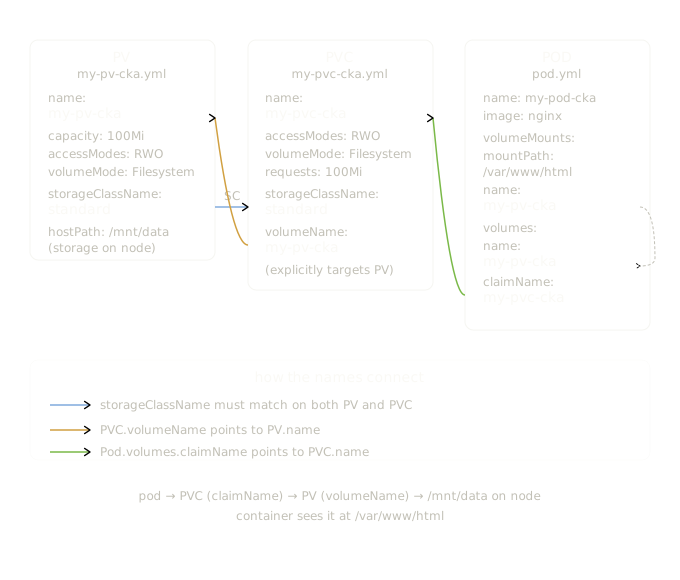
The three files are linked by three name references:
pod.volumes.persistentVolumeClaim.claimName: my-pvc-cka
                    ↓
        PVC metadata.name: my-pvc-cka
                    ↓
        PVC spec.volumeName: my-pv-cka
                    ↓
        PV metadata.name: my-pv-cka
                    ↓
        PV spec.hostPath.path: /mnt/data (on the node)
And the storageClassName ties PV and PVC together as a category match:
One-Line Summary Per File
PV = here's a real piece of storage, this is where it lives on the node, this is how big it is.
PVC = I need storage with these specs, find me a matching PV and give it to me.
Pod = I want to use that PVC, mount it inside my container at this path.