CKA road trip - Kubernetes Volumes vs VolumeMounts
If you've looked at a Kubernetes pod spec and wondered why storage is defined in two separate places, you're not alone. The split between volumes and volumeMounts trips up a lot of people. Here's what's actually going on.
The USB Drive Analogy
Think of it like this:
volumes= the USB drive itselfvolumeMounts= plugging that USB into a specific port, at a specific location
A volume is the storage — it exists at the pod level, independent of any single container. A volumeMount is how a specific container accesses that storage, at a specific path inside itself.
Where Each One Lives in the YAML
This is important: they live in different places in the pod spec.
volumes is defined at pod level, outside the containers list:
volumeMounts is defined inside each container that needs access:
spec:
  containers:
  - name: nginx-container
    image: nginx
    volumeMounts:
    - name: shared-storage
      mountPath: /var/www/html

  - name: sidecar-container
    image: busybox
    volumeMounts:
    - name: shared-storage
      mountPath: /var/www/shared
      readOnly: true
The name field is the link between the two. volumes declares it, volumeMounts references it by that exact same name.
The Full Storage Chain
When you use a PersistentVolume (PV) and PersistentVolumeClaim (PVC), the full chain looks like this:
PV (real disk on the node)
    ↓
PVC (request/claim for that storage)
    ↓
volume (named reference inside the pod spec)
    ↓
volumeMount (path inside each container)
In a real cluster, the PV might be an actual directory on a node:
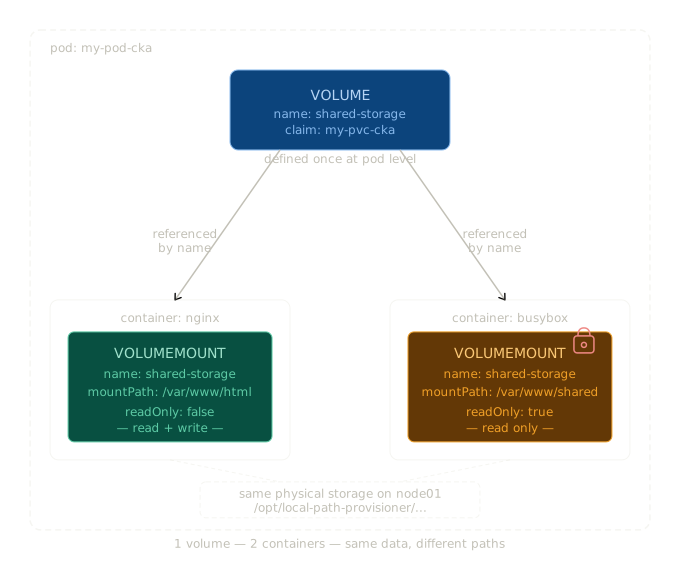
Both containers — nginx and busybox — are reading and writing to that same physical directory on the node. They just see it at different paths inside themselves:
- nginx sees it at
/var/www/html - busybox sees it at
/var/www/shared
Same data. Two different windows into the same storage. If nginx writes a file to /var/www/html/index.html, busybox can read it at /var/www/shared/index.html. Same file.
Why Are They Separate?
Because volumes need to exist independently of any single container.
If volumes were defined inside a container's spec, they'd be tied to that container's lifecycle. If the container crashed and restarted, the volume definition would go with it. By defining volumes at the pod level, the storage exists as long as the pod exists — regardless of what individual containers are doing.
It also allows multiple containers to share the same volume, which is a common pattern for sidecars (logging agents, config watchers, etc.) that need access to the same files as the main application container.
A Real Example — Nginx + Sidecar
Here's a complete pod spec with two containers sharing a volume. The sidecar has read-only access:
apiVersion: v1
kind: Pod
metadata:
  name: my-pod-cka
spec:
  containers:
  - name: nginx-container
    image: nginx
    volumeMounts:
    - name: shared-storage
      mountPath: /var/www/html       # nginx reads/writes here

  - name: sidecar-container
    image: busybox
    command: ["tail", "-f", "/dev/null"]
    volumeMounts:
    - name: shared-storage
      mountPath: /var/www/shared     # sidecar reads from here
      readOnly: true                 # read-only access

  volumes:
  - name: shared-storage
    persistentVolumeClaim:
      claimName: my-pvc-cka          # points to the PVC
Notice volumes is at the bottom, at pod level — not nested inside either container.
Quick Reference
volumes |
volumeMounts |
|
|---|---|---|
| Where | Pod level (under spec) |
Container level (inside each container) |
| What | Declares the storage and where it comes from | Declares where to mount it inside the container |
| How many | Once per volume | Once per container that needs it |
| Link | Sets the name |
References that name |
The One-Line Summary
volumes = what storage exists.
volumeMounts = who can see it, and where.