Skip to content

Troubleshooting

CKA Road Trip: Kubernetes Health Endpoints

Every major Kubernetes component exposes HTTP endpoints you can curl to check if it's alive. Useful when kubectl isn't working and you need to verify what's actually running.


The Endpoints

# apiserver
curl -k https://localhost:6443/healthz
curl -k https://localhost:6443/livez
curl -k https://localhost:6443/readyz
curl -k https://localhost:6443/readyz?verbose   # shows each check by name

# kubelet
curl -k https://localhost:10250/healthz

# scheduler
curl -k https://localhost:10259/healthz

# controller-manager
curl -k https://localhost:10257/healthz

# etcd — needs certs
curl -k https://localhost:2379/health \
  --cert /etc/kubernetes/pki/etcd/server.crt \
  --key /etc/kubernetes/pki/etcd/server.key \
  --cacert /etc/kubernetes/pki/etcd/ca.crt

All return ok when healthy.

/readyz?verbose is the most useful — shows each individual check:

[+] ping ok
[+] etcd ok
[+] poststarthook/start-informers ok
[-] some-check failed   ← tells you exactly what's wrong

Where to Run These From

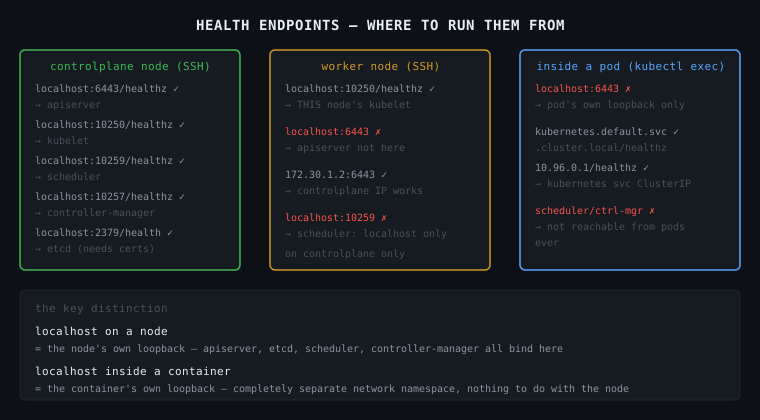
This is the part that trips people up. localhost means different things depending on where you are.

From the controlplane node (SSH'd in)

You are on the Linux host. localhost here is the node itself.

ssh controlplane

curl -k https://localhost:6443/healthz      # reaches apiserver ✓
curl -k https://localhost:10250/healthz     # reaches kubelet ✓
curl -k https://localhost:10259/healthz     # reaches scheduler ✓
curl -k https://localhost:10257/healthz     # reaches controller-manager ✓
curl -k https://localhost:2379/health ...   # reaches etcd ✓

All components run on the controlplane node, so localhost works for all of them.

From a worker node (SSH'd in)

You are on a different Linux host. The apiserver, etcd, scheduler, controller-manager are NOT here.

ssh node01

curl -k https://localhost:10250/healthz     # reaches THIS node's kubelet ✓
curl -k https://localhost:6443/healthz      # FAILS — apiserver not on this node ✗
curl -k https://172.30.1.2:6443/healthz    # works — using controlplane IP ✓

From inside a pod (kubectl exec)

This is the most confusing one. When you kubectl exec into a pod, you are inside a container. That container has its own network namespace — its own localhost, its own loopback. It is completely separate from the node's network.

kubectl exec -it some-pod -- /bin/sh

# inside the container:
curl localhost:6443       # FAILS — localhost here is the container, not the node
curl localhost:10250      # FAILS — same reason

# to reach the apiserver from inside a container:
curl -k https://kubernetes.default.svc.cluster.local/healthz   # ✓
curl -k https://10.96.0.1/healthz                               # ✓ (kubernetes service ClusterIP)

# scheduler and controller-manager — NOT reachable from pods at all
# they only bind to localhost on the controlplane node, intentionally

Why scheduler and controller-manager are localhost-only

They don't need to accept connections from anything except the apiserver, and the apiserver talks to them on the same node. Binding to an external interface would expose them unnecessarily. So they listen on 127.0.0.1 only — unreachable from pods or other nodes.


The Mental Model

controlplane node
  127.0.0.1:6443    ← apiserver    (also on node IP — reachable from anywhere)
  127.0.0.1:10250   ← kubelet      (also on node IP)
  127.0.0.1:10259   ← scheduler    (localhost ONLY)
  127.0.0.1:10257   ← controller-manager (localhost ONLY)
  127.0.0.1:2379    ← etcd         (localhost ONLY)

worker node
  127.0.0.1:10250   ← kubelet (its own kubelet)

pod/container
  127.0.0.1         ← the container itself, nothing else
  10.96.0.1         ← kubernetes service → routes to apiserver

The key distinction: localhost inside a container is the container's own loopback. It has nothing to do with the node it's running on.
697

CKA Road Trip: Every Path That Matters in Kubernetes

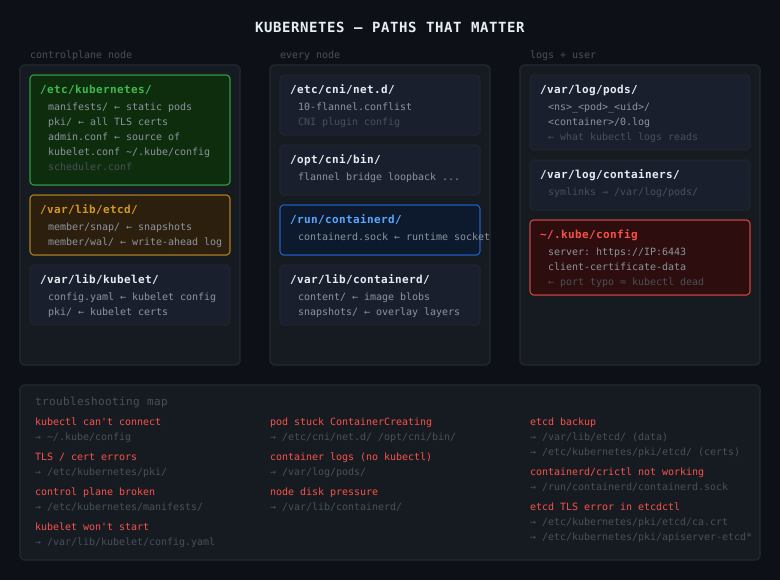
Kubernetes isn't one thing in one place. It's a set of components, each with their own config files, certs, and data directories spread across the filesystem. When something breaks, knowing where to look is half the fix.


/etc/kubernetes/

The main Kubernetes config directory. Lives on the controlplane node.

/etc/kubernetes/
  manifests/                  # static pod manifests — control plane lives here
    kube-apiserver.yaml
    kube-controller-manager.yaml
    kube-scheduler.yaml
    etcd.yaml
  pki/                        # all TLS certs and keys
    ca.crt / ca.key           # cluster CA
    apiserver.crt / apiserver.key
    apiserver-etcd-client.crt / .key
    apiserver-kubelet-client.crt / .key
    etcd/
      ca.crt
      server.crt / server.key
  kubelet.conf                # kubelet's kubeconfig
  controller-manager.conf
  scheduler.conf
  admin.conf                  # admin kubeconfig — source of ~/.kube/config

manifests/ — the kubelet watches this directory directly. No API server involved. Drop a yaml in, the pod starts. Edit it, the pod restarts. This is how the control plane bootstraps itself and why you fix broken control plane components by editing files here, not with kubectl.

pki/ — every TLS cert the cluster uses. apiserver cert, etcd client certs, kubelet client certs. When you see x509: certificate errors, the answer is in here.


~/.kube/config

kubectl's kubeconfig. Where kubectl gets the server address, port, and credentials.

clusters:
- cluster:
    server: https://172.30.1.2:6443   # ← port typo here = kubectl dead
    certificate-authority-data: ...
  name: kubernetes
users:
- name: kubernetes-admin
  user:
    client-certificate-data: ...
    client-key-data: ...

If kubectl can't connect, check this file first. The error message will tell you the URL it's trying — if the port looks wrong, it came from here.

cat ~/.kube/config | grep server

/var/lib/kubelet/

Kubelet runtime data. Lives on every node.

/var/lib/kubelet/
  config.yaml          # kubelet configuration — cgroup driver, eviction thresholds
  kubeconfig           # kubelet's auth to the apiserver
  pki/
    kubelet.crt / kubelet.key
    kubelet-client-current.pem

config.yaml — if the kubelet won't start, this is usually why. Malformed config, wrong cgroup driver, missing fields.

cat /var/lib/kubelet/config.yaml
journalctl -u kubelet -n 50 --no-pager

/var/lib/etcd/

etcd's data directory. The actual cluster database.

/var/lib/etcd/
  member/
    snap/      # snapshots
    wal/       # write-ahead log

You don't edit files here directly. You interact with etcd via etcdctl. But this is where the data lives — and this is what you're backing up when you run etcdctl snapshot save.

If this directory is corrupted or missing, the cluster loses all state.


/etc/cni/net.d/

CNI plugin configuration. Tells the container runtime which CNI plugin to use and how.

/etc/cni/net.d/
  10-flannel.conflist     # if using Flannel
  10-calico.conflist      # if using Calico
  05-cilium.conflist      # if using Cilium

If pods are stuck in ContainerCreating with network errors, check here. The CNI config might be missing or malformed.


/opt/cni/bin/

CNI plugin binaries. The actual executables that set up pod networking.

ls /opt/cni/bin/
# flannel  bridge  host-local  loopback  portmap  ...

If the CNI binary is missing, pods can't get IPs. The config in /etc/cni/net.d/ points at a binary that doesn't exist.


/var/log/pods/

Container logs on disk. Organised by namespace, pod name, pod UID, container name.

/var/log/pods/
  <namespace>_<pod-name>_<pod-uid>/
    <container-name>/
      0.log    # current log file
      1.log    # rotated

kubectl logs reads from here and strips the JSON wrapper. When kubectl isn't available — node issues, apiserver down — you can read logs directly:

cat /var/log/pods/kube-system_kube-apiserver-controlplane_*/kube-apiserver/0.log

/var/log/containers/

Symlinks to /var/log/pods/. Older tooling uses this path. Same data, different entrypoint.

ls /var/log/containers/
# kube-apiserver-controlplane_kube-system_kube-apiserver-abc123.log -> /var/log/pods/...

/run/containerd/

containerd's runtime socket. How kubectl exec, kubectl logs, and the kubelet talk to containerd.

/run/containerd/
  containerd.sock    # the Unix socket

If containerd is dead, this socket won't exist or won't respond. crictl and the kubelet both talk through here.

systemctl status containerd
crictl --runtime-endpoint unix:///run/containerd/containerd.sock ps

/var/lib/containerd/

containerd's data directory. Images and container layers live here.

/var/lib/containerd/
  io.containerd.content.v1.content/
    blobs/sha256/          # raw image layer blobs
  io.containerd.snapshots.v1.overlayfs/
    snapshots/             # unpacked OverlayFS layers
  io.containerd.metadata.v1.bolt/
    meta.db                # metadata database

If a node is running out of disk space, this directory is usually why. Image layers accumulate.

du -sh /var/lib/containerd/
crictl images    # see what's cached
crictl rmi --prune   # remove unused images

The Troubleshooting Map

kubectl can't connect
  → ~/.kube/config (wrong server, port typo)

control plane component broken
  → /etc/kubernetes/manifests/ (fix the static pod yaml)

TLS / cert errors
  → /etc/kubernetes/pki/

kubelet won't start
  → /var/lib/kubelet/config.yaml
  → journalctl -u kubelet

pod stuck in ContainerCreating
  → /etc/cni/net.d/ (CNI config)
  → /opt/cni/bin/ (CNI binary missing)

container logs when kubectl isn't working
  → /var/log/pods/

node disk pressure
  → /var/lib/containerd/ (image layer bloat)

etcd backup / restore
  → /var/lib/etcd/ (data lives here)
  → /etc/kubernetes/pki/etcd/ (certs for etcdctl)

697

CKA Road Trip: Node NotReady + etcd Backup

Two tasks, one exercise.


Part 1 — Node NotReady

k get nodes
# controlplane   NotReady
k describe node controlplane
# Conditions:
#   Ready   Unknown   NodeStatusUnknown   Kubelet stopped posting node status.

The condition message is the signal. Kubelet stopped posting node status means one thing — the kubelet process is dead.

ssh controlplane
systemctl status kubelet
# Active: inactive (dead)

systemctl start kubelet
systemctl status kubelet
# Active: active (running)

exit
k get nodes
# controlplane   Ready

The kubelet was stopped. Start it, node recovers.


Part 2 — etcd Backup

Verify etcd is running first:

k get pods -n kube-system | grep etcd
# etcd-controlplane   1/1   Running

Take the snapshot:

ETCDCTL_API=3 etcdctl \
  --endpoints=https://127.0.0.1:2379 \
  --cacert=/etc/kubernetes/pki/etcd/ca.crt \
  --cert=/etc/kubernetes/pki/apiserver-etcd-client.crt \
  --key=/etc/kubernetes/pki/apiserver-etcd-client.key \
  snapshot save /opt/cluster_backup.db > backup.txt 2>&1

The three certs are always required — etcd won't talk without mTLS. Find them at:

/etc/kubernetes/pki/etcd/ca.crt
/etc/kubernetes/pki/apiserver-etcd-client.crt
/etc/kubernetes/pki/apiserver-etcd-client.key

> backup.txt 2>&1 redirects both stdout and stderr to the file. Without the > before backup.txt etcdctl sees it as a second argument and throws snapshot save expects one argument.


The Diagnostic Chain

node NotReady
k describe node → "Kubelet stopped posting node status"
ssh into node
systemctl status kubelet → inactive
systemctl start kubelet
node Ready

Kubelet stopped posting node status is unambiguous. Go straight to the kubelet, don't waste time elsewhere.

CKA Road Trip: SSH Into a Node — Troubleshooting Commands

Once a node is NotReady, kubectl becomes limited. You SSH in and it's just Linux from there.


The Commands, In Order

# is the kubelet alive?
systemctl status kubelet

# is the container runtime alive?
systemctl status containerd

# kubelet logs — what's it complaining about?
journalctl -u kubelet -n 50 --no-pager

# disk space — is the node full?
df -h

# memory — is it under pressure?
free -m

# are containers actually running at the OS level?
crictl ps

# what does the kubelet config look like?
cat /var/lib/kubelet/config.yaml

# static pod manifests — anything broken here?
ls /etc/kubernetes/manifests/

What Each One Tells You

systemctl status kubelet — is the kubelet process running or dead. First thing to check, every time.

systemctl status containerd — is the container runtime up. If containerd is dead, no containers can start even if kubelet is fine.

journalctl -u kubelet -n 50 --no-pager — the last 50 kubelet log lines. This is where the actual error is. Typo in a binary name, missing config file, cert error — it'll be here.

df -h — disk pressure. A full disk kills the kubelet. Nodes with full disks go NotReady silently from kubectl's perspective.

free -m — memory pressure. Same idea — resource exhaustion shows as NotReady.

crictl ps — shows containers running at the containerd level, bypassing Kubernetes entirely. Useful when kubectl shows nothing but containers might still be running. Think of it as docker ps for the CRI layer.

cat /var/lib/kubelet/config.yaml — the kubelet's own config file. If it's malformed or missing, the kubelet won't start.

ls /etc/kubernetes/manifests/ — static pod manifests for control plane components. A broken yaml here means apiserver, etcd, scheduler, or controller-manager won't start.


The Pattern

The first two commands tell you if the key processes are up. journalctl tells you why if they're not. df and free rule out resource pressure. Everything else is digging deeper once you know the direction.

Fixing comes after. Troubleshoot first, understand what's broken, then fix it.

CKA Road Trip: UP-TO-DATE Was 0 — But Nothing Was Broken

The task said UP-TO-DATE should be 1. It was showing 0. I assumed something was broken and went the long way round. The issue was one field.


The Symptom

k get deploy stream-deployment
# NAME                READY   UP-TO-DATE   AVAILABLE   AGE
# stream-deployment   0/0     0            0           69s

Task: UP-TO-DATE is showing 0, it should be 1. Troubleshoot and fix.


What I Did (the Long Way)

k get deploy stream-deployment -o yaml > deploy.yml
vim deploy.yml          # changed replicas: 0 → 1
k delete deploy stream-deployment --force
k apply -f deploy.yml

It worked. But it was 4 steps, and the force delete is dangerous in prod — bypasses graceful termination. If the pod was doing anything, that's data loss risk.


What I Should Have Done

k scale deploy stream-deployment --replicas=1

One command. No file, no delete, no risk.

Or if editing more than just replicas:

k edit deploy stream-deployment

Live YAML in the editor. Change what you need, save, done. No delete needed — ever.


What UP-TO-DATE Actually Means

READY = running / desired. 0/0 means you asked for 0, you got 0. Not broken.

UP-TO-DATE = how many pods are running the latest pod template spec — latest image, env vars, config. Are your pods on the current version of the deployment?

UP-TO-DATE: 0 when replicas: 0 is correct math. Nothing to update. The actual issue was replicas: 0 in the spec. UP-TO-DATE was a red herring.


When UP-TO-DATE Actually Matters

k get deploy my-deploy
# NAME        READY   UP-TO-DATE   AVAILABLE
# my-deploy   3/3     1            3

3 pods running, only 1 on the new version. Rolling update in progress — the other 2 are still on the old template. That is the signal UP-TO-DATE is for. Not deployment health — rollout progress.


The Rule

READY left/right = reality vs desired. If they don't match, something is wrong.

UP-TO-DATE only means something when replicas > 0 and you have changed the pod template. When you see 0/0, check spec.replicas first.

k get deploy stream-deployment -o jsonpath='{.spec.replicas}'
# 0

Root cause in one shot.

CKA Road Trip: Pod Pending — Three PV/PVC Bugs

database-deployment pods stuck in Pending. The fix required three separate corrections before anything ran.


The Symptom

k get pods
# database-deployment-5bd4f5bc58-2gl9m   0/1   Pending   0   4s

k describe pod database-deployment-5bd4f5bc58-2gl9m
# FailedScheduling: pod has unbound immediate PersistentVolumeClaims

Pod never scheduled. No node assigned.

That message is generic — it's the scheduler saying the PVC isn't in Bound state. It doesn't tell you why. The scheduler's only job is placing pods on nodes — it sees an unbound PVC and stops there.

The actual reason lives one level deeper:

k describe pvc postgres-pvc
# Cannot bind to requested volume "postgres-pv": requested PV is too small
# Cannot bind to requested volume "postgres-pv": incompatible accessMode

The diagnostic chain when a pod is Pending with storage:

k describe pod   →  tells you WHAT (PVC unbound)
k describe pvc   →  tells you WHY (size / accessMode / name mismatch)

Always go to k describe pvc when you see that message. Pod describe will never give you the PV/PVC detail.


Bug 1 — Wrong PVC name in the deployment

The deployment referenced postgres-db-pvc. The actual PVC in the cluster was named postgres-pvc. Kubernetes couldn't find it.

k edit deploy database-deployment
# fix claimName: postgres-db-pvc → postgres-pvc

New pod created. Still Pending.


Bug 2 — PV too small

k describe pvc postgres-pvc
# Cannot bind to requested volume "postgres-pv": requested PV is too small

PVC requested 150Mi. PV capacity was 100Mi. A PVC cannot bind to a PV smaller than its request.

k edit pv postgres-pv
# change capacity.storage: 100Mi → 150Mi

Still Pending. One more issue.


Bug 3 — Access mode mismatch

k describe pvc postgres-pvc
# Cannot bind to requested volume "postgres-pv": incompatible accessMode

PVC was ReadWriteMany. PV was ReadWriteOnce. They must match exactly.

PVCs are mostly immutable — you can't edit accessModes on a live PVC:

k edit pvc postgres-pvc
# error: persistentvolumeclaims "postgres-pvc" is invalid

Only way out is delete and recreate:

k get pvc postgres-pvc -o yaml > pvc.yml
k delete pvc postgres-pvc --force
# edit pvc.yml: accessModes: ReadWriteMany → ReadWriteOnce
k apply -f pvc.yml

Forcing the pods to pick up the fix

Editing the PV or recreating the PVC doesn't restart the pods. The deployment has no way of knowing something changed. Force new pods with:

k rollout restart deploy database-deployment

This patches the deployment with a restart timestamp, triggering a rolling update — old pods terminate, new pods come up and attempt the mount against the now-bound PVC.

k get pods
# database-deployment-645c9cf4f-txwpq   1/1   Running   0   22s

The binding rules

For a PVC to bind to a PV, three things must align:

storageClassName   ← same on both
capacity           ← PV must be >= PVC request  
accessModes        ← must match exactly

All three were wrong here. Check them first whenever a PVC is stuck in Pending.


The Takeaway

k describe pvc gives you the exact reason binding failed — not k describe pod. Fix the PV if possible, delete and recreate the PVC if the field is immutable, then rollout restart to force pods to remount.

CKA Road Trip: Three Things Called "name" in a ConfigMap Volume Mount

This tripped me up. The same word name appears three times in the same yaml block and they all mean different things.


The Yaml

spec:
  containers:
  - name: nginx-container
    volumeMounts:
    - name: nginx-config          # (A) internal label — links to volumes below
      mountPath: /etc/nginx/nginx.conf

  volumes:
  - name: nginx-config            # (A) same internal label — must match above
    configMap:
      name: nginx-configmap       # (B) the actual ConfigMap object in Kubernetes

What Each One Is

(A) nginx-config — appears twice, in volumeMounts and volumes. This is just an internal label you make up. It's the link between the two blocks. Could be called foo, my-vol, whatever — doesn't matter as long as both sides match each other.

(B) nginx-configmap — this is the actual Kubernetes object name. What you see when you run k get cm. This must match exactly or the pod fails with:

MountVolume.SetUp failed: configmap "nginx-configuration" not found

To Make It Clearer

Rename the internal label to something obviously different:

spec:
  containers:
  - name: nginx-container
    volumeMounts:
    - name: my-internal-label           # (A) made up name
      mountPath: /etc/nginx/nginx.conf

  volumes:
  - name: my-internal-label             # (A) must match above
    configMap:
      name: nginx-configmap             # (B) real ConfigMap object name

Identical result. The internal label is just plumbing — it exists only to connect volumeMounts to volumes. The ConfigMap name is what actually matters.


The One Rule

volumes.name and volumeMounts.name must match each other — they're the same internal label.

configMap.name must match the actual ConfigMap object in the cluster — check with k get cm.

They don't have to look similar. The exercise used nginx-config for the label and nginx-configmap for the object which made them look like the same thing. They're not.

CKA Road Trip: CronJob Keeps Failing — Two Bugs, One Exercise

A cronjob running curl kept erroring with exit code 6. Fixed it, but only after realising I'd forgotten how services actually work. Two bugs, both fundamental.


The Symptom

k get pods
# cka-cronjob-xxx   0/1   Error   5   4m
# cka-pod           1/1   Running 0   4m

k logs cka-cronjob-xxx
# curl: (6) Could not resolve host: cka-pod

Exit code 6 in curl = DNS resolution failed. The host doesn't exist or can't be resolved.


How Services Actually Work — The Part I Forgot

A service doesn't know about pods by name. It finds pods using label selectors. The service defines a selector like app=cka-pod, Kubernetes finds all pods with that label, and builds an Endpoints list from their IPs. Traffic to the ClusterIP gets routed to those endpoints.

service selector: app=cka-pod
find pods with label app=cka-pod
build Endpoints list (pod IPs)
ClusterIP routes traffic there

If no pods have matching labels → Endpoints: <none> → traffic goes nowhere.


DNS — Pods vs Services

Every service gets a DNS entry automatically:

<service-name>.<namespace>.svc.cluster.local

Within the same namespace, just the service name works:

curl cka-service   # works — service has a DNS entry
curl cka-pod       # fails — pod names don't get DNS entries

Pods don't get DNS entries by default. Only services do. Curling a pod name directly will always fail with exit code 6.


The Two Bugs

Bug 1 — pod missing labels

k describe pod cka-pod
# Labels: <none>    ← nothing

The service selector was app=cka-pod but the pod had no labels. So:

k describe svc cka-service
# Endpoints:   ← empty, selector matches nothing

The service existed. The pod existed. But they weren't connected because the label was missing.

Bug 2 — cronjob curling the wrong hostname

k describe pod cka-cronjob-xxx
# Command: curl cka-pod   ← wrong

cka-pod is a pod name, not a DNS hostname. Should be cka-service.


The Fix

# fix 1 — add the missing label to the pod
k label pod cka-pod app=cka-pod

# verify the service now has endpoints
k get endpoints cka-service
# NAME          ENDPOINTS           AGE
# cka-service   192.168.1.184:80    4m

# fix 2 — edit the cronjob to curl the service name
k edit cronjob cka-cronjob
# change: curl cka-pod
# to:     curl cka-service

Next cronjob run completes successfully.


How to Diagnose a Broken Service

# 1. check what the service is selecting
k describe svc cka-service
# Selector: app=cka-pod

# 2. check if any pods match that selector
k get pods -l app=cka-pod
# No resources found = label missing on pod

# 3. check endpoints directly
k get endpoints cka-service
# Endpoints: <none> = selector matches nothing

# 4. check pod labels
k describe pod cka-pod | grep Labels
# Labels: <none> = add the label

Endpoints: <none> on a service is the clearest signal the selector isn't matching any pods.


The Two Things Worth Remembering

Services find pods via labels, not names. No matching label = no endpoints = traffic goes nowhere. Always check k get endpoints <service> when a service isn't working.

curl the service name, not the pod name. Pod names don't resolve as DNS. Only services do.

CKA Road Trip: Deployment Has 0 Pods — How to Actually Diagnose It

After fixing a controller manager crash, I assumed 0 pods always meant a broken controller manager. Wrong. Events: <none> is the specific signal. Here's the full diagnostic flow.


Not Always the Controller Manager

0 pods on a deployment has multiple causes. The controller manager is one of them — but not the only one. Getting the diagnosis right means reading the signals in order.


Step 1 — Check the Obvious First

k get deploy video-app -o yaml | grep -E 'replicas|paused'

Replicas set to 0:

spec:
  replicas: 0   # someone scaled it down
Not a bug. Fix: k scale deploy video-app --replicas=2

Deployment paused:

spec:
  paused: true   # deployment is paused, won't create pods
Fix: k rollout resume deploy video-app


Step 2 — Read the Events

k describe deploy video-app
# look at the Events section at the bottom

Events: <none> with replicas > 0 and not paused: Nobody is acting on the deployment. The controller manager isn't running. Go check it:

k get pods -n kube-system | grep controller-manager

Events present — scheduling failure:

FailedScheduling — 0/2 nodes available: insufficient memory
Pod objects were created but couldn't be scheduled. Node issue, resource issue, taint/toleration mismatch.

Events present — quota exceeded:

FailedCreate — exceeded quota: pods, requested: 2, used: 10, limited: 10
ResourceQuota in the namespace is blocking pod creation.

Events present — image pull failure:

Failed to pull image "nginx:wrongtag": not found
Pod was created and scheduled but container can't start.


The Diagnostic Flow

deployment has 0 pods
check replicas field — is it 0?
        ↓ no
check paused field — is it true?
        ↓ no
k describe deploy → read Events
Events: <none>
→ controller manager down
→ k get pods -n kube-system | grep controller-manager

Events: FailedScheduling
→ node/resource/taint issue
→ k describe pod, k get nodes

Events: FailedCreate
→ quota exceeded
→ k get resourcequota -n <namespace>

Events: image pull error
→ wrong image tag or missing registry credentials
→ k describe pod → check image name

The One Signal Worth Memorising

Events: <none> on a deployment with replicas > 0 and not paused = controller manager is the problem. Every other cause leaves events. Silence is the specific fingerprint of a dead controller manager.

Everything else — read the events. They tell you exactly what went wrong.

CKA Road Trip: Deployment Stuck at 0 Replicas — The Silent Killer

A deployment with 2 desired replicas, 0 pods created, and not a single event. No errors. Just silence. That silence is the clue.


The Symptom

k get deploy video-app
# NAME        READY   UP-TO-DATE   AVAILABLE   AGE
# video-app   0/2     0            0           53s

k describe deploy video-app
# Replicas: 2 desired | 0 updated | 0 total | 0 available
# Events: <none>

No events at all. That's not a scheduling failure, not an image pull error — those would show events. Complete silence means nobody is even trying to create the pods.


The Chain

When you create a deployment, Kubernetes doesn't just magically make pods appear. The controller manager is the component that watches deployments and acts on them. It sees "desired: 2, actual: 0" and creates the pod objects. Without it, the deployment just sits there with nobody home to action it.

So Events: <none> on a deployment = controller manager isn't running.

k get pods -n kube-system
# kube-controller-manager-controlplane   0/1   CrashLoopBackOff   5    3m

There it is. Then:

k describe pod kube-controller-manager-controlplane -n kube-system
# exec: "kube-controller-manegaar": executable file not found in $PATH

Typo. kube-controller-manegaar instead of kube-controller-manager. One transposed letter, entire cluster stops creating pods.


Why You Can't Fix It With kubectl

The controller manager is a static pod — it's managed by the kubelet directly from a file on disk, not through the API server. Editing it via kubectl edit just modifies a read-only mirror copy that the kubelet immediately overwrites.

The source of truth is the manifest file:

vim /etc/kubernetes/manifests/kube-controller-manager.yaml
# fix: kube-controller-manegaar → kube-controller-manager

Save it. The kubelet watches that directory, detects the change, and restarts the pod automatically. No kubectl apply needed.

k get pods -n kube-system
# kube-controller-manager-controlplane   1/1   Running   0   30s

k get pods
# NAME                        READY   STATUS    RESTARTS   AGE
# video-app-xxx               1/1     Running   0          10s
# video-app-yyy               1/1     Running   0          10s

The Troubleshooting Chain

deployment 0 replicas, Events: <none>
        ↓ nobody is acting on the deployment
        ↓ k get pods -n kube-system
        ↓ kube-controller-manager CrashLoopBackOff
        ↓ k describe pod → typo in binary name
        ↓ fix /etc/kubernetes/manifests/kube-controller-manager.yaml
        ↓ kubelet restarts it automatically
        ↓ pods created, deployment Running

The Key Signal

Events: <none> on a deployment that has 0 pods is not normal. A scheduling failure has events. An image pull failure has events. Zero events means the controller manager never ran. That's your first check — not the deployment, not the pods, the controller manager.