How to Troubleshoot a SIP Call Failure with Wireshark
Tools needed: - Wireshark - A PCAP file of the failed call - Provider's SIP proxy IP list (for Telnyx: sip.telnyx.com)
1. View the SIP Flow
Open the PCAP in Wireshark, then:
This gives you a ladder diagram — every SIP message in order, with direction, timestamp, and message type. Start here before touching individual packets.
To filter the packet list to SIP only:
2. Identify the Parties
Two IPs will appear. To identify which belongs to your provider, cross-reference against their published SIP proxy list.
For Telnyx:
| Region | Primary IP | Secondary IP |
|---|---|---|
| US | 192.76.120.10 | 64.16.250.10 |
| Europe | 185.246.41.140 | 185.246.41.141 |
| Australia | 103.115.244.145 | 103.115.244.146 |
| Canada | 192.76.120.31 | 64.16.250.13 |
The client IP is confirmed by packet direction — the client initiates the call, so their IP appears as Src in the first INVITE.
3. Read the INVITE Headers
Open the first INVITE packet and expand the SIP section. The two headers that matter most:
To — the number being called:
From — the caller ID being presented:
If the From header contains a username instead of a phone number, that is your problem.
4. Read the Failure Response
A normal successful call flow:
A rejected call terminates early with a 4xx response. Read the response code and the reason string — they tell you exactly why.
Common ones:
| Code | Reason | Meaning |
|---|---|---|
| 401 | Unauthorized | Wrong credentials |
| 403 | Forbidden | Request understood but rejected — read the reason string |
| 404 | Not Found | Number doesn't exist |
| 486 | Busy Here | Destination is busy |
| 487 | Request Terminated | Call was cancelled |
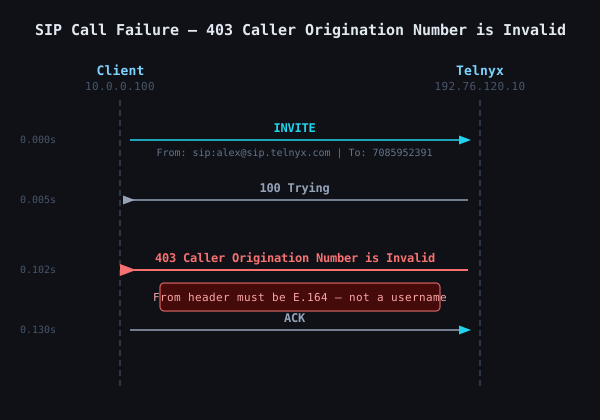
Example failure flow:
403 with "Caller Origination Number is Invalid" means the From header contains a value that isn't a valid E.164 phone number. Carriers require a real number in the From header to comply with STIR/SHAKEN caller ID validation. A username fails that check.
5. Fix the Caller ID
The caller ID is not a softphone setting — it is controlled at the SIP trunk level. In Telnyx:
Real-Time Communications → Voice → SIP Trunking
→ Select connection → Edit → Outbound tab → Caller ID Override
Set it to a number you own on Telnyx, or an external number you have verified. This overrides whatever the softphone sends in the From header.
Key Points
- Always start with the flow diagram — it shows you where the call died before you dig into packets
- 403 is not always an auth issue — read the reason string, it's specific
- The From header carries the caller ID — it must be E.164 format (
+12125551234), not a username - Caller ID is set at the trunk, not the softphone — the actual outbound caller ID is overridden at the carrier level
- Cross-reference IPs against the provider's published list to orient yourself fast in any unfamiliar capture