CKA Road Trip: Kubernetes Secrets — Env Var or File?
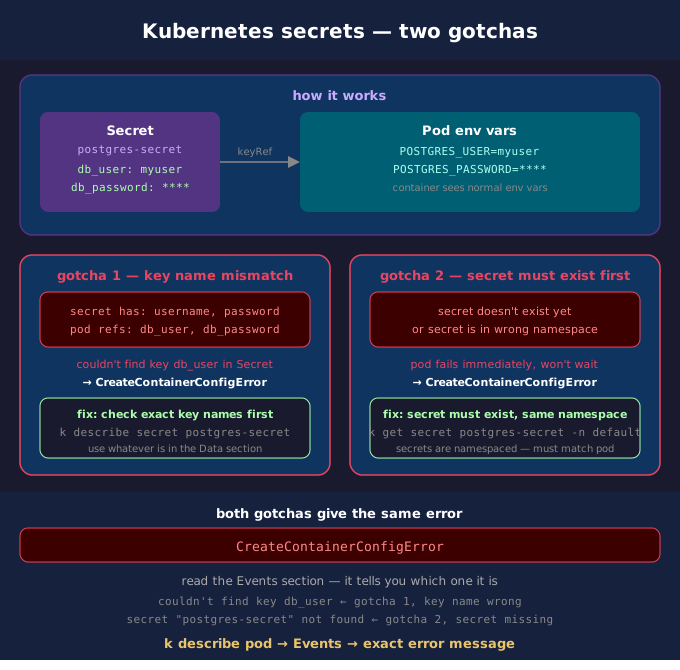
The pod wouldn't start. CreateContainerConfigError. The secret existed. The fix was one word — the key name in the deployment didn't match the key name in the secret.
What a Secret Is
A Secret stores sensitive data — passwords, tokens, keys. Base64 encoded, not encrypted by default. You reference it in a pod instead of hardcoding values in the yaml.
kubectl create secret generic postgres-secret \
  --from-literal=db_user=myuser \
  --from-literal=db_password=mypassword

k describe secret postgres-secret
# Data
# ====
# db_password:  10 bytes
# db_user:      6 bytes
Two Ways to Use a Secret in a Pod
Option 1 — Environment variable
Kubernetes reads the secret, extracts the value, and injects it as an env var before the container starts. The container has no idea it came from a secret.
spec:
  containers:
  - name: postgres-container
    image: postgres:latest
    env:                              # inside the container spec
    - name: POSTGRES_USER            # what the env var is called inside the container
      valueFrom:
        secretKeyRef:
          name: postgres-secret      # the Secret object name
          key: db_user               # the key inside that secret
    - name: POSTGRES_PASSWORD
      valueFrom:
        secretKeyRef:
          name: postgres-secret
          key: db_password
Inside the container:
Option 2 — File mount
volumeMounts is inside the container spec — it says where to see the files. volumes is at pod spec level outside containers — it declares what the storage is. The name field links the two together.
spec:
  containers:
  - name: postgres-container
    image: postgres:latest
    volumeMounts:                     # inside container spec
    - name: secret-vol                # references the volume below
      mountPath: /etc/secrets         # where files appear inside the container
  volumes:                            # pod spec level, outside containers
  - name: secret-vol                  # matches the name in volumeMounts
    secret:
      secretName: postgres-secret     # the Secret object
Inside the container:
This puts the secret values as files on disk inside the container:
The container reads the files instead of env vars. Same secret, different delivery mechanism.
What Broke in This Exercise
The secret had keys username and password. The deployment was referencing db_user and db_password.
Key name in the pod spec didn't match key name in the secret. Fix: always check the exact key names with k describe secret before writing the pod spec. Use whatever is in the Data section, exactly as written.
Env Var vs File — When to Use Which
Use env var when: - The app reads configuration from environment variables (most 12-factor apps) - Simple values like passwords, usernames, API keys - You don't control the app code — it already expects env vars (postgres, redis, etc.)
Use file mount when:
- The app reads config from a file path (TLS certificates, kubeconfig, SSH keys)
- The secret is large or structured (a full config file, a JSON credentials file)
- You need the app to pick up secret rotation without restarting — file mounts update automatically, env vars don't