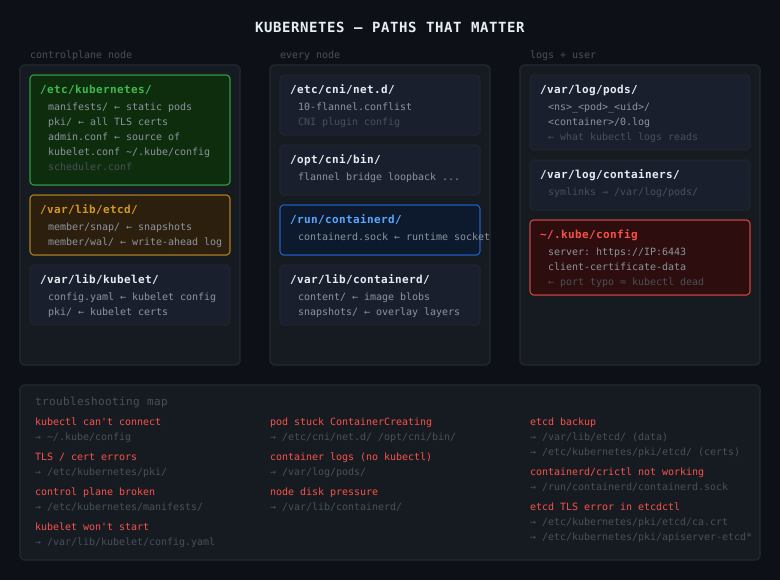
CKA Road Trip: Every Path That Matters in Kubernetes
Kubernetes isn't one thing in one place. It's a set of components, each with their own config files, certs, and data directories spread across the filesystem. When something breaks, knowing where to look is half the fix.
/etc/kubernetes/
The main Kubernetes config directory. Lives on the controlplane node.
/etc/kubernetes/
  manifests/                  # static pod manifests — control plane lives here
    kube-apiserver.yaml
    kube-controller-manager.yaml
    kube-scheduler.yaml
    etcd.yaml
  pki/                        # all TLS certs and keys
    ca.crt / ca.key           # cluster CA
    apiserver.crt / apiserver.key
    apiserver-etcd-client.crt / .key
    apiserver-kubelet-client.crt / .key
    etcd/
      ca.crt
      server.crt / server.key
  kubelet.conf                # kubelet's kubeconfig
  controller-manager.conf
  scheduler.conf
  admin.conf                  # admin kubeconfig — source of ~/.kube/config
manifests/ — the kubelet watches this directory directly. No API server involved. Drop a yaml in, the pod starts. Edit it, the pod restarts. This is how the control plane bootstraps itself and why you fix broken control plane components by editing files here, not with kubectl.
pki/ — every TLS cert the cluster uses. apiserver cert, etcd client certs, kubelet client certs. When you see x509: certificate errors, the answer is in here.
~/.kube/config
kubectl's kubeconfig. Where kubectl gets the server address, port, and credentials.
clusters:
- cluster:
    server: https://172.30.1.2:6443   # ← port typo here = kubectl dead
    certificate-authority-data: ...
  name: kubernetes
users:
- name: kubernetes-admin
  user:
    client-certificate-data: ...
    client-key-data: ...
If kubectl can't connect, check this file first. The error message will tell you the URL it's trying — if the port looks wrong, it came from here.
/var/lib/kubelet/
Kubelet runtime data. Lives on every node.
/var/lib/kubelet/
  config.yaml          # kubelet configuration — cgroup driver, eviction thresholds
  kubeconfig           # kubelet's auth to the apiserver
  pki/
    kubelet.crt / kubelet.key
    kubelet-client-current.pem
config.yaml — if the kubelet won't start, this is usually why. Malformed config, wrong cgroup driver, missing fields.
/var/lib/etcd/
etcd's data directory. The actual cluster database.
You don't edit files here directly. You interact with etcd via etcdctl. But this is where the data lives — and this is what you're backing up when you run etcdctl snapshot save.
If this directory is corrupted or missing, the cluster loses all state.
/etc/cni/net.d/
CNI plugin configuration. Tells the container runtime which CNI plugin to use and how.
/etc/cni/net.d/
  10-flannel.conflist     # if using Flannel
  10-calico.conflist      # if using Calico
  05-cilium.conflist      # if using Cilium
If pods are stuck in ContainerCreating with network errors, check here. The CNI config might be missing or malformed.
/opt/cni/bin/
CNI plugin binaries. The actual executables that set up pod networking.
If the CNI binary is missing, pods can't get IPs. The config in /etc/cni/net.d/ points at a binary that doesn't exist.
/var/log/pods/
Container logs on disk. Organised by namespace, pod name, pod UID, container name.
/var/log/pods/
  <namespace>_<pod-name>_<pod-uid>/
    <container-name>/
      0.log    # current log file
      1.log    # rotated
kubectl logs reads from here and strips the JSON wrapper. When kubectl isn't available — node issues, apiserver down — you can read logs directly:
/var/log/containers/
Symlinks to /var/log/pods/. Older tooling uses this path. Same data, different entrypoint.
ls /var/log/containers/
# kube-apiserver-controlplane_kube-system_kube-apiserver-abc123.log -> /var/log/pods/...
/run/containerd/
containerd's runtime socket. How kubectl exec, kubectl logs, and the kubelet talk to containerd.
If containerd is dead, this socket won't exist or won't respond. crictl and the kubelet both talk through here.
/var/lib/containerd/
containerd's data directory. Images and container layers live here.
/var/lib/containerd/
  io.containerd.content.v1.content/
    blobs/sha256/          # raw image layer blobs
  io.containerd.snapshots.v1.overlayfs/
    snapshots/             # unpacked OverlayFS layers
  io.containerd.metadata.v1.bolt/
    meta.db                # metadata database
If a node is running out of disk space, this directory is usually why. Image layers accumulate.
du -sh /var/lib/containerd/
crictl images    # see what's cached
crictl rmi --prune   # remove unused images
The Troubleshooting Map
kubectl can't connect
  → ~/.kube/config (wrong server, port typo)

control plane component broken
  → /etc/kubernetes/manifests/ (fix the static pod yaml)

TLS / cert errors
  → /etc/kubernetes/pki/

kubelet won't start
  → /var/lib/kubelet/config.yaml
  → journalctl -u kubelet

pod stuck in ContainerCreating
  → /etc/cni/net.d/ (CNI config)
  → /opt/cni/bin/ (CNI binary missing)

container logs when kubectl isn't working
  → /var/log/pods/

node disk pressure
  → /var/lib/containerd/ (image layer bloat)

etcd backup / restore
  → /var/lib/etcd/ (data lives here)
  → /etc/kubernetes/pki/etcd/ (certs for etcdctl)