CKA Road Trip: Kubernetes Health Endpoints
Every major Kubernetes component exposes HTTP endpoints you can curl to check if it's alive. Useful when kubectl isn't working and you need to verify what's actually running.
The Endpoints
# apiserver
curl -k https://localhost:6443/healthz
curl -k https://localhost:6443/livez
curl -k https://localhost:6443/readyz
curl -k https://localhost:6443/readyz?verbose   # shows each check by name

# kubelet
curl -k https://localhost:10250/healthz

# scheduler
curl -k https://localhost:10259/healthz

# controller-manager
curl -k https://localhost:10257/healthz

# etcd — needs certs
curl -k https://localhost:2379/health \
  --cert /etc/kubernetes/pki/etcd/server.crt \
  --key /etc/kubernetes/pki/etcd/server.key \
  --cacert /etc/kubernetes/pki/etcd/ca.crt
All return ok when healthy.
/readyz?verbose is the most useful — shows each individual check:
[+] ping ok
[+] etcd ok
[+] poststarthook/start-informers ok
[-] some-check failed   ← tells you exactly what's wrong
Where to Run These From
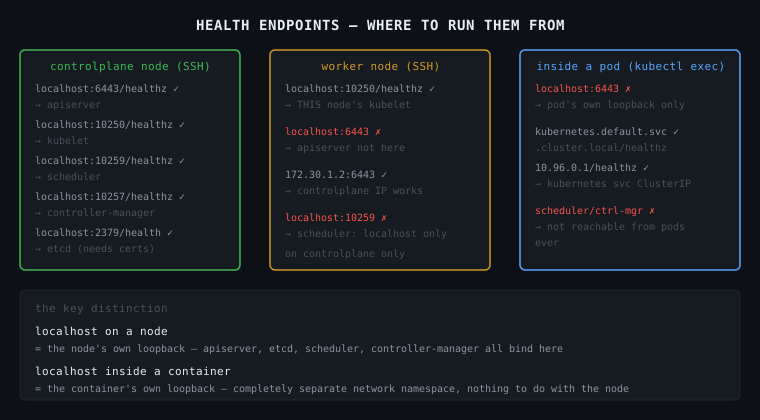
This is the part that trips people up. localhost means different things depending on where you are.
From the controlplane node (SSH'd in)
You are on the Linux host. localhost here is the node itself.
ssh controlplane

curl -k https://localhost:6443/healthz      # reaches apiserver ✓
curl -k https://localhost:10250/healthz     # reaches kubelet ✓
curl -k https://localhost:10259/healthz     # reaches scheduler ✓
curl -k https://localhost:10257/healthz     # reaches controller-manager ✓
curl -k https://localhost:2379/health ...   # reaches etcd ✓
All components run on the controlplane node, so localhost works for all of them.
From a worker node (SSH'd in)
You are on a different Linux host. The apiserver, etcd, scheduler, controller-manager are NOT here.
ssh node01

curl -k https://localhost:10250/healthz     # reaches THIS node's kubelet ✓
curl -k https://localhost:6443/healthz      # FAILS — apiserver not on this node ✗
curl -k https://172.30.1.2:6443/healthz    # works — using controlplane IP ✓
From inside a pod (kubectl exec)
This is the most confusing one. When you kubectl exec into a pod, you are inside a container. That container has its own network namespace — its own localhost, its own loopback. It is completely separate from the node's network.
kubectl exec -it some-pod -- /bin/sh

# inside the container:
curl localhost:6443       # FAILS — localhost here is the container, not the node
curl localhost:10250      # FAILS — same reason

# to reach the apiserver from inside a container:
curl -k https://kubernetes.default.svc.cluster.local/healthz   # ✓
curl -k https://10.96.0.1/healthz                               # ✓ (kubernetes service ClusterIP)

# scheduler and controller-manager — NOT reachable from pods at all
# they only bind to localhost on the controlplane node, intentionally
Why scheduler and controller-manager are localhost-only
They don't need to accept connections from anything except the apiserver, and the apiserver talks to them on the same node. Binding to an external interface would expose them unnecessarily. So they listen on 127.0.0.1 only — unreachable from pods or other nodes.
The Mental Model
controlplane node
  127.0.0.1:6443    ← apiserver    (also on node IP — reachable from anywhere)
  127.0.0.1:10250   ← kubelet      (also on node IP)
  127.0.0.1:10259   ← scheduler    (localhost ONLY)
  127.0.0.1:10257   ← controller-manager (localhost ONLY)
  127.0.0.1:2379    ← etcd         (localhost ONLY)

worker node
  127.0.0.1:10250   ← kubelet (its own kubelet)

pod/container
  127.0.0.1         ← the container itself, nothing else
  10.96.0.1         ← kubernetes service → routes to apiserver
The key distinction: localhost inside a container is the container's own loopback. It has nothing to do with the node it's running on.