CKA Road Trip: Namespace Not Found
Applied a deployment manifest. Got an error before a single pod even tried to start. Fixed it in one command, but it forced me to think about what namespaces actually are.
The Symptom
k apply -f frontend-deployment.yaml
# Error from server (NotFound): error when creating "frontend-deployment.yaml": namespaces "nginx-ns" not found
Nothing about the image, nothing about the container. The API server refused to process the request entirely because the target namespace didn't exist.
What a Namespace Actually Is
A namespace is a scope for resource names. When Kubernetes stores a resource in etcd, the key includes the namespace:
/registry/deployments/nginx-ns/frontend-deployment
/registry/deployments/default/frontend-deployment
Those are two different keys. Same name, no conflict. The namespace is part of the path — that's all it is.
When you run kubectl get pods, the API server filters by namespace. You're not entering an isolated environment — you're scoping the query.
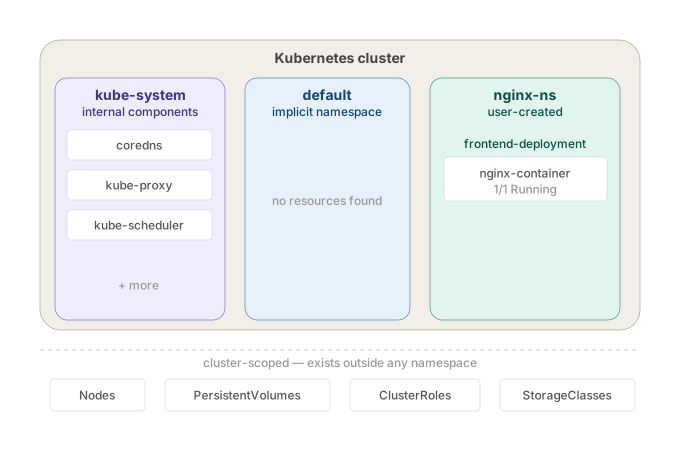
cluster
├── namespace: default       ← where everything lands if you don't specify
├── namespace: kube-system   ← Kubernetes internal components
└── namespace: nginx-ns      ← doesn't exist until you create it
It does not isolate network traffic. A pod in nginx-ns can reach a pod in default by IP with no restriction. Pods from every namespace land on the same nodes. There's no kernel-level separation of any kind. It's a naming boundary, not a network or compute boundary.
It means namespaces are purely organisational. Kubernetes doesn't build any walls between them at the infrastructure level.
Network: Two pods in different namespaces can talk to each other directly by pod IP. No firewall, no routing rule, nothing blocking it. The namespace label on the pod makes zero difference to how packets flow.
Nodes: You have 3 nodes in your cluster. A pod from kube-system and a pod from nginx-ns can both end up scheduled on node01. The scheduler doesn't segregate by namespace.
Kernel: Container isolation (namespaces in the Linux sense — pid, net, mount) happens at the container runtime level, not the Kubernetes namespace level. A Kubernetes namespace does nothing to the underlying Linux process isolation.
So if someone tells you "put this in a separate namespace for security" — that's meaningless on its own. The namespace just stops name collisions. It doesn't stop traffic, it doesn't stop resource contention, it doesn't sandbox anything. To actually isolate traffic between namespaces you need NetworkPolicies on top.
Why Kubernetes Won't Create It Automatically
Intentional. Kubernetes has no way to know if nginx-ns in your manifest is:
- a namespace you meant to create
- a typo (
nginx-ninstead ofnginx-ns) - a namespace that should already exist from a previous step
Auto-creating it would silently mask config mistakes. It fails loudly instead. If you're deploying into a namespace, that namespace is infrastructure — it should already exist.
The Fix
Or declaratively:
Apply the namespace file first, then the deployment. Namespace as code — that's the production pattern.
Querying Across Namespaces
k get pods                 # default namespace only
k get pods -n nginx-ns     # specific namespace
k get pods -A              # all namespaces
If you forget -n and your pod isn't in default, you'll get No resources found — looks like the pod doesn't exist. It does. Wrong namespace.
Setting a Default Namespace
All kubectl commands now target nginx-ns without -n. Useful during exam tasks scoped to one namespace. Reset it when done.
The Takeaway
Namespaces don't create themselves. The NotFound error isn't about your deployment — it's about missing infrastructure the deployment depends on. Namespace first, resources second.