Kubernetes StorageClass — What It's Actually For
The killercoda lab has you defining a StorageClass, a PV, and a PVC manually with no-provisioner. It works, but it makes the StorageClass look pointless. That's because in that example, it kind of is. Here's what I learned it's actually for.
The Problem It Solves
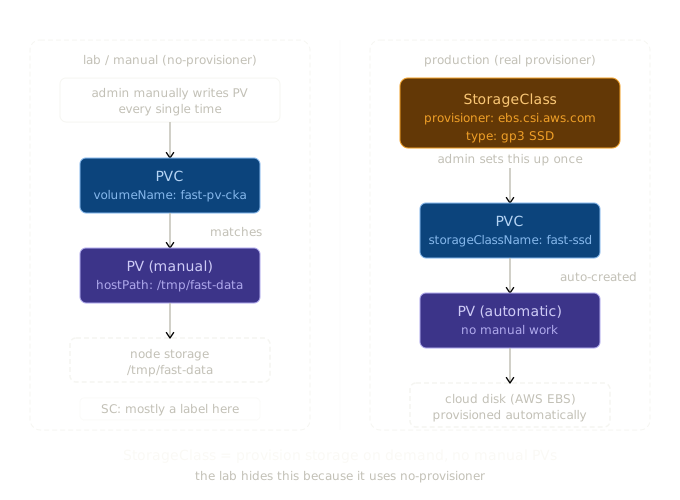
In the lab, creating storage looked like this:
- I manually wrote a PV pointing to a hostPath on the node
- I wrote a PVC that pointed directly at that PV by name
- StorageClass sat in the middle doing almost nothing
In production, nobody does this. You don't want to manually create a PV every time a developer needs storage. You want to say "I need 50Gi of fast SSD storage" and have Kubernetes sort out the rest.
That's what StorageClass is for — dynamic provisioning.
Without StorageClass (manual, what I did in the lab)
This doesn't scale. Someone has to create every PV by hand.
With StorageClass (how it works in production)
admin creates StorageClass once
        ↓
developer creates PVC referencing that StorageClass
        ↓
Kubernetes automatically creates the PV
        ↓
storage is available
No manual PV creation. The StorageClass tells Kubernetes which provisioner to call and with what parameters.
A Real Example — AWS EBS
An admin sets this up once:
apiVersion: storage.k8s.io/v1
kind: StorageClass
metadata:
  name: fast-ssd
provisioner: ebs.csi.aws.com     # AWS EBS provisioner
parameters:
  type: gp3                       # SSD type
  iops: "3000"
reclaimPolicy: Delete             # delete disk when PVC is deleted
volumeBindingMode: WaitForFirstConsumer
allowVolumeExpansion: true
A developer then just writes this:
apiVersion: v1
kind: PersistentVolumeClaim
metadata:
  name: my-data
spec:
  storageClassName: fast-ssd
  accessModes:
    - ReadWriteOnce
  resources:
    requests:
      storage: 50Gi
Kubernetes sees the PVC, calls the AWS EBS provisioner, creates a real 50Gi SSD volume in AWS, creates the PV automatically, and binds it. The developer never wrote a PV. The admin never logged into AWS.
The Key Fields
provisioner — who creates the storage. ebs.csi.aws.com for AWS, pd.csi.storage.gke.io for GCP, disk.csi.azure.com for Azure, kubernetes.io/no-provisioner for manual (lab only).
parameters — provisioner-specific settings. Disk type, IOPS, encryption, zone etc. Different for every provisioner.
reclaimPolicy
- Delete — when the PVC is deleted, the PV and the actual disk are deleted too. Good for ephemeral data.
- Retain — PV stays around after PVC deletion. Good for anything you don't want to accidentally lose.
volumeBindingMode
- Immediate — PV is created and bound the moment the PVC is submitted
- WaitForFirstConsumer — waits until a pod actually uses the PVC. Better for multi-zone clusters so the disk gets created in the same zone as the pod.
allowVolumeExpansion — whether you can resize the PVC after creation.
Why the Lab Example Is Confusing
The lab uses kubernetes.io/no-provisioner which means StorageClass does zero provisioning. I ended up writing the PV manually anyway, which made the whole thing feel circular.
The StorageClass in that example is really just being used as:
1. A label to match PVC to PV (storageClassName: fast-storage on both)
2. A place to set volumeBindingMode: Immediate
That's it. In a real cluster with a real provisioner, I'd never write a PV manually. The StorageClass handles it.
StorageClass as a Tier System
The other thing StorageClass gives you is storage tiers. An admin defines multiple classes once:
| StorageClass | Provisioner | Type | Use case |
|---|---|---|---|
fast-ssd |
ebs.csi.aws.com | gp3 SSD | databases, high IOPS |
standard |
ebs.csi.aws.com | gp2 | general workloads |
cheap-hdd |
ebs.csi.aws.com | sc1 | backups, archives |
Developers pick a tier by name in their PVC. They don't care which specific disk they get, which zone it's in, or how it's configured. That's the admin's problem, solved once in the StorageClass.
The One-Line Summary
StorageClass = a template that tells Kubernetes how to automatically create storage on demand, so nobody has to manually manage PVs.
The lab makes it look useless because it uses no-provisioner. In production, it's the main player.