Linux Networking From Zero — The 4 Things You Need to Understand Kubernetes Networking
Before Kubernetes. Before containers. Just Linux.
If you understand these 4 things, Kubernetes networking stops being magic and becomes obvious. If you don't, no amount of Kubernetes articles will help.
1. The Network Interface
A network interface is how a machine sends and receives data on a network. Think of it as a socket in the wall — the physical plug point between your machine and the outside world.
On a Linux machine:
ip a
# 1: lo: <LOOPBACK>
#    inet 127.0.0.1/8
# 2: eth0: <BROADCAST,MULTICAST,UP>
#    inet 192.168.1.10/24
Two interfaces here:
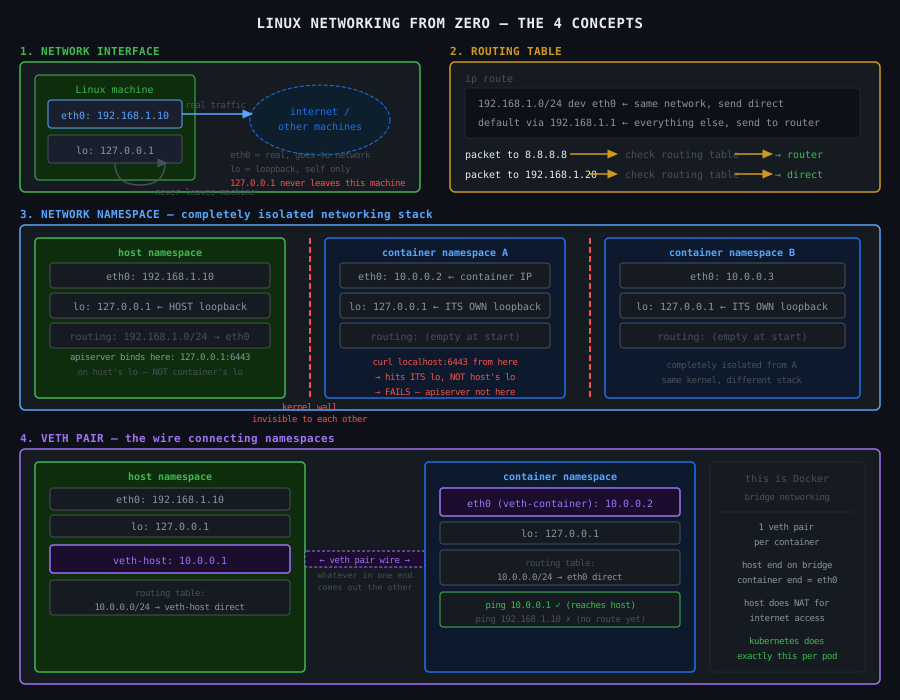
eth0 — the real network interface. Has IP 192.168.1.10. This is how this machine talks to other machines. Data going out leaves through eth0. Data coming in arrives through eth0.
lo — the loopback interface. Has IP 127.0.0.1. This is special — it never leaves the machine. It's a self-addressed envelope. When you curl localhost, the packet goes into lo and comes straight back out to the same machine. No network cable involved. Nothing leaves.
This is critical. 127.0.0.1 and localhost are not "the machine" in an abstract sense. They are specifically the loopback interface lo. Traffic sent to 127.0.0.1 goes to lo and stays on that machine. It cannot reach any other machine. It cannot be seen by any other machine.
2. The Routing Table
When your machine wants to send a packet, it needs to know where to send it. The routing table is the map it uses to make that decision.
Two rules here:
192.168.1.0/24 dev eth0 — any packet going to an IP in the range 192.168.1.0 to 192.168.1.255 — send it out through eth0 directly. These machines are on the same network. No middleman needed.
default via 192.168.1.1 dev eth0 — any packet going anywhere else — send it to 192.168.1.1 (the router/gateway) through eth0. The router knows where to forward it from there.
The machine checks the routing table top to bottom, picks the first rule that matches the destination IP, and sends the packet out through the specified interface.
If no rule matches and there's no default — the packet is dropped. The machine has no idea where to send it.
The key point: the routing table is per-machine. Every machine has its own. Every container has its own. This is why networking breaks when routing tables are wrong or missing.
3. The Network Namespace
Here is where containers start making sense.
A network namespace is a completely isolated copy of the entire Linux networking stack. Not a different machine — the same kernel — but a completely separate set of:
- network interfaces
- routing tables
- iptables rules
- port bindings
When you create a new network namespace, it starts with nothing. No interfaces except a DOWN loopback. No routes. Empty iptables. No way to reach anything.
# create a new network namespace called "myns"
ip netns add myns

# run a command inside it
ip netns exec myns ip a
# 1: lo: <LOOPBACK>  ← only loopback, and it's DOWN
#    inet 127.0.0.1/8

ip netns exec myns ip route
# (empty — no routes at all)
From inside myns, you cannot reach the internet. You cannot reach the host. You cannot reach anything. It is completely empty.
From the host, myns doesn't exist on the network at all. The host's eth0 has no idea myns is there.
This is what a container is. When Docker or containerd creates a container, it creates a new network namespace. The container's process runs inside that namespace. It gets its own interfaces, its own routing table, its own 127.0.0.1. The host's network is completely invisible to it.
This is why localhost inside a container is the container's own loopback — not the host's. The container is in a different network namespace. It has its own lo. The host's lo is in a different namespace entirely.
4. The veth Pair
A network namespace starts isolated. To make it useful, you need to connect it to something. That connection is a veth pair.
A veth pair is two virtual network interfaces linked together like a pipe. Whatever you send into one end comes out the other end. They always come in pairs — you cannot have just one.
# create a veth pair: veth-host and veth-container
ip link add veth-host type veth peer name veth-container

# currently both ends are on the host
ip a | grep veth
# veth-host
# veth-container

# move veth-container into the namespace
ip link set veth-container netns myns

# now:
# veth-host      → on the host
# veth-container → inside myns namespace

# configure the host end
ip addr add 10.0.0.1/24 dev veth-host
ip link set veth-host up

# configure the container end
ip netns exec myns ip addr add 10.0.0.2/24 dev veth-container
ip netns exec myns ip link set veth-container up
ip netns exec myns ip link set lo up

# test
ip netns exec myns ping 10.0.0.1   # namespace pings host end ✓
ping 10.0.0.2                       # host pings namespace ✓
The namespace now has connectivity — but only to the host end of the veth pair. Not the internet. Not other namespaces. Just the one wire you gave it.
This is exactly what Docker does for every container. One veth pair per container. One end on the host, one end inside the container's network namespace. The container calls its end eth0.
How These 4 Things Connect
Start from nothing and build up:
Step 1 — bare machine:
eth0: 192.168.1.10   ← real interface, talks to the world
lo:   127.0.0.1      ← loopback, stays on this machine
routing table tells packets which interface to use
Step 2 — create a network namespace:
host namespace         new namespace (myns)
  eth0: 192.168.1.10     lo: 127.0.0.1 (DOWN)
  lo:   127.0.0.1        (nothing else)

myns is completely isolated — no way in or out
Step 3 — add a veth pair:
host namespace              myns namespace
  eth0: 192.168.1.10          eth0: 10.0.0.2  ← veth-container renamed
  lo:   127.0.0.1             lo:   127.0.0.1
  veth-host: 10.0.0.1 ←──→ veth-container: 10.0.0.2

myns can now talk to the host via the veth pair
myns still cannot reach the internet
Step 4 — add routing + NAT for internet access:
host enables IP forwarding
host adds NAT rule: traffic from 10.0.0.0/24 → masquerade as 192.168.1.10

myns adds default route: all traffic → via 10.0.0.1 (the host end)

now myns can reach the internet through the host
This is a Docker container with bridge networking. Every container is a network namespace connected to the host via a veth pair, with the host doing NAT to give it internet access.
The 5 Things to Remember
A network interface is how a machine connects to a network. eth0 is real. lo is loopback — never leaves the machine.
The routing table decides where each packet goes based on the destination IP. No route = packet dropped.
A network namespace is a completely isolated networking stack. Its own interfaces, routes, iptables, and its own 127.0.0.1. What happens in a namespace stays in that namespace.
A veth pair is the wire connecting two namespaces. Always two ends. Move one end into a namespace, the other stays on the host.
localhost inside a container is the container's own loopback in its own namespace. It is not the host's loopback. They share a kernel but not a network namespace.