Skip to content

K8s

CKA road trip - Kubernetes PV, PVC and StorageClass

If volumes and volumeMounts are about how containers access storage, then PersistentVolumes, PersistentVolumeClaims and StorageClasses are about where that storage actually comes from.


The Chain

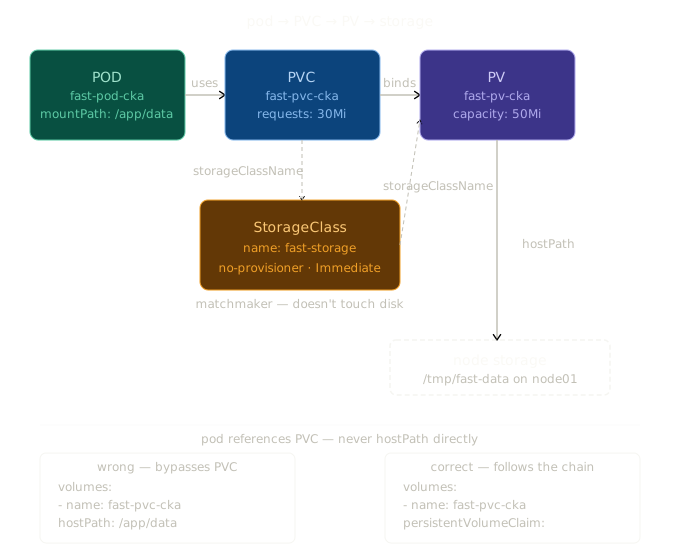
pod → PVC → PV → physical storage on node

The pod only knows about the PVC. The PVC only knows about the PV. The PV knows where the actual disk is. Each layer is deliberately decoupled so you can swap out the underlying storage without touching anything above it.


PersistentVolume (PV)

The PV represents actual storage. It's a cluster-level resource that describes a piece of storage; how big it is, what access modes it supports, and where it physically lives.

apiVersion: v1
kind: PersistentVolume
metadata:
  name: fast-pv-cka
spec:
  capacity:
    storage: 50Mi
  volumeMode: Filesystem
  accessModes:
    - ReadWriteOnce
  persistentVolumeReclaimPolicy: Recycle
  storageClassName: fast-storage
  hostPath:
    path: /tmp/fast-data

hostPath means the storage lives at /tmp/fast-data on the node itself. Since this uses kubernetes.io/no-provisioner (see StorageClass below), Kubernetes won't create that directory for you; it must already exist on the node.

The PV has 50Mi available. A PVC claiming from it just needs to request equal or less.


PersistentVolumeClaim (PVC)

The PVC is a request for storage. It says "I need X amount of storage with these access modes from this storage class." Kubernetes matches it to a suitable PV.

apiVersion: v1
kind: PersistentVolumeClaim
metadata:
  name: fast-pvc-cka
  namespace: default
spec:
  storageClassName: fast-storage
  accessModes:
    - ReadWriteOnce
  volumeName: fast-pv-cka
  resources:
    requests:
      storage: 30Mi

The PVC requests 30Mi. The PV has 50Mi. PV just needs to have equal or more than what's requested. The volumeName field explicitly binds this PVC to fast-pv-cka rather than letting Kubernetes pick any available PV.


StorageClass

The StorageClass defines how storage gets provisioned. It's the glue between PVCs and PVs.

apiVersion: storage.k8s.io/v1
kind: StorageClass
metadata:
  name: fast-storage
  annotations:
    storageclass.kubernetes.io/is-default-class: "false"
provisioner: kubernetes.io/no-provisioner
reclaimPolicy: Retain
allowVolumeExpansion: true
volumeBindingMode: Immediate

Two important fields here:

provisioner: kubernetes.io/no-provisioner -> Kubernetes will not automatically create the disk. The storage must already exist on the node. You're just telling Kubernetes to use it.

volumeBindingMode: Immediate -> the PVC binds to the PV the moment the PVC is created, without waiting for a pod to use it. The alternative is WaitForFirstConsumer, which delays binding until a pod actually needs it.


The Pod

This is where I often get it wrong. The pod references the PVC; not the PV, and not the hostPath directly.

Wrong:

volumes:
- name: fast-pvc-cka
  hostPath:
    path: /app/data        # bypasses the PVC entirely

Correct:

volumes:
- name: fast-pvc-cka
  persistentVolumeClaim:
    claimName: fast-pvc-cka   # references the PVC

The full pod spec:

apiVersion: v1
kind: Pod
metadata:
  name: fast-pod-cka
spec:
  containers:
  - image: nginx:latest
    name: fast-pod-cka
    volumeMounts:
    - name: fast-pvc-cka
      mountPath: /app/data     # container sees the storage here
  volumes:
  - name: fast-pvc-cka
    persistentVolumeClaim:
      claimName: fast-pvc-cka  # points to the PVC

The container sees the storage at /app/data. Under the hood, that maps through PVC → PV → /tmp/fast-data on the node. The container doesn't need to know any of that.


Why the Decoupling?

The pod uses persistentVolumeClaim instead of hostPath directly because:

  • The pod shouldn't care where storage physically lives
  • You can swap the underlying storage (different node, different disk, cloud storage) without changing the pod
  • Access control and capacity management happens at the PV/PVC layer, not the pod layer

Think of it like a power socket. Your laptop (pod) plugs into the socket (PVC). The socket connects to the grid (PV). The grid pulls power from a source (hostPath/cloud disk/etc). Your laptop doesn't need to know anything about power stations.


Quick Reference

Resource Level What it does
PV Cluster Describes actual storage and where it lives
PVC Namespace Requests storage from a PV
StorageClass Cluster Defines how storage is provisioned and bound
volume Pod Names the PVC for use inside the pod
volumeMount Container Maps the volume to a path inside the container

The One-Line Summary

PV = the actual disk. PVC = the request for that disk. StorageClass = the rules for how binding happens. Pod = just references the PVC and doesn't care about anything below it.

Side note that trips me all the time:

The SC is just a set of rules; it defines how binding works (Immediate, no-provisioner, Retain etc).

Both the PVC and PV reference the SC by name (storageClassName: fast-storage), and that's how Kubernetes knows they belong together. The SC is the matchmaker, not the storage.

The actual connection to node storage is:

PV → hostPath → /tmp/fast-data on node

SC never touches the disk directly.
CKA road trip - PV, PVC and Pod

I've been working through Kubernetes storage labs and found the documentation sparse. Here's what every line actually does and how the three files connect to each other.


The Three Files

PersistentVolume (my-pv-cka.yml)

apiVersion: v1
kind: PersistentVolume
metadata:
  name: my-pv-cka
spec:
  capacity:
    storage: 100Mi
  volumeMode: Filesystem
  accessModes:
    - ReadWriteOnce
  storageClassName: standard
  hostPath:
    path: /mnt/data

apiVersion: v1 — PersistentVolume is a core Kubernetes resource, lives in the v1 API group.

kind: PersistentVolume — tells Kubernetes this is a PV, not a pod or service.

name: my-pv-cka — the name used to reference this PV. The PVC will point to this exact name.

capacity.storage: 100Mi — how much storage this PV offers. A PVC requesting from this PV cannot exceed this amount.

volumeMode: Filesystem — the storage will be presented as a filesystem (directories and files). The alternative is Block which presents raw block device — rarely needed.

accessModes: ReadWriteOnce — only one node can mount this volume at a time for reading and writing. Other options are ReadOnlyMany (many nodes, read only) and ReadWriteMany (many nodes, read and write — requires specific storage backends).

storageClassName: standard — the label that links this PV to a StorageClass. The PVC must use the same label to match. Think of it as a category name.

hostPath.path: /mnt/data — the actual directory on the node where data is stored. This is a lab setup — in production this would be a cloud disk reference instead.


PersistentVolumeClaim (my-pvc-cka.yml)

apiVersion: v1
kind: PersistentVolumeClaim
metadata:
  name: my-pvc-cka
spec:
  accessModes:
    - ReadWriteOnce
  volumeMode: Filesystem
  resources:
    requests:
      storage: 100Mi
  storageClassName: standard
  volumeName: my-pv-cka

name: my-pvc-cka — the name the pod will reference when claiming this storage.

accessModes: ReadWriteOnce — must match the PV. Kubernetes won't bind a PVC to a PV if the access modes are incompatible.

volumeMode: Filesystem — must match the PV.

resources.requests.storage: 100Mi — how much storage I'm requesting. Must be equal to or less than the PV's capacity. I made a mistake here — the task said less than 100Mi but I requested exactly 100Mi. Should have been 50Mi or 80Mi.

storageClassName: standard — must match the PV's storageClassName. This is how Kubernetes knows which PVs are eligible to satisfy this claim.

volumeName: my-pv-cka — explicitly targets this specific PV by name. Without this, Kubernetes would find any available PV that matches the storageClassName, accessModes and capacity. In production I'd leave this out and let Kubernetes match automatically.


Pod (pod.yml)

apiVersion: v1
kind: Pod
metadata:
  labels:
    run: my-pod-cka
  name: my-pod-cka
spec:
  containers:
  - image: nginx
    name: my-pod-cka
    resources: {}
    volumeMounts:
      - mountPath: "/var/www/html"
        name: my-pv-cka
  dnsPolicy: ClusterFirst
  restartPolicy: Always
  volumes:
    - name: my-pv-cka
      persistentVolumeClaim:
        claimName: my-pvc-cka

image: nginx — the container image to run.

volumeMounts — tells this container which volumes to use and where to see them inside itself.

mountPath: /var/www/html — where inside the container the storage appears. The nginx container will serve files from here.

name: my-pv-cka — this name links the volumeMount to the volume defined below. Must match exactly.

volumes — defined at pod level, outside containers. Declares what storage the pod has access to.

name: my-pv-cka — the name containers use to reference this volume in their volumeMounts.

persistentVolumeClaim.claimName: my-pvc-cka — tells Kubernetes to use the PVC named my-pvc-cka as the source for this volume. This is how the pod connects to the storage chain. Never use hostPath here — the pod shouldn't know or care where the storage physically lives. That's the PV's job.


How They Connect

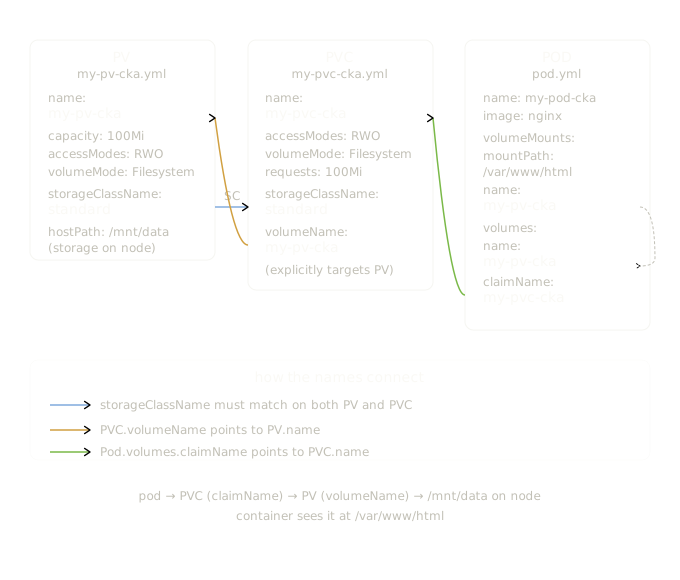
The three files are linked by three name references:

pod.volumes.persistentVolumeClaim.claimName: my-pvc-cka
        PVC metadata.name: my-pvc-cka
        PVC spec.volumeName: my-pv-cka
        PV metadata.name: my-pv-cka
        PV spec.hostPath.path: /mnt/data (on the node)

And the storageClassName ties PV and PVC together as a category match:

PV  storageClassName: standard
PVC storageClassName: standard  ← must match

One-Line Summary Per File

PV = here's a real piece of storage, this is where it lives on the node, this is how big it is.

PVC = I need storage with these specs, find me a matching PV and give it to me.

Pod = I want to use that PVC, mount it inside my container at this path.

CKA road trip: Why My Pod Was Stuck Pending -> PVC Access Mode Mismatch

I was working through a Kubernetes troubleshooting exercise and found a pod stuck in Pending with no obvious reason. Here's exactly what I found and what it taught me about PVC access modes.


The Symptom

k get pods
# NAME         READY   STATUS    RESTARTS   AGE
# my-pod-cka   0/1     Pending   0          2m57s

Pod stuck in Pending. First thing I always check is describe:

k describe pod my-pod-cka
# Events:
#   Warning  FailedScheduling  default-scheduler
#   0/2 nodes are available: pod has unbound immediate PersistentVolumeClaims

The pod couldn't be scheduled because its PVC wasn't bound. So I looked at the PVC:

k describe pvc my-pvc-cka
# Events:
#   Warning  VolumeMismatch  persistentvolume-controller
#   Cannot bind to requested volume "my-pv-cka": incompatible accessMode

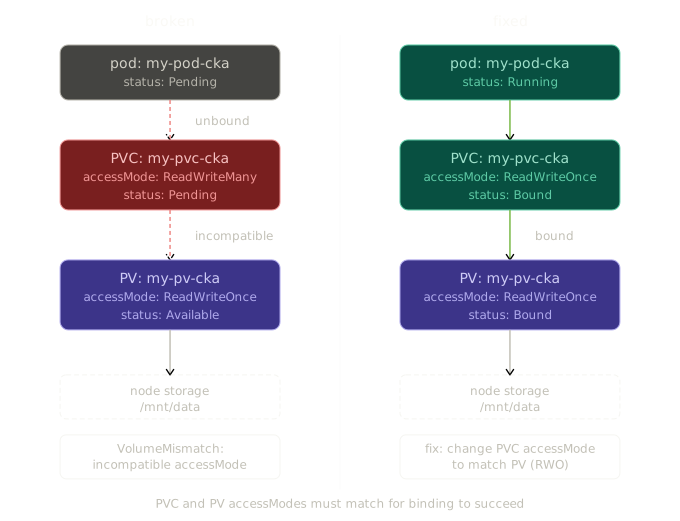
There it was. The PVC was explicitly targeting my-pv-cka via volumeName, but Kubernetes refused to bind them because their access modes were incompatible.


The Cause

The PV was defined with ReadWriteOnce:

spec:
  accessModes:
    - ReadWriteOnce
  capacity:
    storage: 100Mi

The PVC was requesting ReadWriteMany:

spec:
  accessModes:
    - ReadWriteMany   # ← wrong
  volumeName: my-pv-cka

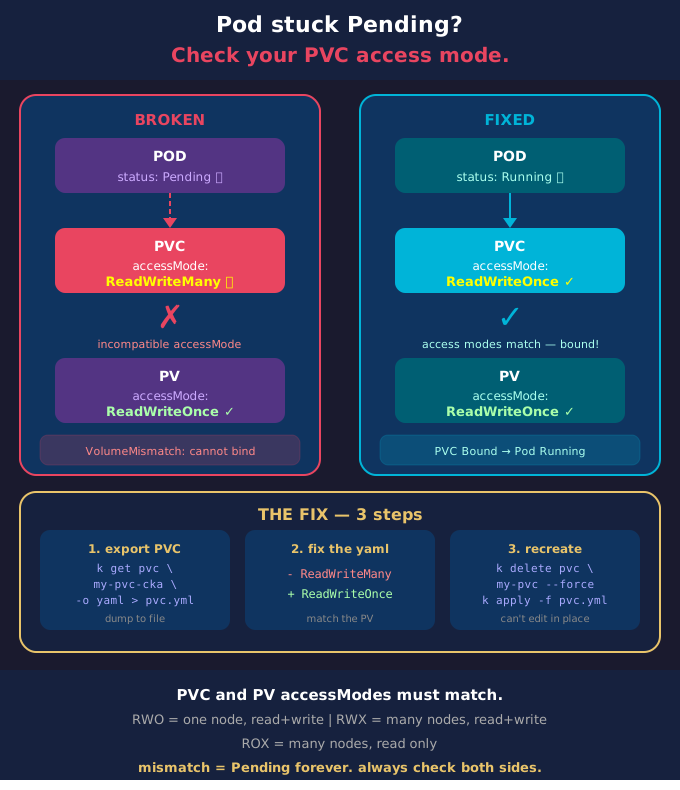
Kubernetes won't bind a PVC to a PV if their access modes don't match. Didn't matter that volumeName was explicitly set — incompatible access modes block the binding entirely.


Access Modes — What They Actually Mean

There are three access modes in Kubernetes:

ReadWriteOnce (RWO) — the volume can be mounted by a single node at a time, for both reading and writing. Most common. hostPath volumes only support this. Most cloud block storage (AWS EBS, GCP Persistent Disk) only supports this too.

ReadOnlyMany (ROX) — the volume can be mounted by many nodes simultaneously, but only for reading. Used for shared config or static assets.

ReadWriteMany (RWX) — the volume can be mounted by many nodes simultaneously for reading and writing. Requires a storage backend that actually supports it — NFS, CephFS, Azure Files. Block storage like EBS cannot do this.

The access mode you set on the PVC must be supported by the PV. If it isn't, the binding fails.


The Binding Rule

For a PVC to bind to a PV, three things must be compatible:

  • storageClassName must match
  • requested storage must be less than or equal to PV capacity
  • accessModes must be compatible

All three. If any one of them is off, the PVC stays Pending and the pod never gets scheduled.


The Fix

I exported the PVC, changed ReadWriteMany to ReadWriteOnce, deleted the existing PVC and reapplied:

k get pvc my-pvc-cka -o yaml > pvc.yml
vim pvc.yml   # change ReadWriteMany → ReadWriteOnce
k delete pvc my-pvc-cka --force
k apply -f pvc.yml

PVC bound immediately. Pod scheduled and running within seconds.

k get pods
# NAME         READY   STATUS    RESTARTS   AGE
# my-pod-cka   1/1     Running   0          5m57s

The Troubleshooting Chain

pod Pending
    ↓ describe pod → "unbound PersistentVolumeClaim"
    ↓ describe pvc → "incompatible accessMode"
    ↓ compare pvc vs pv → RWX vs RWO mismatch
    ↓ fix pvc accessMode → delete → reapply → bound → pod running

The key habit: when a pod is Pending, don't stare at the pod — follow the chain down. In this case the pod was fine, the PVC was fine, the PV was fine. The problem was a single mismatched field between the two.


One Thing Worth Knowing

You can't edit a bound PVC's access mode — and you can't edit a Pending PVC's spec either in some versions. The only reliable fix is delete and recreate with the correct spec. In production that means planning access modes correctly upfront, because changing them later is disruptive.

Kubernetes StorageClass — What It's Actually For

The killercoda lab has you defining a StorageClass, a PV, and a PVC manually with no-provisioner. It works, but it makes the StorageClass look pointless. That's because in that example, it kind of is. Here's what I learned it's actually for.


The Problem It Solves

In the lab, creating storage looked like this:

  1. I manually wrote a PV pointing to a hostPath on the node
  2. I wrote a PVC that pointed directly at that PV by name
  3. StorageClass sat in the middle doing almost nothing

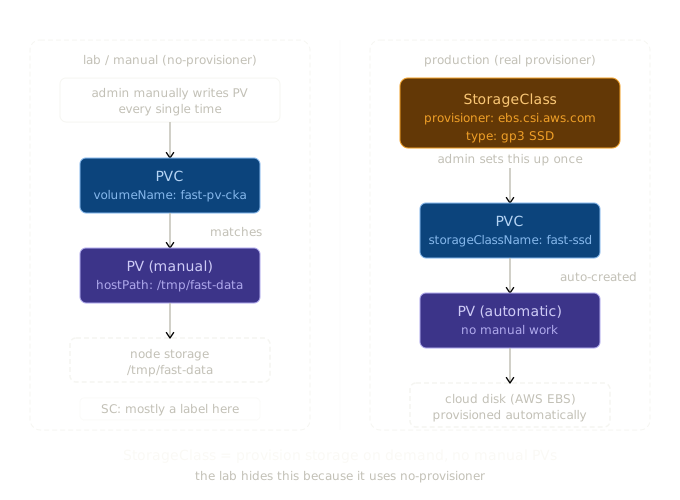
In production, nobody does this. You don't want to manually create a PV every time a developer needs storage. You want to say "I need 50Gi of fast SSD storage" and have Kubernetes sort out the rest.

That's what StorageClass is for — dynamic provisioning.


Without StorageClass (manual, what I did in the lab)

developer creates PVC
admin manually creates PV
Kubernetes matches them
storage is available

This doesn't scale. Someone has to create every PV by hand.


With StorageClass (how it works in production)

admin creates StorageClass once
developer creates PVC referencing that StorageClass
Kubernetes automatically creates the PV
storage is available

No manual PV creation. The StorageClass tells Kubernetes which provisioner to call and with what parameters.


A Real Example — AWS EBS

An admin sets this up once:

apiVersion: storage.k8s.io/v1
kind: StorageClass
metadata:
  name: fast-ssd
provisioner: ebs.csi.aws.com     # AWS EBS provisioner
parameters:
  type: gp3                       # SSD type
  iops: "3000"
reclaimPolicy: Delete             # delete disk when PVC is deleted
volumeBindingMode: WaitForFirstConsumer
allowVolumeExpansion: true

A developer then just writes this:

apiVersion: v1
kind: PersistentVolumeClaim
metadata:
  name: my-data
spec:
  storageClassName: fast-ssd
  accessModes:
    - ReadWriteOnce
  resources:
    requests:
      storage: 50Gi

Kubernetes sees the PVC, calls the AWS EBS provisioner, creates a real 50Gi SSD volume in AWS, creates the PV automatically, and binds it. The developer never wrote a PV. The admin never logged into AWS.


The Key Fields

provisioner — who creates the storage. ebs.csi.aws.com for AWS, pd.csi.storage.gke.io for GCP, disk.csi.azure.com for Azure, kubernetes.io/no-provisioner for manual (lab only).

parameters — provisioner-specific settings. Disk type, IOPS, encryption, zone etc. Different for every provisioner.

reclaimPolicy - Delete — when the PVC is deleted, the PV and the actual disk are deleted too. Good for ephemeral data. - Retain — PV stays around after PVC deletion. Good for anything you don't want to accidentally lose.

volumeBindingMode - Immediate — PV is created and bound the moment the PVC is submitted - WaitForFirstConsumer — waits until a pod actually uses the PVC. Better for multi-zone clusters so the disk gets created in the same zone as the pod.

allowVolumeExpansion — whether you can resize the PVC after creation.


Why the Lab Example Is Confusing

The lab uses kubernetes.io/no-provisioner which means StorageClass does zero provisioning. I ended up writing the PV manually anyway, which made the whole thing feel circular.

The StorageClass in that example is really just being used as: 1. A label to match PVC to PV (storageClassName: fast-storage on both) 2. A place to set volumeBindingMode: Immediate

That's it. In a real cluster with a real provisioner, I'd never write a PV manually. The StorageClass handles it.


StorageClass as a Tier System

The other thing StorageClass gives you is storage tiers. An admin defines multiple classes once:

StorageClass Provisioner Type Use case
fast-ssd ebs.csi.aws.com gp3 SSD databases, high IOPS
standard ebs.csi.aws.com gp2 general workloads
cheap-hdd ebs.csi.aws.com sc1 backups, archives

Developers pick a tier by name in their PVC. They don't care which specific disk they get, which zone it's in, or how it's configured. That's the admin's problem, solved once in the StorageClass.


The One-Line Summary

StorageClass = a template that tells Kubernetes how to automatically create storage on demand, so nobody has to manually manage PVs.

The lab makes it look useless because it uses no-provisioner. In production, it's the main player.

CKA road trip - Kubernetes Volumes vs VolumeMounts

If you've looked at a Kubernetes pod spec and wondered why storage is defined in two separate places, you're not alone. The split between volumes and volumeMounts trips up a lot of people. Here's what's actually going on.


The USB Drive Analogy

Think of it like this:

  • volumes = the USB drive itself
  • volumeMounts = plugging that USB into a specific port, at a specific location

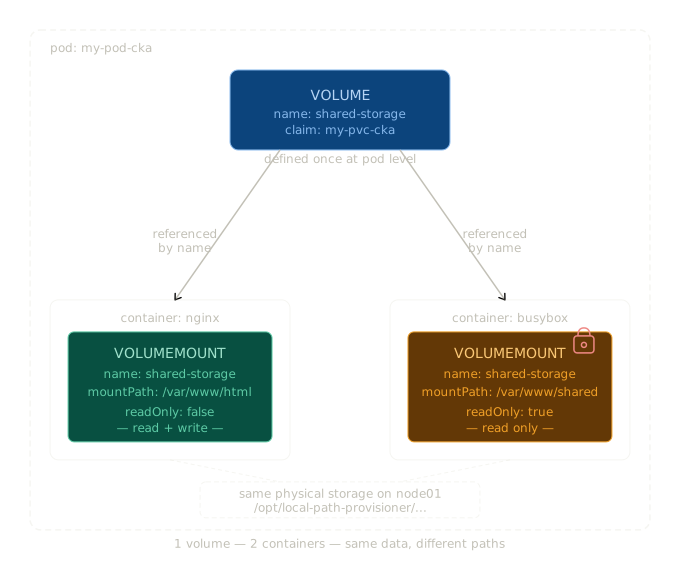
A volume is the storage — it exists at the pod level, independent of any single container. A volumeMount is how a specific container accesses that storage, at a specific path inside itself.


Where Each One Lives in the YAML

This is important: they live in different places in the pod spec.

volumes is defined at pod level, outside the containers list:

spec:
  volumes:
  - name: shared-storage
    persistentVolumeClaim:
      claimName: my-pvc-cka

volumeMounts is defined inside each container that needs access:

spec:
  containers:
  - name: nginx-container
    image: nginx
    volumeMounts:
    - name: shared-storage
      mountPath: /var/www/html

  - name: sidecar-container
    image: busybox
    volumeMounts:
    - name: shared-storage
      mountPath: /var/www/shared
      readOnly: true

The name field is the link between the two. volumes declares it, volumeMounts references it by that exact same name.


The Full Storage Chain

When you use a PersistentVolume (PV) and PersistentVolumeClaim (PVC), the full chain looks like this:

PV (real disk on the node)
PVC (request/claim for that storage)
volume (named reference inside the pod spec)
volumeMount (path inside each container)

In a real cluster, the PV might be an actual directory on a node:

/opt/local-path-provisioner/pvc-6170ebad-bd66-4896-a150-005733bf2c22_default_my-pvc-cka

Both containers — nginx and busybox — are reading and writing to that same physical directory on the node. They just see it at different paths inside themselves:

  • nginx sees it at /var/www/html
  • busybox sees it at /var/www/shared

Same data. Two different windows into the same storage. If nginx writes a file to /var/www/html/index.html, busybox can read it at /var/www/shared/index.html. Same file.


Why Are They Separate?

Because volumes need to exist independently of any single container.

If volumes were defined inside a container's spec, they'd be tied to that container's lifecycle. If the container crashed and restarted, the volume definition would go with it. By defining volumes at the pod level, the storage exists as long as the pod exists — regardless of what individual containers are doing.

It also allows multiple containers to share the same volume, which is a common pattern for sidecars (logging agents, config watchers, etc.) that need access to the same files as the main application container.


A Real Example — Nginx + Sidecar

Here's a complete pod spec with two containers sharing a volume. The sidecar has read-only access:

apiVersion: v1
kind: Pod
metadata:
  name: my-pod-cka
spec:
  containers:
  - name: nginx-container
    image: nginx
    volumeMounts:
    - name: shared-storage
      mountPath: /var/www/html       # nginx reads/writes here

  - name: sidecar-container
    image: busybox
    command: ["tail", "-f", "/dev/null"]
    volumeMounts:
    - name: shared-storage
      mountPath: /var/www/shared     # sidecar reads from here
      readOnly: true                 # read-only access

  volumes:
  - name: shared-storage
    persistentVolumeClaim:
      claimName: my-pvc-cka          # points to the PVC

Notice volumes is at the bottom, at pod level — not nested inside either container.


Quick Reference

volumes volumeMounts
Where Pod level (under spec) Container level (inside each container)
What Declares the storage and where it comes from Declares where to mount it inside the container
How many Once per volume Once per container that needs it
Link Sets the name References that name

The One-Line Summary

volumes = what storage exists. volumeMounts = who can see it, and where.

CKA road trip — StorageClass + Provisioner end to end

Step 1 — Admin applies the StorageClass once

# storageclass.yaml
apiVersion: storage.k8s.io/v1
kind: StorageClass
metadata:
  name: fast-ssd
provisioner: ebs.csi.aws.com
parameters:
  type: gp3
  iops: "3000"
reclaimPolicy: Delete
volumeBindingMode: WaitForFirstConsumer
kubectl apply -f storageclass.yaml
# storageclass.storage.k8s.io/fast-ssd created

Step 2 — Developer submits a PVC

# pvc.yaml
apiVersion: v1
kind: PersistentVolumeClaim
metadata:
  name: postgres-data
  namespace: default
spec:
  storageClassName: fast-ssd
  accessModes:
    - ReadWriteOnce
  resources:
    requests:
      storage: 50Gi
kubectl apply -f pvc.yaml
# persistentvolumeclaim/postgres-data created

kubectl get pvc
# NAME            STATUS    VOLUME   CAPACITY   STORAGECLASS   AGE
# postgres-data   Pending                        fast-ssd       2s
# STATUS is Pending because volumeBindingMode is WaitForFirstConsumer
# it will bind when a pod uses it

Step 3 — Provisioner sees the PVC and calls AWS

The provisioner (ebs.csi.aws.com) is a program already running inside the cluster. This is what it does internally when it sees the PVC:

# provisioner sees new PVC: postgres-data, storageClassName: fast-ssd
# it matches — so it runs:

response = ec2.create_volume(
    Size=50,
    VolumeType='gp3',
    Iops=3000,
    AvailabilityZone='us-east-1a'
)
# AWS responds: { 'VolumeId': 'vol-0abc1234def5678' }

# provisioner now creates the PV automatically in Kubernetes:
pv = V1PersistentVolume(
    metadata=V1ObjectMeta(name='pvc-a1b2c3d4'),
    spec=V1PersistentVolumeSpec(
        capacity={'storage': '50Gi'},
        access_modes=['ReadWriteOnce'],
        storage_class_name='fast-ssd',
        aws_elastic_block_store=V1AWSElasticBlockStoreVolumeSource(
            volume_id='vol-0abc1234def5678',
            fs_type='ext4'
        )
    )
)
k8s.create_persistent_volume(pv)

Step 4 — PV appears automatically (nobody wrote this)

kubectl get pv
# NAME           CAPACITY  ACCESS MODES  STORAGECLASS  STATUS     CLAIM
# pvc-a1b2c3d4   50Gi      RWO           fast-ssd      Bound      default/postgres-data

This PV was never written by anyone. The provisioner created it after calling AWS.

kubectl get pvc
# NAME            STATUS  VOLUME         CAPACITY  STORAGECLASS  AGE
# postgres-data   Bound   pvc-a1b2c3d4   50Gi      fast-ssd      10s
# STATUS is now Bound

Step 5 — Developer deploys the pod using the PVC

# pod.yaml
apiVersion: v1
kind: Pod
metadata:
  name: postgres
spec:
  containers:
  - name: postgres
    image: postgres:15
    env:
    - name: POSTGRES_PASSWORD
      value: "password"
    volumeMounts:
    - name: data
      mountPath: /var/lib/postgresql/data
  volumes:
  - name: data
    persistentVolumeClaim:
      claimName: postgres-data    # references the PVC
kubectl apply -f pod.yaml
# pod/postgres created

kubectl get pod postgres
# NAME       READY   STATUS    RESTARTS   AGE
# postgres   1/1     Running   0          15s

What just happened — full picture

Admin applied StorageClass (once, ever)
        |
Developer submitted PVC (pvc.yaml)
        |
Kubernetes told the provisioner (ebs.csi.aws.com)
        |
Provisioner called AWS API → created real disk vol-0abc1234def5678
        |
Provisioner created PV in Kubernetes pointing to that disk
        |
Kubernetes bound PVC to PV
        |
Developer deployed pod referencing the PVC
        |
Pod is running, writing data to /var/lib/postgresql/data
which maps to vol-0abc1234def5678 in AWS

The developer only wrote pvc.yaml and pod.yaml. Nobody wrote a PV. Nobody logged into AWS. The StorageClass + provisioner handled everything in between.


Compare to the lab (no-provisioner)

You wrote PV manually       ← provisioner would have done this
You wrote PVC               ← same
You wrote pod               ← same
StorageClass did nothing    ← provisioner would have called AWS here

The lab skips the automatic part entirely. That's why StorageClass looked pointless — because in that example, it was.