Skip to content

IT Help Blog

Plain English tech help for small business owners. No jargon, just solutions.

Need hands-on help? Get in touch →

The IIS App Pool That Drifted Into Business Hours

The problem

I got pulled into a production availability incident where users were reporting a brief but complete outage — everything was down for about 20 seconds in the middle of the working day. No deployments had happened, no patches, no config changes anyone could point to. The first instinct from the team was "must be a fluke." My instinct was to look at IIS recycle events, because 20 seconds of downtime with a clean recovery screams app pool restart to me.

Symptoms

  • All web-facing services simultaneously unavailable for approximately 20 seconds
  • Clean recovery — no errors after the window, no data corruption
  • No deployment or infrastructure change logged around the time
  • Incident repeated on multiple days, but not every day, and at different times
  • Gradually the outage window had been creeping forward in the day — previous incidents were overnight or early morning

Diagnostic path

I pulled the Windows Application event log on the IIS host and filtered for EventID 1033 (app pool shutdown) and 1032 (app pool startup). The timestamps told the story immediately:

[15:31:36] ApiGateway shutdown
[15:31:36] ReportServer shutdown
[15:31:36] WebApp shutdown
[15:31:49] ApiGateway started
[15:31:58] WebApp started

Every app pool recycled at the same second. That's not a crash — that's a scheduled recycle. I then checked the IIS Advanced Settings for the app pools and found the culprit: Regular Time Interval set to 1740 minutes (29 hours).

Here's the math that makes this nasty. A 29-hour interval doesn't anchor to midnight — it anchors to whenever IIS last started, then fires every 1740 minutes from that point. Since 1740 minutes is 29 hours, the recycle time advances by approximately 5 hours per calendar day:

Day Recycle time (UTC)
Day 1 04:30
Day 2 09:30
Day 3 14:30
Day 4 19:30
Day 5 00:30
Day 6 05:30
Day 7 10:30
Day 8 15:30 ← business hours

So every 5–6 days, the recycle drifts back into peak usage time. Past incidents that were logged as "middle of the night brief hiccup" were the same root cause — just earlier in the drift cycle when nobody noticed.

I confirmed this by checking the IIS recycle history across previous weeks. The pattern was there perfectly. The setting had likely been misconfigured during initial server setup — someone typed 1740 instead of 1440 (24 hours), or just left the default non-zero interval in place.

To check the current interval via PowerShell:

Get-WebConfigurationProperty -pspath 'MACHINE/WEBROOT/APPHOST' `
  -filter "system.applicationHost/applicationPools/add[@name='YourAppPool']/recycling/periodicRestart" `
  -name "time"

Any non-zero value here means interval-based recycling is active and subject to drift.

The fix

Two changes: disable the Regular Time Interval entirely, and add an explicit Specific Times entry set to 02:00 AM. Specific Times don't drift — IIS fires them at that wall-clock time every day, regardless of when the service last restarted.

In IIS Manager: Application Pools → Advanced Settings → Recycling: - Set Regular Time Interval to 0 - Add 02:00:00 under Specific Times

Or via PowerShell for all affected pools at once:

$appPool = "YourAppPoolName"

# Disable interval recycling
Set-WebConfigurationProperty -pspath 'MACHINE/WEBROOT/APPHOST' `
  -filter "system.applicationHost/applicationPools/add[@name='$appPool']/recycling/periodicRestart" `
  -name "time" -value "00:00:00"

# Add 2am specific recycle
Add-WebConfigurationProperty -pspath 'MACHINE/WEBROOT/APPHOST' `
  -filter "system.applicationHost/applicationPools/add[@name='$appPool']/recycling/periodicRestart/schedule" `
  -name "." -value @{value="02:00:00"}

Applied across all app pools on the server. Monitored for two weeks — no further mid-day outages.

Lesson

Interval-based IIS recycling is a trap. It looks harmless in the config, but "1740 minutes" sitting in that field is a time bomb that detonates on a rotating schedule. The correct approach is always Specific Times anchored to a low-traffic window. When inheriting a server setup, the IIS recycle config is now on my standard checklist — it's the kind of misconfiguration that was set once years ago and nobody ever questioned it because the outages were rare and brief enough to dismiss as noise. If you have recurring 20-second "mystery" outages that happen at different times of day and gradually shift forward, check this first.
Microsoft 365 Was Throttling batch emails

The problem

A client was reporting that a small number of report notification emails were occasionally failing to deliver when a large batch job ran. Not all of them — most would arrive fine — but a handful would consistently go missing after high-volume dispatch events. The application logged the failures, but they were buried in noise and the pattern wasn't obvious until someone counted the missing notifications against the send volume and noticed the failures clustered tightly in time.

Symptoms

  • Intermittent email delivery failures, never on all emails — always a subset
  • Failures clustered immediately after batch report runs, not during low-volume periods
  • Affected emails logged as failed but not automatically retried
  • 25 emails succeeded in the same batch where 2 failed — failure rate roughly 5–10%
  • No SMTP authentication errors, no SPF/DKIM issues — the failing emails never even got through the connection handshake

The error in the application log was:

ERROR Error in SendEmail while sending email: 4.3.2 Concurrent connections limit exceeded.
      Visit https://aka.ms/concurrent_sending for more information.
      [Hostname=DM4PR18MB4126.namprd18.prod.outlook.com]

Diagnostic path

The 4.3.2 SMTP code is a temporary rejection — a soft bounce. Microsoft is not saying the email is bad; it's saying "too many connections right now, try later." The aka.ms/concurrent_sending link in the error message points directly to Microsoft's documentation on per-account connection throttling for Office 365.

My first step was to confirm this was genuinely a Microsoft-side throttle rather than an application misconfiguration. I queried the email log table in the database:

SELECT status, COUNT(*)
FROM email_log
WHERE sent_date >= TRUNC(SYSDATE)
GROUP BY status;

The counts matched exactly what the logs said — a small number of F (failed) records, the rest successful, all within the same few seconds.

SELECT * FROM email_log
WHERE status = 'F'
AND sent_date >= SYSDATE - 1
ORDER BY sent_date DESC;

All failed records had the same 4.3.2 error text and timestamps within a 2–3 second window. That's not a random delivery failure — that's a burst throttle being applied.

The application sends report emails in parallel when a batch job completes. When 20+ reports finish simultaneously, the email service opens that many concurrent SMTP connections to Office 365. Microsoft's per-account limit for concurrent SMTP connections is low (the exact number isn't published, but in practice you hit it with more than a handful of simultaneous connections from a single sending account). The excess connections get the 4.3.2 rejection.

What made this harder to spot earlier: the failed emails were logged but the retry mechanism was a separate manual job rather than automatic. So failed records just sat in the database, and nobody had set up alerting on email_log failure counts.

The fix

Three parts:

Immediate: Ran the failed-email resend job to recover the undelivered notifications from the current incident. Query to identify what needs resending:

SELECT * FROM email_log
WHERE status = 'F'
ORDER BY sent_date DESC
FETCH FIRST 20 ROWS ONLY;

Short-term: Throttled the application's parallel SMTP dispatch — instead of opening N connections simultaneously for a batch of N reports, introduced a concurrency cap so no more than 3–4 SMTP connections were open at any one time. This trades slightly slower batch completion for reliable delivery.

Longer-term: Flagged to the client's Microsoft 365 administrator to review the sending connector configuration and evaluate whether a request to Microsoft for a higher throttle limit was warranted, or whether switching to Microsoft Graph API for mail delivery (which has higher and more predictable limits) made sense for their volume.

Lesson

The 4.3.2 SMTP code is easy to miss because the email doesn't bounce back to the sender — it just fails silently in the application log. If you're running batch email delivery through Office 365, the concurrent connection limit will eventually bite you as volume grows. The fix is straightforward but you have to know to look for it. Monitoring email_log failure counts with an alert threshold is the defensive measure I'd put in place from day one now. Also: automatic retry on 4.3.2 (it is explicitly a temporary rejection) is the difference between "degraded delivery" and "silent data loss."

CKA Road Trip: Kubernetes Health Endpoints

Every major Kubernetes component exposes HTTP endpoints you can curl to check if it's alive. Useful when kubectl isn't working and you need to verify what's actually running.


The Endpoints

# apiserver
curl -k https://localhost:6443/healthz
curl -k https://localhost:6443/livez
curl -k https://localhost:6443/readyz
curl -k https://localhost:6443/readyz?verbose   # shows each check by name

# kubelet
curl -k https://localhost:10250/healthz

# scheduler
curl -k https://localhost:10259/healthz

# controller-manager
curl -k https://localhost:10257/healthz

# etcd — needs certs
curl -k https://localhost:2379/health \
  --cert /etc/kubernetes/pki/etcd/server.crt \
  --key /etc/kubernetes/pki/etcd/server.key \
  --cacert /etc/kubernetes/pki/etcd/ca.crt

All return ok when healthy.

/readyz?verbose is the most useful — shows each individual check:

[+] ping ok
[+] etcd ok
[+] poststarthook/start-informers ok
[-] some-check failed   ← tells you exactly what's wrong

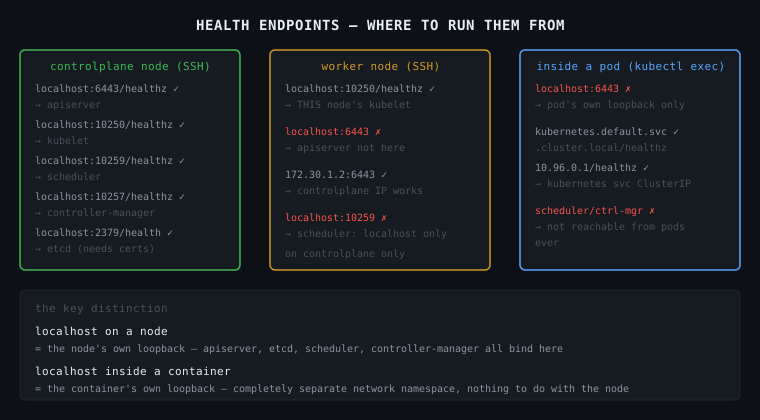
Where to Run These From

This is the part that trips people up. localhost means different things depending on where you are.

From the controlplane node (SSH'd in)

You are on the Linux host. localhost here is the node itself.

ssh controlplane

curl -k https://localhost:6443/healthz      # reaches apiserver ✓
curl -k https://localhost:10250/healthz     # reaches kubelet ✓
curl -k https://localhost:10259/healthz     # reaches scheduler ✓
curl -k https://localhost:10257/healthz     # reaches controller-manager ✓
curl -k https://localhost:2379/health ...   # reaches etcd ✓

All components run on the controlplane node, so localhost works for all of them.

From a worker node (SSH'd in)

You are on a different Linux host. The apiserver, etcd, scheduler, controller-manager are NOT here.

ssh node01

curl -k https://localhost:10250/healthz     # reaches THIS node's kubelet ✓
curl -k https://localhost:6443/healthz      # FAILS — apiserver not on this node ✗
curl -k https://172.30.1.2:6443/healthz    # works — using controlplane IP ✓

From inside a pod (kubectl exec)

This is the most confusing one. When you kubectl exec into a pod, you are inside a container. That container has its own network namespace — its own localhost, its own loopback. It is completely separate from the node's network.

kubectl exec -it some-pod -- /bin/sh

# inside the container:
curl localhost:6443       # FAILS — localhost here is the container, not the node
curl localhost:10250      # FAILS — same reason

# to reach the apiserver from inside a container:
curl -k https://kubernetes.default.svc.cluster.local/healthz   # ✓
curl -k https://10.96.0.1/healthz                               # ✓ (kubernetes service ClusterIP)

# scheduler and controller-manager — NOT reachable from pods at all
# they only bind to localhost on the controlplane node, intentionally

Why scheduler and controller-manager are localhost-only

They don't need to accept connections from anything except the apiserver, and the apiserver talks to them on the same node. Binding to an external interface would expose them unnecessarily. So they listen on 127.0.0.1 only — unreachable from pods or other nodes.


The Mental Model

controlplane node
  127.0.0.1:6443    ← apiserver    (also on node IP — reachable from anywhere)
  127.0.0.1:10250   ← kubelet      (also on node IP)
  127.0.0.1:10259   ← scheduler    (localhost ONLY)
  127.0.0.1:10257   ← controller-manager (localhost ONLY)
  127.0.0.1:2379    ← etcd         (localhost ONLY)

worker node
  127.0.0.1:10250   ← kubelet (its own kubelet)

pod/container
  127.0.0.1         ← the container itself, nothing else
  10.96.0.1         ← kubernetes service → routes to apiserver

The key distinction: localhost inside a container is the container's own loopback. It has nothing to do with the node it's running on.

697

CKA Road Trip: Kubernetes Networking — From the Ground Up

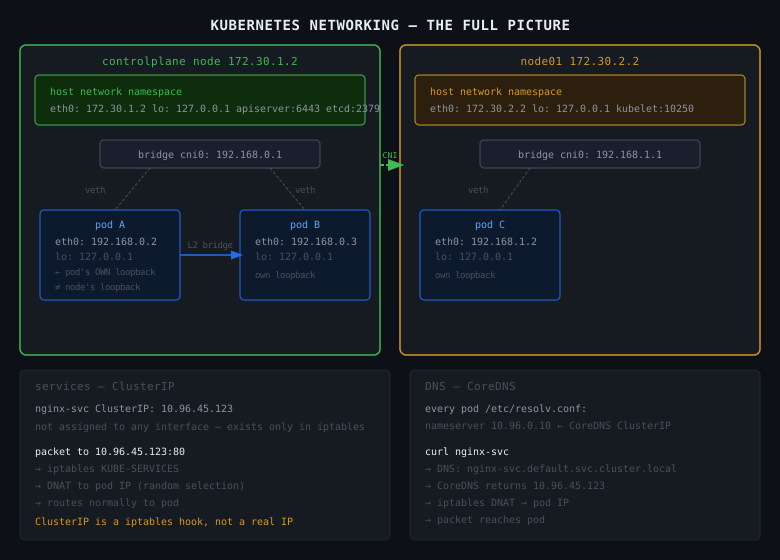
Kubernetes networking is confusing because there are multiple layers of "network" stacked on top of each other. Once you understand each layer and what it owns, it stops being magic.


Layer 0 — The Linux Host Network

Before Kubernetes exists, you have a Linux machine with a network interface:

controlplane node
  eth0: 172.30.1.2     ← the real IP of this machine
  lo:   127.0.0.1      ← loopback, local to this machine only

This is the node network. Machines talk to each other here. 172.30.1.2 is reachable from node01 at 172.30.2.2. Normal networking.


Layer 1 — Linux Network Namespaces

This is where containers come in. When a container starts, the kernel creates a network namespace for it. Think of a network namespace as a completely separate, isolated copy of the networking stack.

Inside a network namespace: - its own network interfaces - its own IP address - its own routing table - its own loopback (127.0.0.1)

The container has no idea the host network exists. Its localhost is its own loopback, not the node's.

host network namespace          container network namespace
  eth0: 172.30.1.2               eth0: 192.168.1.5  ← pod IP
  lo:   127.0.0.1                lo:   127.0.0.1     ← container's OWN loopback

These are two completely separate localhostes. This is the source of most networking confusion.


Layer 2 — The veth Pair (The Wire)

A container in its own namespace can't talk to anything. It needs a wire connecting it to the outside world.

That wire is a veth pair — two virtual network interfaces connected like a cable. What goes in one end comes out the other.

host side                    container side
  veth_abc123  ←──────────→  eth0 (inside container)
  (on the bridge)              (pod IP: 192.168.1.5)

The host end plugs into a bridge (think: a virtual network switch). The container end is the pod's eth0. Every pod gets one veth pair.


Layer 3 — The Bridge (The Switch)

The bridge connects all the veth pairs on a node. Pods on the same node talk through the bridge.

         bridge (cni0: 192.168.1.1)
         /            \
   veth_pod_A      veth_pod_B
       |                |
   pod A             pod B
192.168.1.2      192.168.1.3

Pod A pings Pod B: 1. Pod A sends packet to 192.168.1.3 2. Goes through veth_pod_A to the bridge 3. Bridge forwards to veth_pod_B 4. Pod B receives it

No iptables, no routing — pure L2 switching on the same node.


Layer 4 — Pod IPs (Cross-Node)

Pods on different nodes need to reach each other too. The CNI plugin (Flannel, Cilium, Calico) handles this.

Each node gets a block of pod IPs:

controlplane: pods get 192.168.0.0/24
node01:       pods get 192.168.1.0/24

Cross-node traffic goes through the CNI plugin — either encapsulated in a tunnel (Flannel VXLAN) or routed directly (Calico BGP). The pod doesn't know or care. It just sends to the destination pod IP and the CNI handles getting it there.

Key point: every pod in the cluster gets a unique IP. Any pod can reach any other pod directly by IP — no NAT, no port mapping needed. This is the Kubernetes networking model.


Layer 5 — Services and ClusterIP

Pod IPs are ephemeral. A pod dies, its IP is gone. A new pod gets a new IP. You can't hardcode pod IPs.

A Service gives you a stable IP that never changes. It's called a ClusterIP.

nginx-service   ClusterIP: 10.96.45.123:80
              load balances to:
                pod-A: 192.168.1.2:80
                pod-B: 192.168.1.3:80

But here's the thing — the ClusterIP is not assigned to any interface. You can't ping it. It exists only as an iptables rule written by kube-proxy on every node.

When a pod sends traffic to 10.96.45.123:80: 1. Packet hits the iptables KUBE-SERVICES chain 2. iptables randomly picks a pod IP (load balancing) 3. DNAT rewrites the destination to the pod IP 4. Packet routes normally to the pod

The ClusterIP is just a hook in iptables. That's it.


Layer 6 — DNS

Nobody remembers 10.96.45.123. DNS maps service names to ClusterIPs.

Every pod has /etc/resolv.conf pointing at CoreDNS:

nameserver 10.96.0.10      ← CoreDNS ClusterIP
search default.svc.cluster.local svc.cluster.local cluster.local

When a pod does curl nginx-service: 1. DNS lookup: nginx-service → resolves to nginx-service.default.svc.cluster.local 2. CoreDNS returns 10.96.45.123 3. Pod sends to 10.96.45.123 4. iptables DNAT → pod IP 5. Packet reaches the pod


The localhost confusion — fully explained

Now that you understand network namespaces:

controlplane node (host namespace)
  127.0.0.1:6443  ← apiserver listening here

pod on that node (its own namespace)
  127.0.0.1       ← the pod's OWN loopback
                    completely separate from the node's loopback

When you kubectl exec into a pod and run curl localhost:6443 — you are inside the pod's network namespace. Its localhost is its own loopback. The apiserver is on the node's loopback, which is a completely different network namespace. The packet never leaves the pod's namespace, never reaches the node, never reaches the apiserver.

To reach the apiserver from inside a pod:

# use the kubernetes service — this IS reachable from any pod
curl -k https://kubernetes.default.svc.cluster.local/healthz
# or
curl -k https://10.96.0.1/healthz   # kubernetes service ClusterIP

This works because 10.96.0.1 is a ClusterIP — iptables on the node rewrites it to the apiserver's actual IP and port.


The Full Picture

                    ┌─────────────────────────────────┐
                    │         controlplane node         │
                    │  eth0: 172.30.1.2  (node IP)     │
                    │  lo:   127.0.0.1   (node loopback)│
                    │    apiserver: 127.0.0.1:6443      │
                    │    etcd:      127.0.0.1:2379      │
                    │                                   │
                    │  ┌─────────────┐                  │
                    │  │   pod A     │ ← own namespace  │
                    │  │ 192.168.0.2 │                  │
                    │  │ lo:127.0.0.1│ ← pod's loopback │
                    │  └──────┬──────┘                  │
                    │      veth pair                    │
                    │      bridge cni0                  │
                    └─────────────────────────────────┘
                              │ cross-node via CNI
                    ┌─────────────────────────────────┐
                    │           node01                  │
                    │  eth0: 172.30.2.2                 │
                    │  ┌─────────────┐                  │
                    │  │   pod B     │                  │
                    │  │ 192.168.1.3 │                  │
                    │  └─────────────┘                  │
                    └─────────────────────────────────┘

services (ClusterIP) — exist only as iptables rules, on every node
DNS (CoreDNS)        — a pod, reachable via its own ClusterIP 10.96.0.10

The Rules Worth Memorising

Pod to pod (same node): direct via bridge — no NAT, no routing.

Pod to pod (different node): CNI handles it — pod just sends to the pod IP.

Pod to service: iptables DNAT on the node — ClusterIP gets rewritten to a pod IP.

Pod to apiserver: use kubernetes.default.svc.cluster.local — never localhost.

Node to component: localhost works — you're on the same host.

localhost inside a container: the container's own loopback only — nothing else.

697

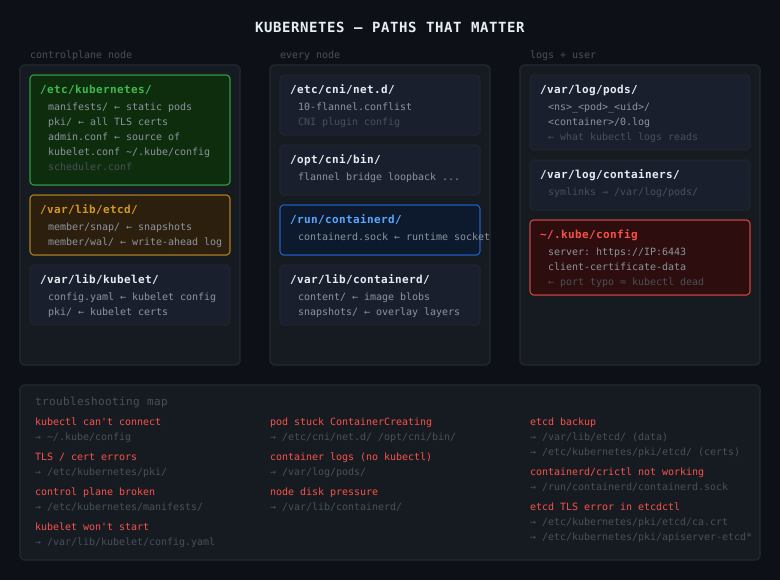
CKA Road Trip: Every Path That Matters in Kubernetes

Kubernetes isn't one thing in one place. It's a set of components, each with their own config files, certs, and data directories spread across the filesystem. When something breaks, knowing where to look is half the fix.


/etc/kubernetes/

The main Kubernetes config directory. Lives on the controlplane node.

/etc/kubernetes/
  manifests/                  # static pod manifests — control plane lives here
    kube-apiserver.yaml
    kube-controller-manager.yaml
    kube-scheduler.yaml
    etcd.yaml
  pki/                        # all TLS certs and keys
    ca.crt / ca.key           # cluster CA
    apiserver.crt / apiserver.key
    apiserver-etcd-client.crt / .key
    apiserver-kubelet-client.crt / .key
    etcd/
      ca.crt
      server.crt / server.key
  kubelet.conf                # kubelet's kubeconfig
  controller-manager.conf
  scheduler.conf
  admin.conf                  # admin kubeconfig — source of ~/.kube/config

manifests/ — the kubelet watches this directory directly. No API server involved. Drop a yaml in, the pod starts. Edit it, the pod restarts. This is how the control plane bootstraps itself and why you fix broken control plane components by editing files here, not with kubectl.

pki/ — every TLS cert the cluster uses. apiserver cert, etcd client certs, kubelet client certs. When you see x509: certificate errors, the answer is in here.


~/.kube/config

kubectl's kubeconfig. Where kubectl gets the server address, port, and credentials.

clusters:
- cluster:
    server: https://172.30.1.2:6443   # ← port typo here = kubectl dead
    certificate-authority-data: ...
  name: kubernetes
users:
- name: kubernetes-admin
  user:
    client-certificate-data: ...
    client-key-data: ...

If kubectl can't connect, check this file first. The error message will tell you the URL it's trying — if the port looks wrong, it came from here.

cat ~/.kube/config | grep server

/var/lib/kubelet/

Kubelet runtime data. Lives on every node.

/var/lib/kubelet/
  config.yaml          # kubelet configuration — cgroup driver, eviction thresholds
  kubeconfig           # kubelet's auth to the apiserver
  pki/
    kubelet.crt / kubelet.key
    kubelet-client-current.pem

config.yaml — if the kubelet won't start, this is usually why. Malformed config, wrong cgroup driver, missing fields.

cat /var/lib/kubelet/config.yaml
journalctl -u kubelet -n 50 --no-pager

/var/lib/etcd/

etcd's data directory. The actual cluster database.

/var/lib/etcd/
  member/
    snap/      # snapshots
    wal/       # write-ahead log

You don't edit files here directly. You interact with etcd via etcdctl. But this is where the data lives — and this is what you're backing up when you run etcdctl snapshot save.

If this directory is corrupted or missing, the cluster loses all state.


/etc/cni/net.d/

CNI plugin configuration. Tells the container runtime which CNI plugin to use and how.

/etc/cni/net.d/
  10-flannel.conflist     # if using Flannel
  10-calico.conflist      # if using Calico
  05-cilium.conflist      # if using Cilium

If pods are stuck in ContainerCreating with network errors, check here. The CNI config might be missing or malformed.


/opt/cni/bin/

CNI plugin binaries. The actual executables that set up pod networking.

ls /opt/cni/bin/
# flannel  bridge  host-local  loopback  portmap  ...

If the CNI binary is missing, pods can't get IPs. The config in /etc/cni/net.d/ points at a binary that doesn't exist.


/var/log/pods/

Container logs on disk. Organised by namespace, pod name, pod UID, container name.

/var/log/pods/
  <namespace>_<pod-name>_<pod-uid>/
    <container-name>/
      0.log    # current log file
      1.log    # rotated

kubectl logs reads from here and strips the JSON wrapper. When kubectl isn't available — node issues, apiserver down — you can read logs directly:

cat /var/log/pods/kube-system_kube-apiserver-controlplane_*/kube-apiserver/0.log

/var/log/containers/

Symlinks to /var/log/pods/. Older tooling uses this path. Same data, different entrypoint.

ls /var/log/containers/
# kube-apiserver-controlplane_kube-system_kube-apiserver-abc123.log -> /var/log/pods/...

/run/containerd/

containerd's runtime socket. How kubectl exec, kubectl logs, and the kubelet talk to containerd.

/run/containerd/
  containerd.sock    # the Unix socket

If containerd is dead, this socket won't exist or won't respond. crictl and the kubelet both talk through here.

systemctl status containerd
crictl --runtime-endpoint unix:///run/containerd/containerd.sock ps

/var/lib/containerd/

containerd's data directory. Images and container layers live here.

/var/lib/containerd/
  io.containerd.content.v1.content/
    blobs/sha256/          # raw image layer blobs
  io.containerd.snapshots.v1.overlayfs/
    snapshots/             # unpacked OverlayFS layers
  io.containerd.metadata.v1.bolt/
    meta.db                # metadata database

If a node is running out of disk space, this directory is usually why. Image layers accumulate.

du -sh /var/lib/containerd/
crictl images    # see what's cached
crictl rmi --prune   # remove unused images

The Troubleshooting Map

kubectl can't connect
  → ~/.kube/config (wrong server, port typo)

control plane component broken
  → /etc/kubernetes/manifests/ (fix the static pod yaml)

TLS / cert errors
  → /etc/kubernetes/pki/

kubelet won't start
  → /var/lib/kubelet/config.yaml
  → journalctl -u kubelet

pod stuck in ContainerCreating
  → /etc/cni/net.d/ (CNI config)
  → /opt/cni/bin/ (CNI binary missing)

container logs when kubectl isn't working
  → /var/log/pods/

node disk pressure
  → /var/lib/containerd/ (image layer bloat)

etcd backup / restore
  → /var/lib/etcd/ (data lives here)
  → /etc/kubernetes/pki/etcd/ (certs for etcdctl)

697

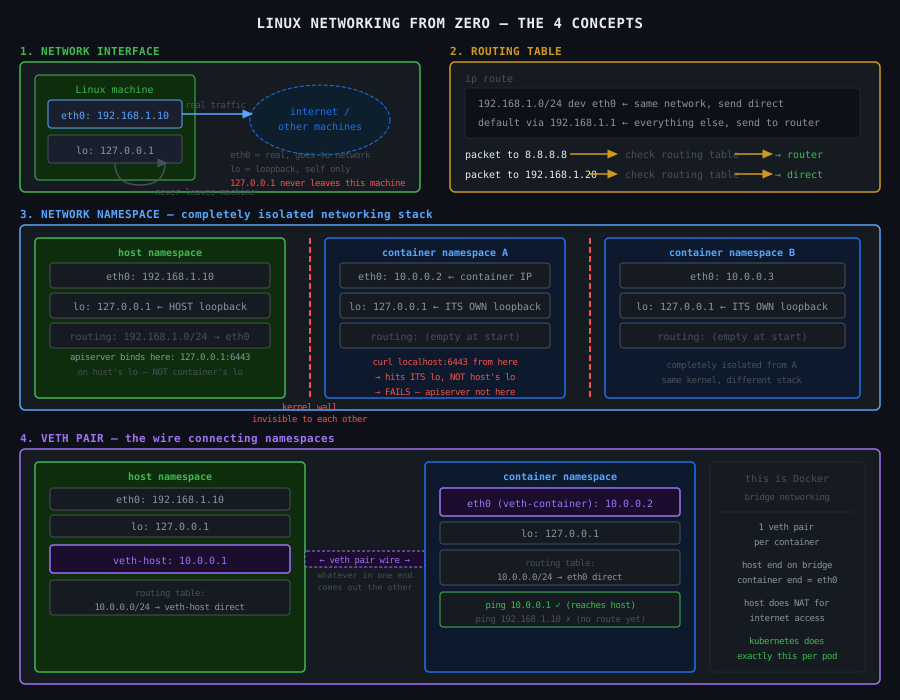
Linux Networking From Zero — The 4 Things You Need to Understand Kubernetes Networking

Before Kubernetes. Before containers. Just Linux.

If you understand these 4 things, Kubernetes networking stops being magic and becomes obvious. If you don't, no amount of Kubernetes articles will help.


1. The Network Interface

A network interface is how a machine sends and receives data on a network. Think of it as a socket in the wall — the physical plug point between your machine and the outside world.

On a Linux machine:

ip a
# 1: lo: <LOOPBACK>
#    inet 127.0.0.1/8
# 2: eth0: <BROADCAST,MULTICAST,UP>
#    inet 192.168.1.10/24

Two interfaces here:

eth0 — the real network interface. Has IP 192.168.1.10. This is how this machine talks to other machines. Data going out leaves through eth0. Data coming in arrives through eth0.

lo — the loopback interface. Has IP 127.0.0.1. This is special — it never leaves the machine. It's a self-addressed envelope. When you curl localhost, the packet goes into lo and comes straight back out to the same machine. No network cable involved. Nothing leaves.

This is critical. 127.0.0.1 and localhost are not "the machine" in an abstract sense. They are specifically the loopback interface lo. Traffic sent to 127.0.0.1 goes to lo and stays on that machine. It cannot reach any other machine. It cannot be seen by any other machine.


2. The Routing Table

When your machine wants to send a packet, it needs to know where to send it. The routing table is the map it uses to make that decision.

ip route
# default via 192.168.1.1 dev eth0
# 192.168.1.0/24 dev eth0 proto kernel scope link

Two rules here:

192.168.1.0/24 dev eth0 — any packet going to an IP in the range 192.168.1.0 to 192.168.1.255 — send it out through eth0 directly. These machines are on the same network. No middleman needed.

default via 192.168.1.1 dev eth0 — any packet going anywhere else — send it to 192.168.1.1 (the router/gateway) through eth0. The router knows where to forward it from there.

both go through eth0 — that's the only physical interface. The difference is what happens at layer 2 (who gets the packet).

Same subnet (192.168.1.0/24): Packet goes out eth0 directly to the destination machine. Your machine uses ARP to find the MAC address of 192.168.1.20 and sends the packet straight to it. No middleman.

Outside the subnet (8.8.8.8): Packet goes out eth0 but addressed to the router's MAC address (192.168.1.1). Your machine doesn't know how to reach 8.8.8.8 directly — it hands it to the router and says "you figure it out." The router then forwards it onward.

So yes, both leave through eth0. The routing table isn't deciding which interface — it's deciding who to hand the packet to once it leaves.

/24 = subnet. It means the first 24 bits of the IP are the network part, leaving 8 bits for hosts — giving you 256 addresses (192.168.1.0 to 192.168.1.255). Anything in that range is considered "same network, talk directly." Anything outside it goes to the router.

The machine checks the routing table top to bottom, picks the first rule that matches the destination IP, and sends the packet out through the specified interface.

If no rule matches and there's no default — the packet is dropped. The machine has no idea where to send it.

The key point: the routing table is per-machine. Every machine has its own. Every container has its own. This is why networking breaks when routing tables are wrong or missing.


3. The Network Namespace

Here is where containers start making sense.

A network namespace is a completely isolated copy of the entire Linux networking stack. Not a different machine — the same kernel — but a completely separate set of:

  • network interfaces
  • routing tables
  • iptables rules
  • port bindings

When you create a new network namespace, it starts with nothing. No interfaces except a DOWN loopback. No routes. Empty iptables. No way to reach anything.

# create a new network namespace called "myns"
ip netns add myns

# run a command inside it
ip netns exec myns ip a
# 1: lo: <LOOPBACK>  ← only loopback, and it's DOWN
#    inet 127.0.0.1/8

ip netns exec myns ip route
# (empty — no routes at all)

From inside myns, you cannot reach the internet. You cannot reach the host. You cannot reach anything. It is completely empty.

From the host, myns doesn't exist on the network at all. The host's eth0 has no idea myns is there.

This is what a container is. When Docker or containerd creates a container, it creates a new network namespace. The container's process runs inside that namespace. It gets its own interfaces, its own routing table, its own 127.0.0.1. The host's network is completely invisible to it.

This is why localhost inside a container is the container's own loopback — not the host's. The container is in a different network namespace. It has its own lo. The host's lo is in a different namespace entirely.


4. The veth Pair

A network namespace starts isolated. To make it useful, you need to connect it to something. That connection is a veth pair.

A veth pair is two virtual network interfaces linked together like a pipe. Whatever you send into one end comes out the other end. They always come in pairs — you cannot have just one.

# create a veth pair: veth-host and veth-container
ip link add veth-host type veth peer name veth-container

# currently both ends are on the host
ip a | grep veth
# veth-host
# veth-container

# move veth-container into the namespace
ip link set veth-container netns myns

# now:
# veth-host      → on the host
# veth-container → inside myns namespace

# configure the host end
ip addr add 10.0.0.1/24 dev veth-host
ip link set veth-host up

# configure the container end
ip netns exec myns ip addr add 10.0.0.2/24 dev veth-container
ip netns exec myns ip link set veth-container up
ip netns exec myns ip link set lo up

# test
ip netns exec myns ping 10.0.0.1   # namespace pings host end ✓
ping 10.0.0.2                       # host pings namespace ✓

The namespace now has connectivity — but only to the host end of the veth pair. Not the internet. Not other namespaces. Just the one wire you gave it.

This is exactly what Docker does for every container. One veth pair per container. One end on the host, one end inside the container's network namespace. The container calls its end eth0.


How These 4 Things Connect

Start from nothing and build up:

Step 1 — bare machine:

eth0: 192.168.1.10   ← real interface, talks to the world
lo:   127.0.0.1      ← loopback, stays on this machine
routing table tells packets which interface to use

Step 2 — create a network namespace:

host namespace         new namespace (myns)
  eth0: 192.168.1.10     lo: 127.0.0.1 (DOWN)
  lo:   127.0.0.1        (nothing else)

myns is completely isolated — no way in or out

Step 3 — add a veth pair:

host namespace              myns namespace
  eth0: 192.168.1.10          eth0: 10.0.0.2  ← veth-container renamed
  lo:   127.0.0.1             lo:   127.0.0.1
  veth-host: 10.0.0.1 ←──→ veth-container: 10.0.0.2

myns can now talk to the host via the veth pair
myns still cannot reach the internet

Step 4 — add routing + NAT for internet access:

host enables IP forwarding
host adds NAT rule: traffic from 10.0.0.0/24 → masquerade as 192.168.1.10

myns adds default route: all traffic → via 10.0.0.1 (the host end)

now myns can reach the internet through the host

This is a Docker container with bridge networking. Every container is a network namespace connected to the host via a veth pair, with the host doing NAT to give it internet access.


The 5 Things to Remember

A network interface is how a machine connects to a network. eth0 is real. lo is loopback — never leaves the machine.

The routing table decides where each packet goes based on the destination IP. No route = packet dropped.

A network namespace is a completely isolated networking stack. Its own interfaces, routes, iptables, and its own 127.0.0.1. What happens in a namespace stays in that namespace.

A veth pair is the wire connecting two namespaces. Always two ends. Move one end into a namespace, the other stays on the host.

localhost inside a container is the container's own loopback in its own namespace. It is not the host's loopback. They share a kernel but not a network namespace.

697

Linux Networking — Layer 1 and Layer 2

Before IP addresses and routing tables, two lower layers handle getting bits from one machine to the next. You don't touch these directly in software, but understanding them explains why the routing table works the way it does.


The OSI Model (Just the Relevant Bits)

The OSI model splits networking into separate concerns, each layer doing one job:

Layer 3 — Network     IP addresses, routing across multiple hops
Layer 2 — Data Link   MAC addresses, getting to the next physical hop
Layer 1 — Physical    The actual wire, raw electrical signals

You only need 1 and 2 here. Layer 3 (IP/routing) is what the previous article covered.


Layer 1 — Physical

The actual cable. Electrical signals, radio waves, light pulses in fibre. No intelligence — just raw bits moving from A to B.

The network interface card (eth0) is partly Layer 1 — it's the hardware that converts digital data into signals on the wire and back again.

You never think about this in software. It just exists underneath everything else.


This is where MAC addresses live.

Every network interface has a MAC address — a unique hardware identifier assigned at the factory. Something like aa:bb:cc:dd:ee:ff. Unlike IP addresses, MAC addresses don't change and don't need to be configured. They're burned into the hardware.

Layer 2 is responsible for one specific job: getting a packet from your machine to the next physical hop — the immediately adjacent machine on the same network. It has no concept of IPs, no concept of routing across multiple networks. It only knows about MACs.

# see your MAC address
ip link show eth0
# link/ether aa:bb:cc:dd:ee:ff

ARP — How Layer 2 Finds MAC Addresses

Your machine knows the destination IP. But to send an ethernet frame, it needs the destination MAC address. ARP (Address Resolution Protocol) is how it finds it.

"Hey everyone on this network — who has IP 192.168.1.20?
 Tell me your MAC address."

192.168.1.20 replies: "That's me. My MAC is bb:cc:dd:ee:ff:00"

Your machine now has the MAC. Sends the frame directly.
# see the ARP cache — IPs your machine has already resolved to MACs
arp -n
# Address          HWtype  HWaddress           Flags
# 192.168.1.1      ether   aa:bb:cc:11:22:33   C     ← router MAC cached
# 192.168.1.20     ether   bb:cc:dd:44:55:66   C     ← neighbour MAC cached

ARP only works on the same network. You cannot ARP for a machine that's on a different subnet — the broadcast doesn't leave your network.


The Decision — Same Subnet or Not?

Here's the part that ties it together. Before your machine even touches ARP, it checks whether the destination is on the same subnet or not. It does this by comparing the destination IP against its own IP and subnet mask.

my IP:      192.168.1.10
subnet:     /24  (mask: 255.255.255.0)
my network: 192.168.1.0 — 192.168.1.255

The /24 means: compare only the first 24 bits of the destination IP against mine. If they match — same network. If not — different network.

Packet to 192.168.1.20:

192.168.1.10  →  binary first 24 bits: 192.168.1
192.168.1.20  →  binary first 24 bits: 192.168.1
                                        ← match → same network
Same network → ARP for 192.168.1.20 directly → send frame to its MAC.

Packet to 8.8.8.8:

192.168.1.10  →  binary first 24 bits: 192.168.1
8.8.8.8       →  binary first 24 bits: 8.8.8
                                        ← no match → different network
Different network → don't ARP for 8.8.8.8 (it's not reachable directly) → use default route → ARP for the router's MAC instead → hand the packet to the router.

The key insight: ARP does fire for 8.8.8.8 — but it fires for the router's IP 192.168.1.1, not for 8.8.8.8 itself. Your machine never tries to ARP for things outside its subnet. It already knows they're unreachable directly.


The Full Flow for Two Packets

Packet to 192.168.1.20 (same subnet):

1. check routing table — 192.168.1.0/24 matches → send direct via eth0
2. ARP: "who has 192.168.1.20?" → gets MAC bb:cc:dd:44:55:66
3. wrap packet in ethernet frame addressed to that MAC
4. send out eth0
5. 192.168.1.20 receives it directly

Packet to 8.8.8.8 (outside subnet):

1. check routing table — no specific match → use default route via 192.168.1.1
2. ARP: "who has 192.168.1.1?" → gets router MAC aa:bb:cc:11:22:33
3. wrap packet in ethernet frame addressed to ROUTER'S MAC
4. send out eth0
5. router receives it, unwraps it, sees destination 8.8.8.8, forwards onward

Both packets leave through eth0. The routing table isn't deciding which interface — it's deciding who to hand the packet to once it leaves.


The Three Layers Together

Layer 3 (IP)      decides WHERE the packet ultimately goes — destination IP
Layer 2 (MAC)     decides WHO gets it next — next hop MAC address
Layer 1 (wire)    moves the bits — the actual signal on the cable

your machine wants to reach 8.8.8.8:
  Layer 3: routing table says → send to router 192.168.1.1
  Layer 2: ARP says router MAC is aa:bb:cc:11:22:33
  Layer 1: ethernet frame with that MAC goes out on the wire

router receives it:
  Layer 2: unwraps ethernet frame
  Layer 3: sees destination 8.8.8.8, checks its own routing table, forwards

Each hop strips the Layer 2 frame and adds a new one. The Layer 3 destination IP stays the same the whole journey. The Layer 2 MAC changes at every hop.


The One-Liners

Layer 1 — the wire. Raw signals. You never touch it.

Layer 2 — MAC addresses. Gets the packet to the next physical hop only.

ARP — maps IP to MAC. Only works on the same subnet.

Subnet mask — the bitmask your machine uses to decide "same network or not" before deciding whether to ARP directly or send to the router.

Both packets leave through eth0 — the routing table decides who to address the ethernet frame to, not which interface to use.

697

CKA Road Trip: Why Would I Schedule a Pod on the Control Plane?

Short answer: you usually wouldn't. But here's why the option exists.


The Default Taint

The control plane node has a taint on it by default:

node-role.kubernetes.io/control-plane:NoSchedule

That means: don't schedule pods here unless they explicitly tolerate it. Without a toleration, the scheduler sees the taint and skips the node silently. No error. Just one less node available.


The Three Legitimate Reasons

Node-level agents that need to run everywhere. A security scanner, log collector, or monitoring agent that must observe every node — including the control plane. If it doesn't run there, you have a blind spot. That's the real production use case for the toleration.

Single or minimal node clusters. In a lab with only a controlplane and one worker, not tolerating the taint means half your cluster is off-limits for scheduling. Fine in prod, painful in a two-node lab.

The exam. KillerKoda and similar environments use minimal setups. You'll hit exercises where pods need to land on the control plane just to satisfy the task.


The Toleration

tolerations:
  - key: node-role.kubernetes.io/control-plane
    operator: Exists
    effect: NoSchedule

Add this under spec in your pod or DaemonSet template. Without it the control plane node is invisible to the scheduler.


Why the Taint Exists

The control plane runs etcd, the API server, the scheduler, the controller manager. It's the most critical node in the cluster. Resource contention here means the whole cluster degrades. The taint enforces separation by default — workloads go on workers, infrastructure stays on the control plane.

The control plane components themselves are static pods. The kubelet places them directly, bypassing the scheduler entirely, so the taint doesn't affect them.


The Rule

In production with real worker nodes: leave the taint alone, never schedule workloads on the control plane.

In a lab or for genuine node-level agents: add the toleration and be deliberate about it.

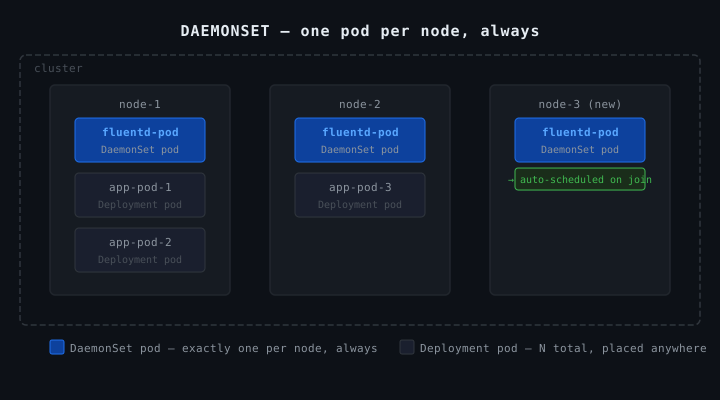
CKA Road Trip: What Is a DaemonSet


What It Is

A DaemonSet ensures exactly one copy of a pod runs on every node in the cluster. New node joins → pod automatically created on it. Node removed → pod goes with it.


Real Uses

  • Log collectors (Fluentd, Filebeat)
  • Monitoring agents (Prometheus node-exporter)
  • Network plugins (Cilium, Flannel)
  • kube-proxy itself is a DaemonSet

Anything that needs to run on every node, once per node.


vs Deployment

Deployment says: run N copies, put them wherever the scheduler decides.

DaemonSet says: run exactly one copy on every node, no exceptions.


vs Static Pod

DaemonSet Static Pod
Managed by controller manager kubelet (file on disk)
Defined in etcd via API server /etc/kubernetes/manifests/
kubectl works yes read-only mirror only
Survives control plane outage no yes
Use case node-level agents control plane bootstrap

DaemonSet is a proper Kubernetes resource — updatable, rollbackable, kubectl works on it normally. Tradeoff: if the control plane goes down, the DaemonSet controller can't manage it.

Static pod has zero dependency on the control plane. The kubelet manages it from a file on disk directly.


The Decision Rule

Do you need this to survive a control plane outage?

  • No → DaemonSet
  • Yes → Static pod

In practice, almost nothing needs to survive a control plane outage except the control plane components themselves — which is exactly why they're static pods.

697

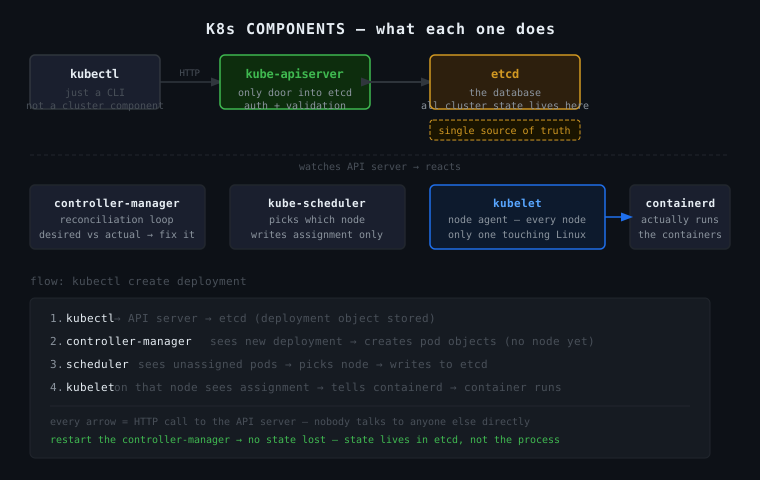
CKA Road Trip: K8s Components — What Each One Does

K8s is not a monolith. It's separate processes, each owning one job, talking to each other over HTTP.


The Components

etcd — the database. Stores every object in the cluster as key-value pairs. Every other component is stateless — they read/write etcd and that's where reality lives. If etcd dies, the cluster loses its mind.

kube-apiserver — the only door into etcd. Nobody talks to etcd directly except the API server. Everything — kubectl, kubelet, controller manager, scheduler — talks through here. It handles auth, validation, then reads/writes etcd.

kube-controller-manager — the reconciliation engine. Watches the API server in a loop: desired state vs actual state, gap found → fix it. ReplicaSet wants 3 pods, 1 exists → create 2 more. Does not actually run containers.

kube-scheduler — decides which node a pod runs on. Sees an unassigned pod, picks a node based on resources/taints/affinity, writes that assignment to the API server. That's it. Doesn't create the pod either.

kubelet — the agent on every node. Watches the API server for pods assigned to its node. When it sees one, it tells the container runtime to run it. The only component that touches real Linux processes. Also manages static pods from /etc/kubernetes/manifests/ with zero dependency on the API server.

kubectl — not a cluster component. A CLI on your machine that sends HTTP requests to the API server. k get pods = GET request to the API server. Nothing more.


The Flow: kubectl create deployment

kubectl → API server → etcd (deployment stored)
    controller manager sees new deployment
    creates ReplicaSet → creates pod objects (no node assigned yet)
    scheduler sees unassigned pods
    picks a node → writes assignment to API server → etcd
    kubelet on that node sees pod assigned to it
    tells containerd → container starts running

Every arrow is an HTTP call to the API server. Nobody talks to anyone else directly.


The One Thing That Makes It Click

API server + etcd = single source of truth. Every other component watches that source and reacts to it. They're all independently running processes that agree on one shared database. Restart the controller manager — no state lost, because state lives in etcd, not in the process.

697